Join us at FabCon Atlanta from March 16 - 20, 2026, for the ultimate Fabric, Power BI, AI and SQL community-led event. Save $200 with code FABCOMM.
Register now!The Power BI Data Visualization World Championships is back! Get ahead of the game and start preparing now! Learn more
HI, everyone...
I have have a table with dates and values, i need to calculate (column) two totals.
total1 = current value + sum(13 days previous of this date)
total2 = sum(next 14 days of the previous of that date)
Example:
Total1 for 7/1/2019 = value of 7/1/2019 + range 6/30/2019 - 6/18/2019 (13 days)
Total2 for 7/1/2019 = range from 6/17/2019 to 6/4/2019 (next 14 days)
Any help
Solved! Go to Solution.
Hi @SQUILES ,
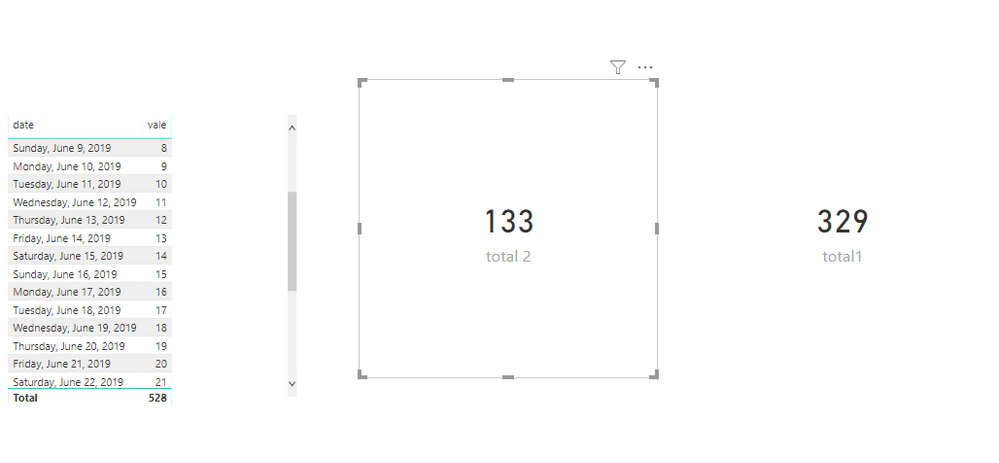
To create measures as below.
total1 =
VAR dat =
DATE ( 2019, 07, 01 )
VAR last13 = dat - 13
RETURN
CALCULATE (
SUM ( 'Table'[vale] ),
FILTER ( 'Table', 'Table'[date] >= last13 && 'Table'[date] <= dat )
)
total 2 =
VAR d =
DATE ( 2019, 07, 01 )
VAR a = d - 14
VAR c = a - 13
RETURN
CALCULATE (
SUM ( 'Table'[vale] ),
FILTER ( 'Table', 'Table'[date] <= a && 'Table'[date] >= c )
)
Hi @SQUILES ,
To create measures as below.
total1 =
VAR dat =
DATE ( 2019, 07, 01 )
VAR last13 = dat - 13
RETURN
CALCULATE (
SUM ( 'Table'[vale] ),
FILTER ( 'Table', 'Table'[date] >= last13 && 'Table'[date] <= dat )
)
total 2 =
VAR d =
DATE ( 2019, 07, 01 )
VAR a = d - 14
VAR c = a - 13
RETURN
CALCULATE (
SUM ( 'Table'[vale] ),
FILTER ( 'Table', 'Table'[date] <= a && 'Table'[date] >= c )
)
You are going to need to use EARLIER. See my article on Mean Time Between Failure (MTBF) which uses EARLIER: http://community.powerbi.com/t5/Community-Blog/Mean-Time-Between-Failure-MTBF-and-Power-BI/ba-p/3395...
The Power BI Data Visualization World Championships is back! Get ahead of the game and start preparing now!
| User | Count |
|---|---|
| 41 | |
| 37 | |
| 35 | |
| 35 | |
| 28 |
| User | Count |
|---|---|
| 134 | |
| 101 | |
| 71 | |
| 67 | |
| 65 |