Get certified for free when you join Fabric Data Days 2026 and dive into Fabric, Power BI, SQL, AI, and other essential data skills.
Join nowData Days is here! Join us now for 60+ days of learning, challenges, and connection. Learn more
HI, everyone...
I have have a table with dates and values, i need to calculate (column) two totals.
total1 = current value + sum(13 days previous of this date)
total2 = sum(next 14 days of the previous of that date)
Example:
Total1 for 7/1/2019 = value of 7/1/2019 + range 6/30/2019 - 6/18/2019 (13 days)
Total2 for 7/1/2019 = range from 6/17/2019 to 6/4/2019 (next 14 days)
Any help
Solved! Go to Solution.
Hi @SQUILES ,
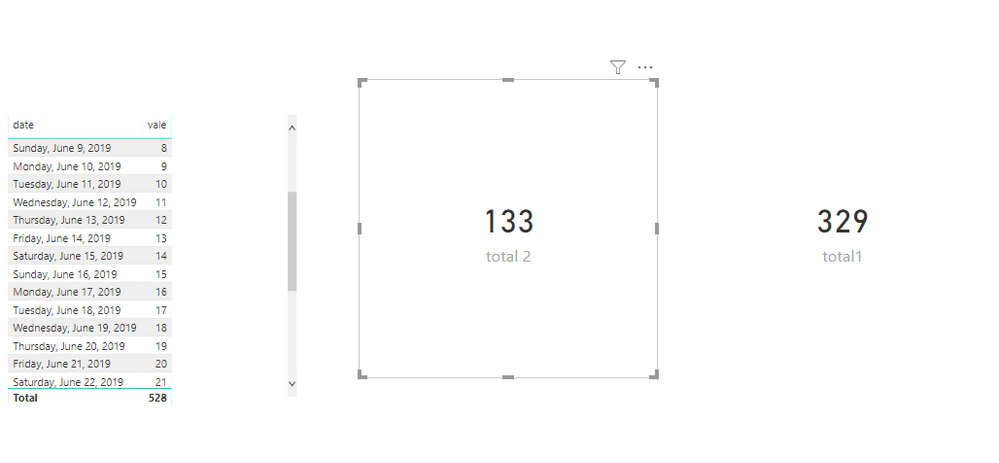
To create measures as below.
total1 =
VAR dat =
DATE ( 2019, 07, 01 )
VAR last13 = dat - 13
RETURN
CALCULATE (
SUM ( 'Table'[vale] ),
FILTER ( 'Table', 'Table'[date] >= last13 && 'Table'[date] <= dat )
)
total 2 =
VAR d =
DATE ( 2019, 07, 01 )
VAR a = d - 14
VAR c = a - 13
RETURN
CALCULATE (
SUM ( 'Table'[vale] ),
FILTER ( 'Table', 'Table'[date] <= a && 'Table'[date] >= c )
)
Hi @SQUILES ,
To create measures as below.
total1 =
VAR dat =
DATE ( 2019, 07, 01 )
VAR last13 = dat - 13
RETURN
CALCULATE (
SUM ( 'Table'[vale] ),
FILTER ( 'Table', 'Table'[date] >= last13 && 'Table'[date] <= dat )
)
total 2 =
VAR d =
DATE ( 2019, 07, 01 )
VAR a = d - 14
VAR c = a - 13
RETURN
CALCULATE (
SUM ( 'Table'[vale] ),
FILTER ( 'Table', 'Table'[date] <= a && 'Table'[date] >= c )
)
You are going to need to use EARLIER. See my article on Mean Time Between Failure (MTBF) which uses EARLIER: http://community.powerbi.com/t5/Community-Blog/Mean-Time-Between-Failure-MTBF-and-Power-BI/ba-p/3395...
Don't miss out on Data Days, June 15 through August 7. Learn Fabric, Power BI, SQL, AI and more.
Check out the May 2026 Power BI update to learn about new features.
| User | Count |
|---|---|
| 23 | |
| 23 | |
| 21 | |
| 17 | |
| 13 |
| User | Count |
|---|---|
| 58 | |
| 50 | |
| 38 | |
| 29 | |
| 24 |