This time we’re going bigger than ever. Fabric, Power BI, SQL, AI and more. We're covering it all. You won't want to miss it.
Learn moreDid you hear? There's a new SQL AI Developer certification (DP-800). Start preparing now and be one of the first to get certified. Register now
Can I specify a linked server in the data source settings?
I am able to write queries in SSMS by specifiying the linked server in the query.
SELECT * FROM [linked server name].[data base name].[table name]
I would like to use this same linked server to access data but can't seem to figure out how to tell Power BI to do this.
You can create a view in your "SomeDatabase" and then query the view in Power BI via a Data Gateway.
d;)
I see this question was asked long ago and probably everybody's solved it by now, but I couldn't find any direct answers posted. Here are several M snippets that pull data through SQL Server via Linked Servers with Joins in M. In the examples, Linked Server LS_Proto is targeted to an Excel Workbook, and I'm pulling data from named ranges but of course these can be hacked to pull from different sources. I'm illustrating use of LS with several M data functions. And while we're pulling data thru SQL Server from external sources, showed use of OPENROWSET too.
Using OleDb.DataSource, with Linked Server Query, to get and join from Excel Named Ranges
let
xlAlloc=OleDb.DataSource("Provider=MSOLEDBSQL; initial catalog=ExcelProto; data source=MYSERVER\SQLEXPRESS", [Query="SELECT * FROM LS_Proto...rngAlloc"]),
xlBOM=OleDb.DataSource("Provider=MSOLEDBSQL; initial catalog=ExcelProto; data source=MYSERVER\SQLEXPRESS", [Query="SELECT * FROM LS_Proto...rngBOM"]),
AB=Table.Join(xlAlloc, {"akAllocRevKey"},xlBOM,{"bmBOMItemKeyIn"},JoinKind.LeftOuter),
in
AB
Using OleDb.Query, with Linked Server Query, to get and join Excel Named Ranges
let
FileSource = "Provider=MSOLEDBSQL; initial catalog=ExcelProto; data source=MYSERVER\SQLEXPRESS",
xlAlloc = OleDb.Query(FileSource,"SELECT * FROM LS_Proto...rngAlloc"),
xlBom = OleDb.Query(FileSource,"SELECT * FROM LS_Proto...rngBOM"),
AB=Table.Join(xlAlloc, {"akAllocRevKey"},xlBOM,{"bmBOMItemKeyIn"},JoinKind.LeftOuter),
in
AB
Using OleDb.DataSource, with OPENROWSET Query, to get and join Excel Named Ranges
let
xlAlloc=OleDb.DataSource("Provider=MSOLEDBSQL; initial catalog=ExcelProto; data source=MYSERVER\SQLEXPRESS", [Query="SELECT * FROM OPENROWSET('Microsoft.ACE.OLEDB.12.0','Excel 12.0; Database=C:\filepath\File.xlsm;HDR=YES', rngAlloc)"]),
xlBOM=OleDb.DataSource("Provider=MSOLEDBSQL; initial catalog=ExcelProto; data source=MYSERVER\SQLEXPRESS", [Query="SELECT * FROM OPENROWSET('Microsoft.ACE.OLEDB.12.0','Excel 12.0; Database=C:\filepath\File.xlsm;HDR=YES', rngBOM)"]),
AB=Table.Join(xlAlloc, {"akAllocRevKey"},xlBOM,{"bmBOMItemKeyIn"},JoinKind.LeftOuter),
in
AB
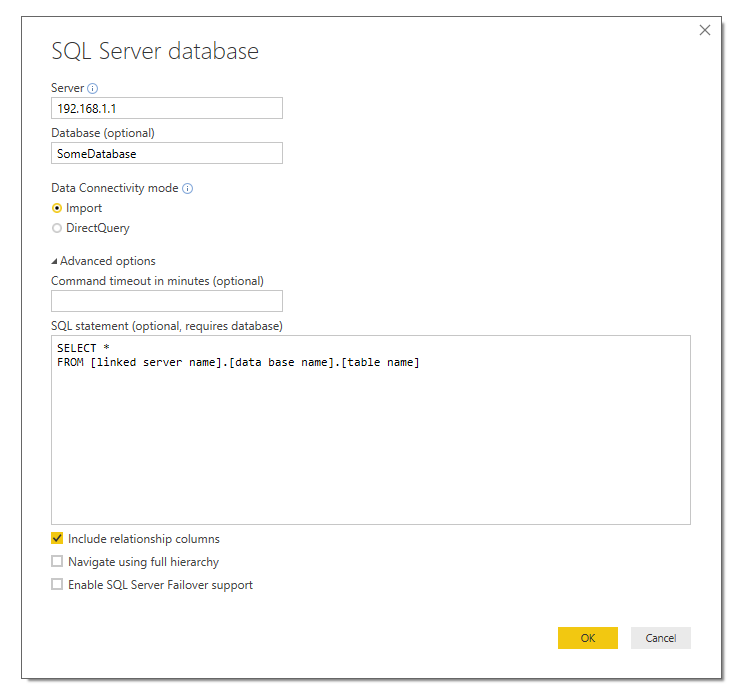
You should be able to do that with a raw query in the Advanced options of the SQL Server prompt.
See screenshot:
Thanks Sonny,
I had tried that before and received the following error...
The key didn't match any rows in the table.
I had tried that before and received the following error...
The key didn't match any rows in the table.
This error indicates that we cannot query linked server directly in Power BI. And to work around this issue, we need to create an ODBC connection and then changing each query to use the ODBC connection and the sql query as you sauid.
If you have any concern on this feature, you can submit your idea on the link below. If this feature was mentioned by mulitple users, product team will consider to add this feature to next release.
https://ideas.powerbi.com/forums/265200-power-bi-ideas
Thank you for your understanding.
Regards,
Charlie Liao
I did find a work around by creating an ODBC connection and then changing each query to use the ODBC connection and the sql query. This was a bit time consuming as I had over 20 queries but it works for now.
= Odbc.Query("dsn=ODBC Connection", "SELECT * FROM [Link Server].[Database].[Table]")
Check out the April 2026 Power BI update to learn about new features.
Sign up to receive a private message when registration opens and key events begin.
If you have recently started exploring Fabric, we'd love to hear how it's going. Your feedback can help with product improvements.
| User | Count |
|---|---|
| 36 | |
| 33 | |
| 31 | |
| 21 | |
| 16 |
| User | Count |
|---|---|
| 66 | |
| 55 | |
| 31 | |
| 24 | |
| 23 |