Join us at FabCon Atlanta from March 16 - 20, 2026, for the ultimate Fabric, Power BI, AI and SQL community-led event. Save $200 with code FABCOMM.
Register now!The Power BI Data Visualization World Championships is back! It's time to submit your entry. Live now!
| Name | Status |
| Mike | Pass |
| John | Fail |
| Nick | Fail |
| Katy | Pass |
I need seperate calcualtion for each Name for their respective status so i can use these calcualtion in an visual.
so for example "Mike Calcualtion" is created & when i put this calculation on a Card, Card should only show "Pass" on it.
Please help how can i craete such calculation !
Solved! Go to Solution.
Hi @Anonymous
If you want a specific measure to get the result, you can use
Mike Calculation = CALCULATE ( SELECTEDVALUE ( 'Tablename'[Status] ), 'Tablename'[Name] = "Mike" )
If you have a slicer or a filter to select a Name, you can use only SELECTEDVALUE like
Mike Calculation = SELECTEDVALUE ( 'Tablename'[Status] )
Hope this helps.
Best Regards,
Community Support Team _ Jing
If this post helps, please Accept it as Solution to help other members find it.
Hi @Anonymous
If you want a specific measure to get the result, you can use
Mike Calculation = CALCULATE ( SELECTEDVALUE ( 'Tablename'[Status] ), 'Tablename'[Name] = "Mike" )
If you have a slicer or a filter to select a Name, you can use only SELECTEDVALUE like
Mike Calculation = SELECTEDVALUE ( 'Tablename'[Status] )
Hope this helps.
Best Regards,
Community Support Team _ Jing
If this post helps, please Accept it as Solution to help other members find it.
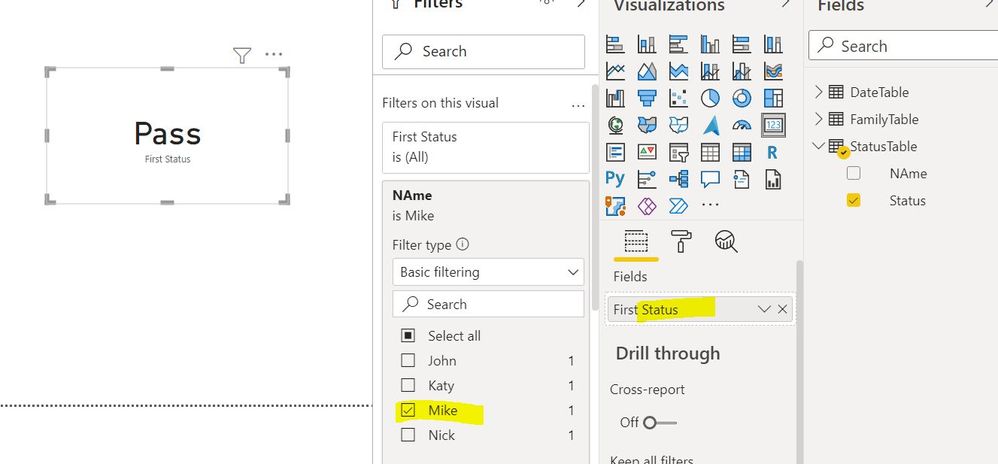
@Anonymous, With the help of visual level filter you can apply seperate user name condition:
The Power BI Data Visualization World Championships is back! It's time to submit your entry.
Check out the January 2026 Power BI update to learn about new features.
| User | Count |
|---|---|
| 61 | |
| 48 | |
| 35 | |
| 25 | |
| 23 |
| User | Count |
|---|---|
| 134 | |
| 110 | |
| 59 | |
| 39 | |
| 32 |