cancel
Showing results for 
Search instead for 
Did you mean: 

July 28 - August 9 | Final Round of the Power BI Dataviz World Championships. This is your chance. Learn more

Reply
abgnfirdaus
Helper I
Helper I

sort data type

Hello there, I need help. Based on the table below.

EquipmentTypeXLPE OutcomePILC Outcome
AXLPEBAD-
BXLPEGOOD

-

CPILC-

BAD

DPILC-

BAD

I would like to make a table visualization show the equipment and the equipment type outcome automatically without showing unrelated type. The TABLE VISUALIZATION should show like this:

EquipmentTypeOutcome
AXLPEBAD
BXLPEGOOD
CPILC

BAD

DPILCBAD

Hope you guys can help me. thank you so much!

1 ACCEPTED SOLUTION
SteveHailey
Solution Specialist
Solution Specialist

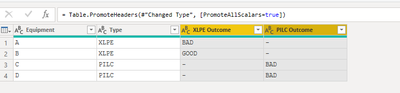
Hi @abgnfirdaus. There are a number of ways to do this, but I would probably do it in Power Query.


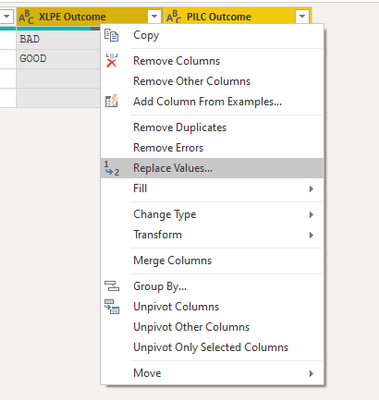
Hold the control key and click to selected the XLPE Outcome column and then with control still held click PILC Outcome column to select it also. Then Right Click and choose Replace Values, and in Value to Find put a "-", and in Replace With, leave it blank. This will get rid of the dashes.
SteveHailey_5-1643114247773.png


SteveHailey_0-1643113691762.png

SteveHailey_1-1643113753864.png


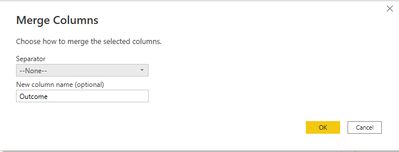
Then with the two columns still selected, click the Merge Columns button on the Transform tab of the ribbon. Enter "Outcome" for the name of the new column and leave the Seperator as --None--.


SteveHailey_2-1643113902001.png


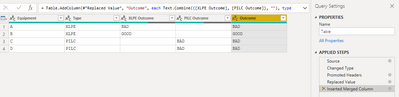
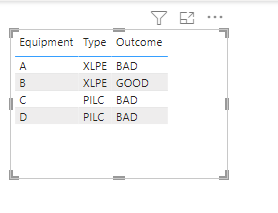
Your data will now look as it is below, and you can Close and Apply your changes and create your table visual.


SteveHailey_3-1643113953914.png


SteveHailey_4-1643113995530.png


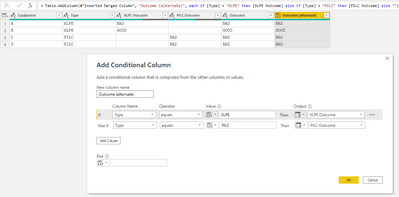
Alternatively, you could create a Conditional Column as below:


SteveHailey_1-1643114874199.png

which is the same as creating a Custom Column with this code:

if [Type] = "XLPE" then [XLPE Outcome] else if [Type] = "PILC" then [PILC Outcome] else ""


I created a .pbix file that is linked here, in case it's helpful.


-Steve

View solution in original post

4 REPLIES 4
Anonymous
Not applicable

Hi,

you can use the conditional column option in the power query editor to solve this. 

Tahreem24
Super User
Super User

@abgnfirdaus Attaching screen shot for your reference:

Capture.PNG


Don't forget to give thumbs up and accept this as a solution if it helped you!!!

Please take a quick glance at newly created dashboards : Restaurant Management Dashboard , HR Analytics Report , Hotel Management Report, Sales Analysis Report , Fortune 500 Companies Analysis , Revenue Tracking Dashboard
Tahreem24
Super User
Super User

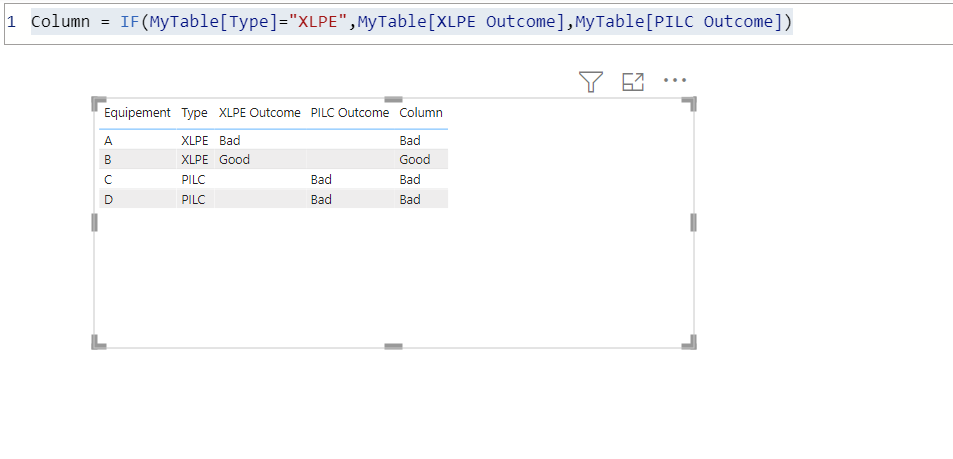
@abgnfirdaus Create a column like below:

Column = IF(MyTable[Type]="XLPE",MyTable[XLPE Outcome],MyTable[PILC Outcome])
 
Don't forget to give thumbs up and accept this as a solution if it helped you!!!

Please take a quick glance at newly created dashboards : Restaurant Management Dashboard , HR Analytics Report , Hotel Management Report, Sales Analysis Report , Fortune 500 Companies Analysis , Revenue Tracking Dashboard
SteveHailey
Solution Specialist
Solution Specialist

Hi @abgnfirdaus. There are a number of ways to do this, but I would probably do it in Power Query.


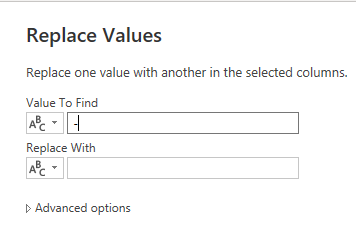
Hold the control key and click to selected the XLPE Outcome column and then with control still held click PILC Outcome column to select it also. Then Right Click and choose Replace Values, and in Value to Find put a "-", and in Replace With, leave it blank. This will get rid of the dashes.
SteveHailey_5-1643114247773.png


SteveHailey_0-1643113691762.png

SteveHailey_1-1643113753864.png


Then with the two columns still selected, click the Merge Columns button on the Transform tab of the ribbon. Enter "Outcome" for the name of the new column and leave the Seperator as --None--.
 

SteveHailey_2-1643113902001.png


Your data will now look as it is below, and you can Close and Apply your changes and create your table visual.
 

SteveHailey_3-1643113953914.png


SteveHailey_4-1643113995530.png


Alternatively, you could create a Conditional Column as below:
 

SteveHailey_1-1643114874199.png

which is the same as creating a Custom Column with this code:

if [Type] = "XLPE" then [XLPE Outcome] else if [Type] = "PILC" then [PILC Outcome] else ""


I created a .pbix file that is linked here, in case it's helpful.


-Steve

Helpful resources

Announcements
Fabric Community Sticker Design Challenge Barcelona Carousel

Fabric Community Sticker Challenge - Barcelona 2026

If you love stickers, then you will definitely want to check out our community sticker challenge, Barcelona edition!

July Power BI Update Carousel

Power BI Monthly Update - July 2026

Check out the July 2026 Power BI update to learn about new features.

Power BI DataViz World Championships carousel

Power BI DataViz World Championships - June 2026

A new Power BI DataViz World Championship is coming this June! Don't miss out on submitting your entry.

Top Solution Authors