Join us at FabCon Atlanta from March 16 - 20, 2026, for the ultimate Fabric, Power BI, AI and SQL community-led event. Save $200 with code FABCOMM.
Register now!The Power BI Data Visualization World Championships is back! Get ahead of the game and start preparing now! Learn more
Hi,
I need to show total of stacked column chart by adding the values from all columns. Please suggest how to achieve it.
Thanks,
Solved! Go to Solution.
Hi,
After my test, i think there is no such custom visual can completely reach your requirement.
Best Regards,
Giotto
Hi,
I haven't received the solution for the problem i have mentioned in the question. Anyone, please suggest how to achieve it ,excluding using card visual and grouping it with visual.
Thanks
Hi,
After my test, i think there is no such custom visual can completely reach your requirement.
Best Regards,
Giotto
Hi,
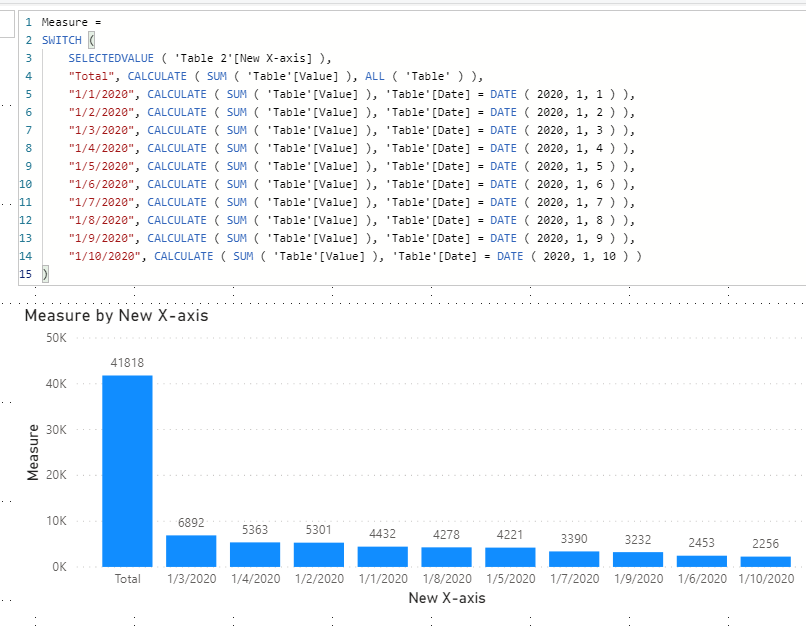
If you do not have many X-axis categories, you can try this workaround:
1)Create a new table first:
Table 2 = UNION(DISTINCT(SELECTCOLUMNS('Table',"New X-axis",'Table'[Date])),DATATABLE("New X-axis",STRING,{{"Total"}}))2)Try this measure:
Measure =
SWITCH (
SELECTEDVALUE ( 'Table 2'[New X-axis] ),
"Total", CALCULATE ( SUM ( 'Table'[Value] ), ALL ( 'Table' ) ),
"1/1/2020", CALCULATE ( SUM ( 'Table'[Value] ), 'Table'[Date] = DATE ( 2020, 1, 1 ) ),
"1/2/2020", CALCULATE ( SUM ( 'Table'[Value] ), 'Table'[Date] = DATE ( 2020, 1, 2 ) ),
"1/3/2020", CALCULATE ( SUM ( 'Table'[Value] ), 'Table'[Date] = DATE ( 2020, 1, 3 ) ),
"1/4/2020", CALCULATE ( SUM ( 'Table'[Value] ), 'Table'[Date] = DATE ( 2020, 1, 4 ) ),
"1/5/2020", CALCULATE ( SUM ( 'Table'[Value] ), 'Table'[Date] = DATE ( 2020, 1, 5 ) ),
"1/6/2020", CALCULATE ( SUM ( 'Table'[Value] ), 'Table'[Date] = DATE ( 2020, 1, 6 ) ),
"1/7/2020", CALCULATE ( SUM ( 'Table'[Value] ), 'Table'[Date] = DATE ( 2020, 1, 7 ) ),
"1/8/2020", CALCULATE ( SUM ( 'Table'[Value] ), 'Table'[Date] = DATE ( 2020, 1, 8 ) ),
"1/9/2020", CALCULATE ( SUM ( 'Table'[Value] ), 'Table'[Date] = DATE ( 2020, 1, 9 ) ),
"1/10/2020", CALCULATE ( SUM ( 'Table'[Value] ), 'Table'[Date] = DATE ( 2020, 1, 10 ) )
)3)The result shows:
Here is my test pbix file:
Hope this helps.
Best Regards,
Giotto
Hi,
@v-gizhi-msft : I have to show Total of all bar's values on single point as I have mentioned in the image above in my question.
@amitchandak : I have been tried this but card visual doesn't appear when i do click on focus mode of bar visual.
@Anonymous
What I have seen is.
Put a Card visual on the bar or any visual and group them together
https://docs.microsoft.com/en-us/power-bi/desktop-grouping-visuals
The Power BI Data Visualization World Championships is back! Get ahead of the game and start preparing now!
Check out the November 2025 Power BI update to learn about new features.
| User | Count |
|---|---|
| 59 | |
| 46 | |
| 42 | |
| 23 | |
| 18 |
| User | Count |
|---|---|
| 193 | |
| 123 | |
| 99 | |
| 67 | |
| 49 |