This is best Fabric, Power BI, SQL and AI community event. How do we know? The last event sold out! Save €200 with code FABCMTY200.
Register nowA new Data Days event is coming soon! This time we’re going bigger than ever. Fabric, Power BI, SQL, AI and more. Don't miss out.
Hi all,
I have a super easy qq.. I did it before... but i cannot do it anymore.. lost 2h already..
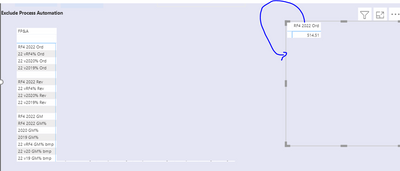
I want to see the case 2 as the case 1.. how can I do it?
thanks to anyone is answering... it probably super dumm but I don t know where to look
Solved! Go to Solution.
Hi @Anonymous ,
In Formatting, under Values, turn the Show on Rows switch on
Proud to be a Super User!
Hi @Anonymous ,
In Formatting, under Values, turn the Show on Rows switch on
Proud to be a Super User!
thanks man... it s super stupid qq... but if you don t know it .. drives you crazy!!!
Hi @Anonymous ,
No worries, glad to help
Proud to be a Super User!
Check out the May 2026 Power BI update to learn about new features.
Sign up to receive a private message when registration opens and key events begin.
If you have recently started exploring Fabric, we'd love to hear how it's going. Your feedback can help with product improvements.
| User | Count |
|---|---|
| 27 | |
| 26 | |
| 22 | |
| 19 | |
| 17 |
| User | Count |
|---|---|
| 45 | |
| 42 | |
| 41 | |
| 21 | |
| 18 |