cancel
Showing results for 
Search instead for 
Did you mean: 

Vote for your favorite vizzies from the Power BI Dataviz World Championship submissions. Vote now!

Reply
Anonymous
Not applicable

shorted waterfall chart

Hello all

Apologies if this is a repost, keep receiving an error message when I try to post my message.

I am looking to create a visual, preferably a waterfall, where I only want to see categories that are either higher than 10K or lower than -10K. All other categories should be aggregated to a new category called lets say OTHER.

I believe this is only possible to happen with DAX. Or is they any shorting option in the waterfall chart or something from the market place that allows such separation.


Thanks

Fanis


1 ACCEPTED SOLUTION
v-kelly-msft
Community Support
Community Support

Hi @Anonymous ,


Create a calculated column as below:


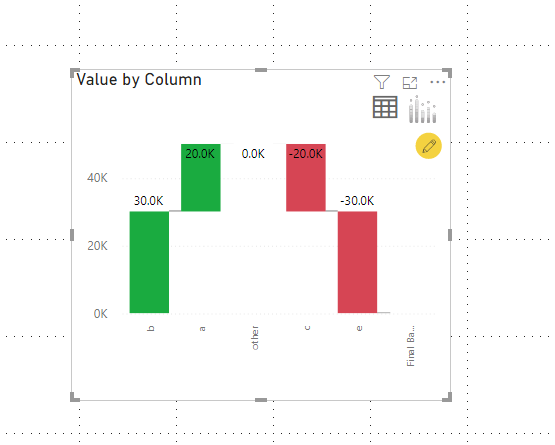
Column = IF('Table'[Value]>1000||'Table'[Value]<-1000,'Table'[Column2],"other")


Then put the column and value in a waterfall chart, and you will see:

Annotation 2020-03-13 142300.png


For the related .pbix file,pls click here.


Best Regards,
Kelly
Did I answer your question? Mark my post as a solution!


View solution in original post

3 REPLIES 3
v-kelly-msft
Community Support
Community Support

Hi @Anonymous ,


Create a calculated column as below:


Column = IF('Table'[Value]>1000||'Table'[Value]<-1000,'Table'[Column2],"other")


Then put the column and value in a waterfall chart, and you will see:

Annotation 2020-03-13 142300.png


For the related .pbix file,pls click here.


Best Regards,
Kelly
Did I answer your question? Mark my post as a solution!


Anonymous
Not applicable

Thanks @v-kelly-msft and @amitchandak 


I got it


Tnx

F


amitchandak
Super User
Super User

@Anonymous , Not sure I got it completely.

But a measure like this can help

calculate([measure],filter(table[measure]>=10000 || table[measure]<=-10000))
Share with Power BI Enthusiasts: Full Power BI Video (20 Hours) YouTube
Microsoft Fabric Series 60+ Videos YouTube
Microsoft Fabric Hindi End to End YouTube

Helpful resources

Announcements
Power BI DataViz World Championships

Power BI Dataviz World Championships

Vote for your favorite vizzies from the Power BI World Championship submissions!

Sticker Challenge 2026 Carousel

Join our Community Sticker Challenge 2026

If you love stickers, then you will definitely want to check out our Community Sticker Challenge!

January Power BI Update Carousel

Power BI Monthly Update - January 2026

Check out the January 2026 Power BI update to learn about new features.

FabCon Atlanta 2026 carousel

FabCon Atlanta 2026

Join us at FabCon Atlanta, March 16-20, for the ultimate Fabric, Power BI, AI and SQL community-led event. Save $200 with code FABCOMM.