Don't miss your chance to take the Fabric Data Engineer (DP-600) exam for FREE! Find out how by attending the DP-600 session on April 23rd (pacific time), live or on-demand.
Learn moreNext up in the FabCon + SQLCon recap series: The roadmap for Microsoft SQL and Maximizing Developer experiences in Fabric. All sessions are available on-demand after the live show. Register now
Not sure how to create this IF Then statement, any help would be appreciated. I have two variables that need to be analyzed and a new column created.
Would like to know if it can be done using DAX functions or the if then builder in the Query mode.
Prosecution Date, Court Date.
If both variables are blank = Unknown
If Prosecution is blank and court has a value = "Court"
If Court is blank and Prosecution has a value= "Prosec"
If both variables have a value = "Court" or "Prosec" whichever has the newest date.
Solved! Go to Solution.
Hi @Anonymous
there are 2 options:
1. DAX using SWITCH()
Column = SWITCH(TRUE(),
ISBLANK([Prosecution Date]) && ISBLANK([Court Date]), "Unknown",
ISBLANK([Prosecution Date]) && NOT(ISBLANK([Court Date])), "Court",
NOT(ISBLANK([Prosecution Date])) && ISBLANK([Court Date]), "Prosec",
[Prosecution Date]>[Court Date], "Prosec",
"Court"
)
2. Power QUery Custom Column
= if [Prosecution Date] = null and [Court Date] = null then "Unknown"
else if [Prosecution Date] = null and [Court Date] <> null then "Court"
else if [Prosecution Date] <> null and [Court Date] = null then "Prosec"
else if [Prosecution Date] > [Court Date] then "Prosec"
else "Court"
Try a new column like
Switch( true(),
isblank([Prosecution Date]) && isblank([Court Date]) ,"Unknown",
isblank([Prosecution Date]) && not(isblank([Court Date])),"Court",
not(isblank([Prosecution Date])) && (isblank([Court Date])),"Prosec",
max([Prosecution Date],[Court Date])
)
Hi @Anonymous
there are 2 options:
1. DAX using SWITCH()
Column = SWITCH(TRUE(),
ISBLANK([Prosecution Date]) && ISBLANK([Court Date]), "Unknown",
ISBLANK([Prosecution Date]) && NOT(ISBLANK([Court Date])), "Court",
NOT(ISBLANK([Prosecution Date])) && ISBLANK([Court Date]), "Prosec",
[Prosecution Date]>[Court Date], "Prosec",
"Court"
)
2. Power QUery Custom Column
= if [Prosecution Date] = null and [Court Date] = null then "Unknown"
else if [Prosecution Date] = null and [Court Date] <> null then "Court"
else if [Prosecution Date] <> null and [Court Date] = null then "Prosec"
else if [Prosecution Date] > [Court Date] then "Prosec"
else "Court"
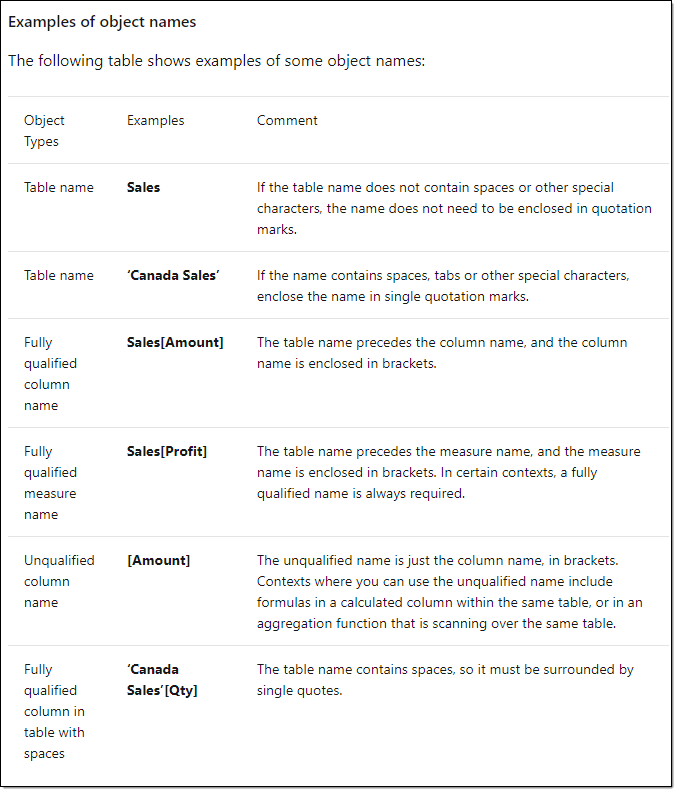
I am fairly new to Power Bi does "[]" indicate a table? All of my variables are columns in one table.
@Anonymous -
The documentation shows a nice explanation of syntax. https://docs.microsoft.com/en-us/dax/dax-syntax-reference.
Proud to be a Super User!
@Anonymous
[] its a column name inside your table.
Table[Column] - full syntax
Thank you so much! This has been so helpful.
Do you know how I culd use this new column in an if then statement sort of thing but using a DAX function instead? Like if = court then [Court Statement] if = Prosec then [Prosec Statement], else unknown.
I would do the if then in power query mode but working from home I lost access to the server adn can't update the data. So no power query for me today.
If you have recently started exploring Fabric, we'd love to hear how it's going. Your feedback can help with product improvements.
A new Power BI DataViz World Championship is coming this June! Don't miss out on submitting your entry.
Experience the highlights from FabCon & SQLCon, available live and on-demand starting April 14th.
| User | Count |
|---|---|
| 48 | |
| 40 | |
| 37 | |
| 20 | |
| 15 |
| User | Count |
|---|---|
| 70 | |
| 67 | |
| 32 | |
| 27 | |
| 25 |