cancel
Showing results for 
Search instead for 
Did you mean: 

Get Fabric Certified for FREE during AI Skills Fest. This week only. Secure your voucher now.

Reply
AAbufarwa
Regular Visitor

scatter with straight line plot in power bi

Hi Dears,

I want to visual a well locatoin x,y in scatter plot with faults coordinates x,y as a lines in that same plot in power bi as what execl offer chart called combo scatter with straingt line plot.

Best regards


4 REPLIES 4
AAbufarwa
Regular Visitor

Thank you, but what I looking for is diffrent not a trend line but combo chart that can visual lines as layer and scatter points as another layer


Sahir_Maharaj
Super User
Super User

Hello @AAbufarwa,


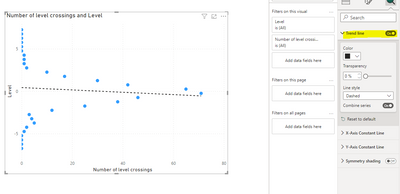
  1. Select the scatter chart and in the "Visualizations" pane, go to the "Analytics" section.
  2. Expand the "Trend lines" section and select "Add" to add a trend line to the scatter chart.

203c0511-364d-4ac3-b593-e586629a1c18_sp9.png

Let me know if you might need further assistance.


Did I answer your question? Mark my post as a solution, this will help others!

If my response(s) assisted you in any way, don't forget to drop me a "Kudos" 🙂

Kind Regards,
Sahir Maharaj
Data Scientist | Data Engineer | Data Analyst | AI Engineer
P.S. Want me to build your Power BI solution? (Yes, its FREE!)
➤ Lets connect on LinkedIn: Join my network of 15K+ professionals
➤ Join my free newsletter: Data Driven: From 0 to 100
➤ Website: https://sahirmaharaj.com
➤ About: https://sahirmaharaj.com/about.html
➤ Email: sahir@sahirmaharaj.com
➤ Want me to build your Power BI solution? Lets chat about how I can assist!
➤ Join my Medium community of 30K readers! Sharing my knowledge about data science and artificial intelligence
➤ Explore my latest project (350K+ views): Wordlit.net
➤ 100+ FREE Power BI Themes: Download Now
LinkedIn Top Voice in Artificial Intelligence, Data Science and Machine Learning

Since on object interaction the option for a Trend line has disappeared.  Not only from the new Reference Line options but also from the old (with on object preview turned off) Analysis sub-pane

Pity - I hope I don't need to write DAX if I can find a way to draw a line on top
Excel has it!!

Anonymous
Not applicable

Hello @Sahir_Maharaj , I have checked your solution because I have the same question as @AAbufarwa .


However your solution is not accurate because you proposed a "Trend line" that is very different as our request.

I'll try to explain in my words and with examples the question:

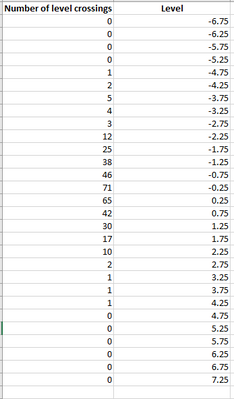
1. I have the following dataset in Excel:

yicastiblancor_1-1692792112176.png


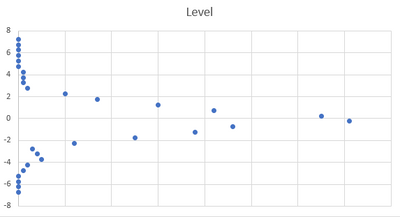
2. There is the scatter plot for the dataset (in excel):

yicastiblancor_2-1692792202263.png


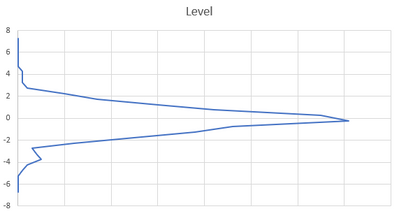
3. I have the option to change the visual by a "scatter plot with straight lines" (in excel)

yicastiblancor_3-1692792269935.png


yicastiblancor_4-1692792299684.png


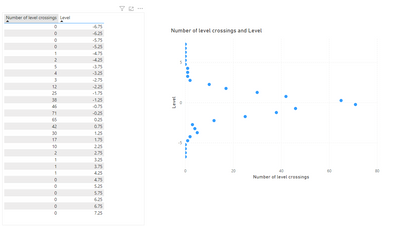
4. In Power BI, with the same dataset I created a scatter plot:

yicastiblancor_5-1692792516333.png


6. But there are no options to "join" all the points with a straight line in Power BI scatter plot.

7. Your solution of "Trend Line" looks like this:

yicastiblancor_6-1692792649851.png


8. @AAbufarwa  and me need to "join" the points of the scatter plot with a straight line as Excel does.

Do you have any idea on how to achieve this?

Thanks and regards,


Yineth Castiblanco Rojas

Helpful resources

Announcements
May Power BI Update Carousel

Power BI Monthly Update - May 2026

Check out the May 2026 Power BI update to learn about new features.

Fabric SQL PBI Data Days

Data Days 2026 coming soon!

Sign up to receive a private message when registration opens and key events begin.

New to Fabric survey Carousel

New to Fabric Survey

If you have recently started exploring Fabric, we'd love to hear how it's going. Your feedback can help with product improvements.

Power BI DataViz World Championships carousel

Power BI DataViz World Championships - June 2026

A new Power BI DataViz World Championship is coming this June! Don't miss out on submitting your entry.