This is best Fabric, Power BI, SQL and AI community event. How do we know? The last event sold out! Save €200 with code FABCMTY200.
Register nowA new Data Days event is coming soon! This time we’re going bigger than ever. Fabric, Power BI, SQL, AI and more. Don't miss out.
Hello all,
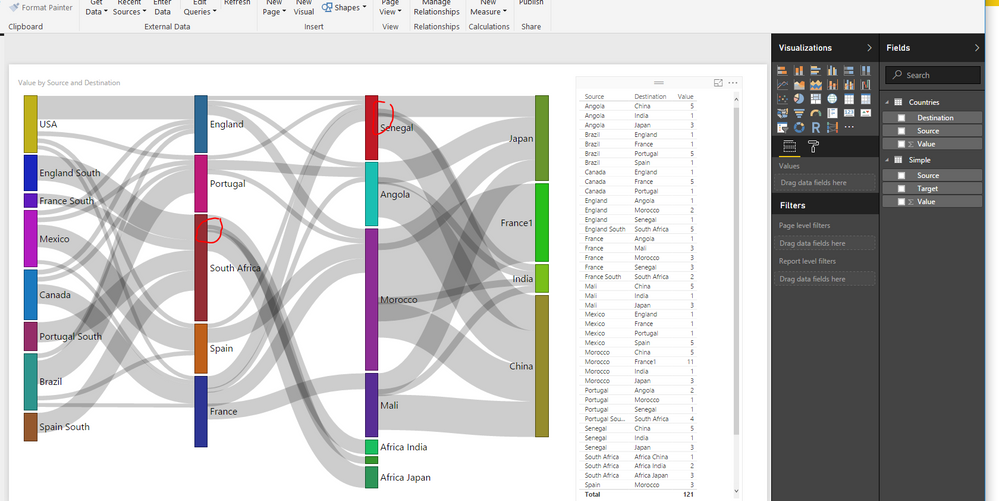
the Sankey visual started exerting some graphical error in recent weeks.
the nodes used to be filled from top to bottom. now, the starting nodes are only filled half way.
in addition, links leading from the middle nodes are ovelapping.
this started happening also on data that previously worked fine.
has anyone had this problem?
am i missing something ?
thanks for any help
Hi,
First, sorry for my english.
I had the same problem with my data. I realized that it happens when my weight field in my source table have negative numbers.
If you delete or filter without them, it will be ok.
Regards,
Hi jurajmesaros,
The nodes filled from half way should be related with the Weight in the Visual.
And I noticed that the overlapping is also showing in the blog and the sample data:
Visual Awesomeness Unlocked – Sankey diagram
So I don't think this should be a problem.
If I misunderstood anything, please let me know.
Regards
Hi Michael,
thanx but i dont think this is the case
- weights should understand to display the node according to the SUM of Weights. this must be true for at least the first nodes.
- i am quite certain the overlaps were not there previously.
if you notice the screenshot included in the original article from Microsoft:
https://powerbi.microsoft.com/en-us/blog/visual-awesomeness-unlocked-sankey-diagram/
the nodes are beautifully filled top to bottom and there is no overlap on the right side of them.
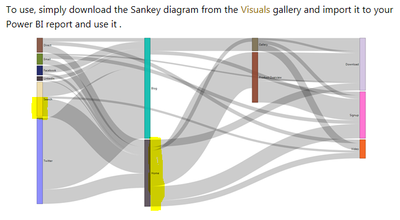
What is more, if you watch the official video in the same link, the entire report is fine, not showing these two issues.
My guess is that the bug is now present in the visual as a whole and thus also showing when you now try to replicate the report with sample data (thats what i suppose you did).
Hi jurajmesaros,
Yes, I tested with the sample Data.
I will make some further tests on this, and once confirmed, will report this from my side.
Thanks for the update.
Regards
Check out the May 2026 Power BI update to learn about new features.
Sign up to receive a private message when registration opens and key events begin.
If you have recently started exploring Fabric, we'd love to hear how it's going. Your feedback can help with product improvements.
| User | Count |
|---|---|
| 27 | |
| 25 | |
| 23 | |
| 19 | |
| 14 |
| User | Count |
|---|---|
| 50 | |
| 45 | |
| 20 | |
| 18 | |
| 18 |