cancel
Showing results for 
Search instead for 
Did you mean: 

The Power BI Data Visualization World Championships is back! Get ahead of the game and start preparing now! Learn more

Reply
Anonymous
Not applicable

Line Chart Issue

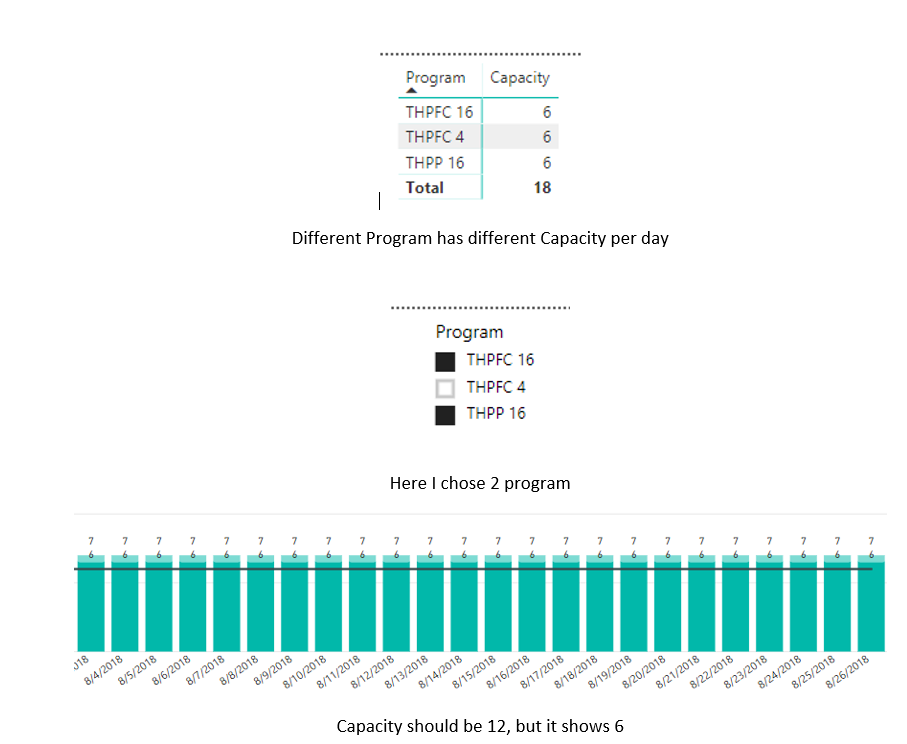
Hi I am Using a Clustered column chart to create a table where it will show all program(Houses) total with the Line  showing the capacity of the houses. I have 3 houses with capacity 6 in each house. When I click on multiple houses, it doesn't show the total capacity in both the houses which should show 12 (6 in each house), but it shows 6.Line Value 1.PNG


Line Value 2.PNG


Let me know if you need any other information.

Thanks,

spanda


1 ACCEPTED SOLUTION
Anonymous
Not applicable

Hi @Anonymous


This happens often when there isn't a valid relationship set up between two tables. Make sure you have created the relationship and specified "Both" for the cross-filter direction if necessary.


Hope this helps,

Parker

View solution in original post

2 REPLIES 2
Anonymous
Not applicable

Hi @Anonymous


This happens often when there isn't a valid relationship set up between two tables. Make sure you have created the relationship and specified "Both" for the cross-filter direction if necessary.


Hope this helps,

Parker

Anonymous
Not applicable

Thank you so much @Anonymous !!

The relationship was not set for both ways, that's what was creating this issue.


Regards,

spanda

Helpful resources

Announcements
Power BI DataViz World Championships

Power BI Dataviz World Championships

The Power BI Data Visualization World Championships is back! Get ahead of the game and start preparing now!

December 2025 Power BI Update Carousel

Power BI Monthly Update - December 2025

Check out the December 2025 Power BI Holiday Recap!

FabCon Atlanta 2026 carousel

FabCon Atlanta 2026

Join us at FabCon Atlanta, March 16-20, for the ultimate Fabric, Power BI, AI and SQL community-led event. Save $200 with code FABCOMM.