cancel
Showing results for 
Search instead for 
Did you mean: 

July 7 - July 17 | Round 2 of the Power BI Dataviz World Championships. Don't miss your chance! Learn more

Reply
Anonymous
Not applicable

sameperiodTHISyear Time Filtering

The Why: So I am building out a visualization that leverages time as a filter/slicer to pick between two points in time. From that filtering/slicer of time I'm looking to see a like for like comparison between what would be most akin to the inverse of the 'SAMEPERIODLASTYEAR' function. 


The How: Basically, if I were to pick a date range between 8/1/2017 - 12/31/2017 or 8/1/2015 - 12/31/2015 I would want to have a series of values summed for 8/1/2017 - 12/31/2017 next to a series of values summed for 8/1/2018 - 12/31/2018. Or in the case of the second range, have the slicer tuned to 8/1/2015- 12/31/2015, and also have values summed (in a different location/visual) between 8/1/2018 - 8/1/2018. Basically, no matter the time change be it the year 2017, or 2015, or 2005 (if there were data), I'd want to see a measurement summation between the selected filtered date and the SAMEPERIODTHISYEAR. 


Note: The way I want to have the filter used in a way where the users pick the date value for the period in question, and in one chart they see the Selected Period's "burn rate" in one chart, then in a separate chart see the Current Year's "burn rate" in another chart. I've tried a few ways to work through this one, but with the variable of the calculation makes for DATEADD a little complex, because the Current Year is never going to be static during the timeline of the Power BI Report.

3 ACCEPTED SOLUTIONS
v-frfei-msft
Community Support
Community Support

Hi @Anonymous,


I made one sample for your reference.


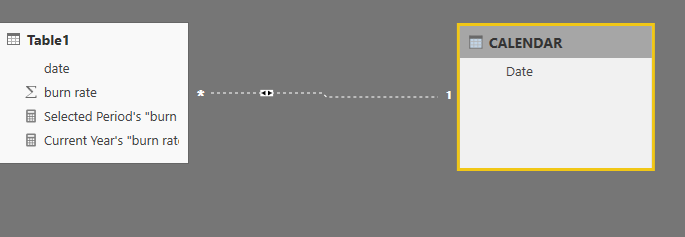
1. Create a CALENDAR table and create relationship with the fact table as below.


Capture.PNG


2. Create the measures as below.


Current Year's "burn rate" = var mind =CALCULATE(MIN('CALENDAR'[Date]))
var maxd = CALCULATE(MAX('CALENDAR'[Date]))
var thisyearmin = DATE(YEAR(TODAY()),MONTH(mind),DAY(mind))
var thisyearmax = DATE(YEAR(TODAY()),MONTH(maxd),DAY(maxd))
return
CALCULATE(SUM(Table1[burn rate]),FILTER(Table1,Table1[date]>=thisyearmin && Table1[date]<=thisyearmax))
Selected Period's "burn rate" = CALCULATE(SUM(Table1[burn rate]),USERELATIONSHIP('CALENDAR'[Date],Table1[date]))

2.PNG


For more details, please check the pbix as attached.


Regards,

Frank

Community Support Team _ Frank
If this post helps, then please consider Accept it as the solution to help the others find it more quickly.

View solution in original post

Hi @Anonymous,


Does that make sense? If so, kindly mark my answer as a solution to close the case.


Regards,
Frank

Community Support Team _ Frank
If this post helps, then please consider Accept it as the solution to help the others find it more quickly.

View solution in original post

Anonymous
Not applicable

Hey, I really appreciate your help on this, this response got kicked by my spam filter for whatever the reason! 


Nevertheless, thank you so much! Happy Holidays! 

View solution in original post

3 REPLIES 3
v-frfei-msft
Community Support
Community Support

Hi @Anonymous,


I made one sample for your reference.


1. Create a CALENDAR table and create relationship with the fact table as below.


Capture.PNG


2. Create the measures as below.


Current Year's "burn rate" = var mind =CALCULATE(MIN('CALENDAR'[Date]))
var maxd = CALCULATE(MAX('CALENDAR'[Date]))
var thisyearmin = DATE(YEAR(TODAY()),MONTH(mind),DAY(mind))
var thisyearmax = DATE(YEAR(TODAY()),MONTH(maxd),DAY(maxd))
return
CALCULATE(SUM(Table1[burn rate]),FILTER(Table1,Table1[date]>=thisyearmin && Table1[date]<=thisyearmax))
Selected Period's "burn rate" = CALCULATE(SUM(Table1[burn rate]),USERELATIONSHIP('CALENDAR'[Date],Table1[date]))

2.PNG


For more details, please check the pbix as attached.


Regards,

Frank

Community Support Team _ Frank
If this post helps, then please consider Accept it as the solution to help the others find it more quickly.
Anonymous
Not applicable

Hey, I really appreciate your help on this, this response got kicked by my spam filter for whatever the reason! 


Nevertheless, thank you so much! Happy Holidays! 

Hi @Anonymous,


Does that make sense? If so, kindly mark my answer as a solution to close the case.


Regards,
Frank

Community Support Team _ Frank
If this post helps, then please consider Accept it as the solution to help the others find it more quickly.

Helpful resources

Announcements
FabCon and SQLCon Barcelona 2026

FabCon & SQLCon – Barcelona 2026

Join us in Barcelona for FabCon and SQLCon, the Fabric, Power BI, SQL, and AI community event. Save €200 with code FABCMTY200.

60 days of Data Days Carousel

Data Days 2026

Join Fabric Data Days 2026: 60 days of free live/on-demand sessions, challenges, study groups, and certification opportunities.

Power BI DataViz World Championships carousel

Power BI DataViz World Championships - June 2026

A new Power BI DataViz World Championship is coming this June! Don't miss out on submitting your entry.