Join us at FabCon Atlanta from March 16 - 20, 2026, for the ultimate Fabric, Power BI, AI and SQL community-led event. Save $200 with code FABCOMM.
Register now!Vote for your favorite vizzies from the Power BI Dataviz World Championship submissions. Vote now!
Hi Guys
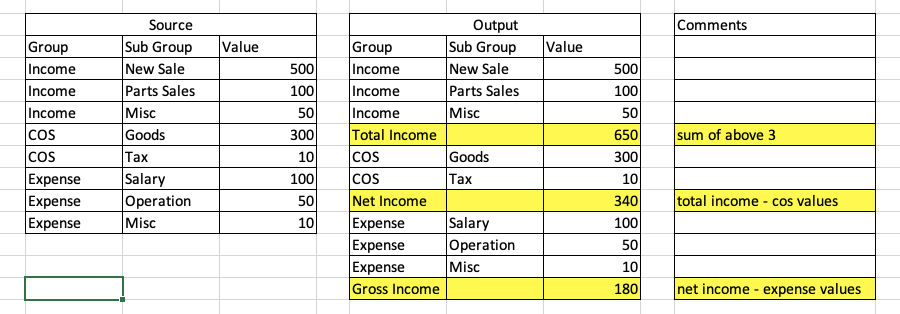
Need a help with this thing below
Problematic things are highlighted.
How to achieve this ??
Thanks in advance....
Solved! Go to Solution.
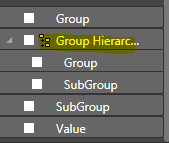
@kohlivinayak Please try to create a hieararchy by dragging the SubGroup field on to the Group field. Then you can see the Hierarchy created as below
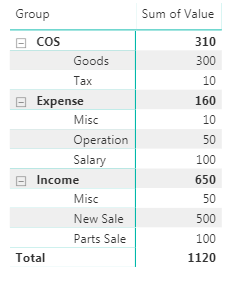
Then create a matrix visual using the Hierarchy that was created in above step and the Value field. You can see the result as
Proud to be a PBI Community Champion
@kohlivinayak Please try to create a hieararchy by dragging the SubGroup field on to the Group field. Then you can see the Hierarchy created as below
Then create a matrix visual using the Hierarchy that was created in above step and the Value field. You can see the result as
Proud to be a PBI Community Champion
Vote for your favorite vizzies from the Power BI World Championship submissions!
If you love stickers, then you will definitely want to check out our Community Sticker Challenge!
Check out the January 2026 Power BI update to learn about new features.
| User | Count |
|---|---|
| 56 | |
| 52 | |
| 45 | |
| 17 | |
| 16 |
| User | Count |
|---|---|
| 108 | |
| 108 | |
| 39 | |
| 33 | |
| 25 |