cancel
Showing results for 
Search instead for 
Did you mean: 

The Power BI Data Visualization World Championships is back! Get ahead of the game and start preparing now! Learn more

Reply
Sowmiya
Helper III
Helper III

remove filter display

Hi Community,

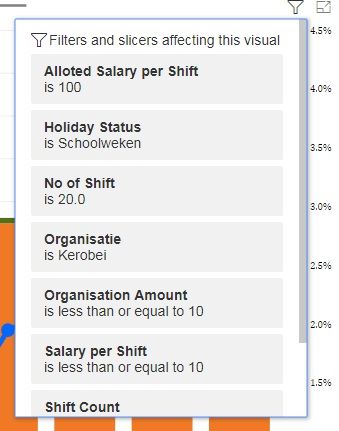
Will anyone help me how to remove filter display when hovering to visuals as shown in figuredoubt.jpg

 Thanks in Advance,

Sowmiya


1 ACCEPTED SOLUTION
v-lili6-msft
Community Support
Community Support

hi, @Sowmiya

After my test, it is The new filter experience in Power BI reports (Preview)

https://docs.microsoft.com/en-us/power-bi/power-bi-report-filter-preview


View filters for a visual in Reading mode

In Reading mode, you can hover over a visual and see a pop-up with all the filters, slicers, and so on, affecting that visual. The formatting of the pop-up is the same as the filter pane formatting.


If you do not want to use this preview feature, you could disable it in   File > Options and Settings > Options > Preview Features > New filter experience

and then restart power bi desktop.


Note: Even if you disable this preview feature, the .pbix file you had created still has this feather, unless you recreate it.


Best Regards,

Lin


Community Support Team _ Lin
If this post helps, then please consider Accept it as the solution to help the other members find it more quickly.

View solution in original post

1 REPLY 1
v-lili6-msft
Community Support
Community Support

hi, @Sowmiya

After my test, it is The new filter experience in Power BI reports (Preview)

https://docs.microsoft.com/en-us/power-bi/power-bi-report-filter-preview


View filters for a visual in Reading mode

In Reading mode, you can hover over a visual and see a pop-up with all the filters, slicers, and so on, affecting that visual. The formatting of the pop-up is the same as the filter pane formatting.


If you do not want to use this preview feature, you could disable it in   File > Options and Settings > Options > Preview Features > New filter experience

and then restart power bi desktop.


Note: Even if you disable this preview feature, the .pbix file you had created still has this feather, unless you recreate it.


Best Regards,

Lin


Community Support Team _ Lin
If this post helps, then please consider Accept it as the solution to help the other members find it more quickly.
Helpful resources

Announcements
Power BI DataViz World Championships

Power BI Dataviz World Championships

The Power BI Data Visualization World Championships is back! Get ahead of the game and start preparing now!

December 2025 Power BI Update Carousel

Power BI Monthly Update - December 2025

Check out the December 2025 Power BI Holiday Recap!

FabCon Atlanta 2026 carousel

FabCon Atlanta 2026

Join us at FabCon Atlanta, March 16-20, for the ultimate Fabric, Power BI, AI and SQL community-led event. Save $200 with code FABCOMM.