We've captured the moments from FabCon & SQLCon that everyone is talking about, and we are bringing them to the community, live and on-demand. Starts on April 14th. Register now
hi friends
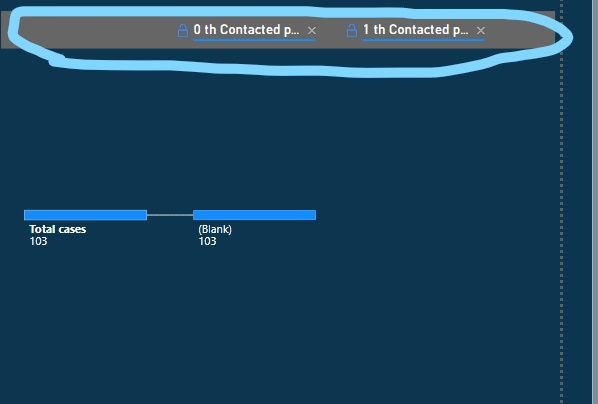
how can i remove header in decomposition tree like pic below
thank in advance for any suggestion
Solved! Go to Solution.
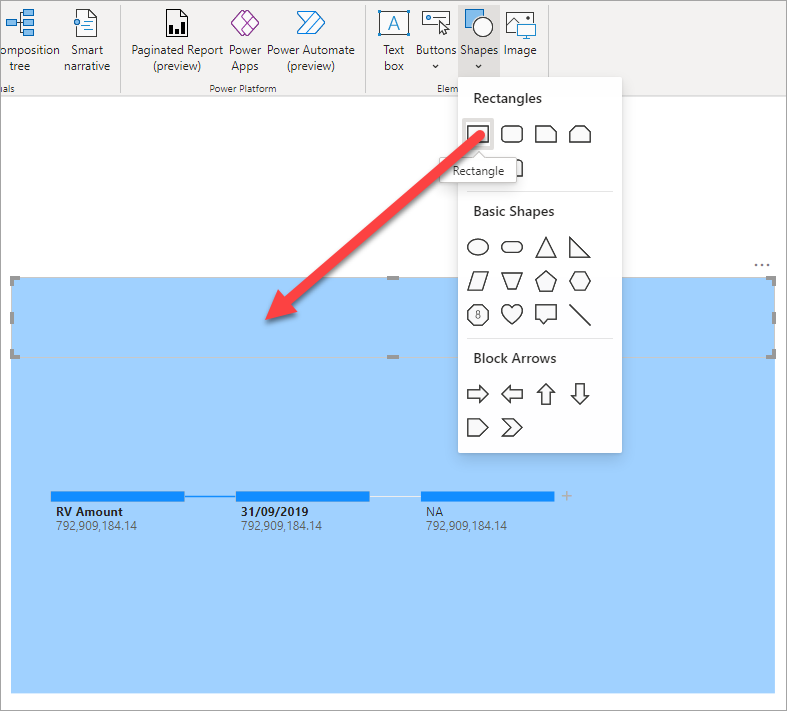
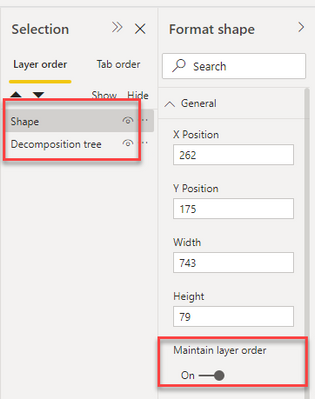
You could put a rectangle shape over the header area with the same background color as the decomp tree. Just make sure to turn on "Maintain layer order" on the rectangle and decomp tree and have the shape above the chart so that the rectangle is not hidden if they click on the decomp tree.
Why is there no option to toggle header on/off in the Format pane? Here goes MS just pushing out visuals without thinking all the way through (and making people wait to post their ideas to get a lot of votes before change is initiated).
LAME
You could put a rectangle shape over the header area with the same background color as the decomp tree. Just make sure to turn on "Maintain layer order" on the rectangle and decomp tree and have the shape above the chart so that the rectangle is not hidden if they click on the decomp tree.
If you have recently started exploring Fabric, we'd love to hear how it's going. Your feedback can help with product improvements.
A new Power BI DataViz World Championship is coming this June! Don't miss out on submitting your entry.
Share feedback directly with Fabric product managers, participate in targeted research studies and influence the Fabric roadmap.
| User | Count |
|---|---|
| 54 | |
| 39 | |
| 32 | |
| 17 | |
| 15 |
| User | Count |
|---|---|
| 64 | |
| 63 | |
| 37 | |
| 36 | |
| 22 |