cancel
Showing results for 
Search instead for 
Did you mean: 

Learn from the best! Meet the four finalists headed to the FINALS of the Power BI Dataviz World Championships! Register now

Reply
lastnn30
Post Patron
Post Patron

remove decimals

Hi

I have the table below, I select "show values as %" and now I see all these values in percentages. I wonder if I want to get ride of these decimals for example


70.32 %   to 70%  or 71%


Is that possible? Thank you very much.


SNAG-0892.jpg

2 ACCEPTED SOLUTIONS
VijayP
Super User
Super User

@lastnn30 

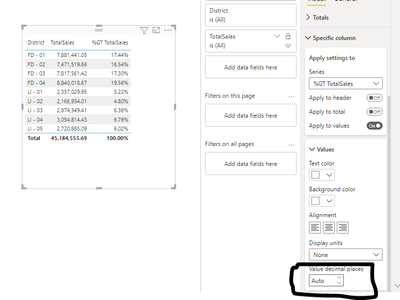
Select the foramt options and go to Specific Columns there you will find decimal options. and you can change the decimals to 0. as showin in picture

VijayP_0-1663487376255.png


Did I answer your question? Mark my post as a solution! Appreciate your Kudos!!
MY Blog || My YouTube Channel || Connect with me on Linkedin || My Latest Data Story - Ageing Analysis

Proud to be a Super User!


View solution in original post

Anonymous
Not applicable

Hi @lastnn30 ,

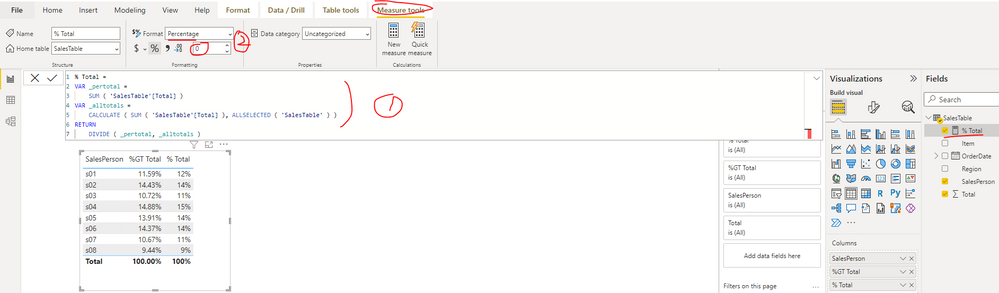
There is no direct option to set the decimal places, you can follow the steps below to get it. Please find the details in the attachment.

1. Create a measure as below to get the percentage

% Total = 
VAR _pertotal =
    SUM ( 'SalesTable'[Total] )
VAR _alltotals =
    CALCULATE ( SUM ( 'SalesTable'[Total] ), ALLSELECTED ( 'SalesTable' ) )
RETURN
    DIVIDE ( _pertotal, _alltotals )

2. Set the data type format of measure as Percentage and decimal places as 0

yingyinr_0-1663663945302.png

Best Regards

View solution in original post

3 REPLIES 3
Anonymous
Not applicable

Hi @lastnn30 ,

There is no direct option to set the decimal places, you can follow the steps below to get it. Please find the details in the attachment.

1. Create a measure as below to get the percentage

% Total = 
VAR _pertotal =
    SUM ( 'SalesTable'[Total] )
VAR _alltotals =
    CALCULATE ( SUM ( 'SalesTable'[Total] ), ALLSELECTED ( 'SalesTable' ) )
RETURN
    DIVIDE ( _pertotal, _alltotals )

2. Set the data type format of measure as Percentage and decimal places as 0

yingyinr_0-1663663945302.png

Best Regards

VijayP
Super User
Super User

@lastnn30 

Select the foramt options and go to Specific Columns there you will find decimal options. and you can change the decimals to 0. as showin in picture

VijayP_0-1663487376255.png


Did I answer your question? Mark my post as a solution! Appreciate your Kudos!!
MY Blog || My YouTube Channel || Connect with me on Linkedin || My Latest Data Story - Ageing Analysis

Proud to be a Super User!


Is there an updated version of this answer. In my current PowerBI instance, there isn't a display units or a value decimal places dropdown


simonet_0-1734113966034.pngsimonet_1-1734113990477.png


Helpful resources

Announcements
Join our Fabric User Panel

Join our Fabric User Panel

Share feedback directly with Fabric product managers, participate in targeted research studies and influence the Fabric roadmap.

February Power BI Update Carousel

Power BI Monthly Update - February 2026

Check out the February 2026 Power BI update to learn about new features.

FabCon Atlanta 2026 carousel

FabCon Atlanta 2026

Join us at FabCon Atlanta, March 16-20, for the ultimate Fabric, Power BI, AI and SQL community-led event. Save $200 with code FABCOMM.