Get certified for free when you join Fabric Data Days 2026 and dive into Fabric, Power BI, SQL, AI, and other essential data skills.
Join nowData Days is here! Join us now for 60+ days of learning, challenges, and connection. Learn more
Hi
I have the table below, I select "show values as %" and now I see all these values in percentages. I wonder if I want to get ride of these decimals for example
70.32 % to 70% or 71%
Is that possible? Thank you very much.
Solved! Go to Solution.
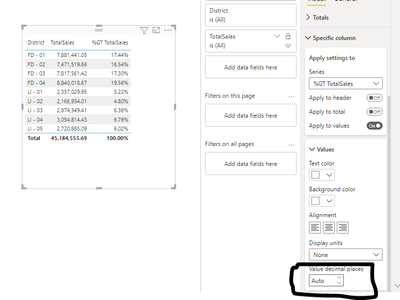
Select the foramt options and go to Specific Columns there you will find decimal options. and you can change the decimals to 0. as showin in picture
Proud to be a Super User!
Hi @lastnn30 ,
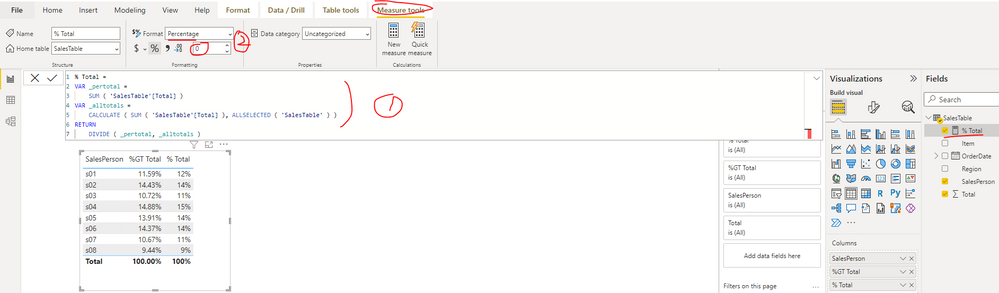
There is no direct option to set the decimal places, you can follow the steps below to get it. Please find the details in the attachment.
1. Create a measure as below to get the percentage
% Total =
VAR _pertotal =
SUM ( 'SalesTable'[Total] )
VAR _alltotals =
CALCULATE ( SUM ( 'SalesTable'[Total] ), ALLSELECTED ( 'SalesTable' ) )
RETURN
DIVIDE ( _pertotal, _alltotals )
2. Set the data type format of measure as Percentage and decimal places as 0
Best Regards
Hi @lastnn30 ,
There is no direct option to set the decimal places, you can follow the steps below to get it. Please find the details in the attachment.
1. Create a measure as below to get the percentage
% Total =
VAR _pertotal =
SUM ( 'SalesTable'[Total] )
VAR _alltotals =
CALCULATE ( SUM ( 'SalesTable'[Total] ), ALLSELECTED ( 'SalesTable' ) )
RETURN
DIVIDE ( _pertotal, _alltotals )
2. Set the data type format of measure as Percentage and decimal places as 0
Best Regards
Select the foramt options and go to Specific Columns there you will find decimal options. and you can change the decimals to 0. as showin in picture
Proud to be a Super User!
Is there an updated version of this answer. In my current PowerBI instance, there isn't a display units or a value decimal places dropdown
Don't miss out on Data Days, June 15 through August 7. Learn Fabric, Power BI, SQL, AI and more.
Check out the May 2026 Power BI update to learn about new features.
| User | Count |
|---|---|
| 23 | |
| 21 | |
| 20 | |
| 19 | |
| 13 |
| User | Count |
|---|---|
| 58 | |
| 50 | |
| 38 | |
| 31 | |
| 27 |