Don't miss your chance to take the Fabric Data Engineer (DP-700) exam on us!
Learn moreWe've captured the moments from FabCon & SQLCon that everyone is talking about, and we are bringing them to the community, live and on-demand. Starts on April 14th. Register now
Hi everyone
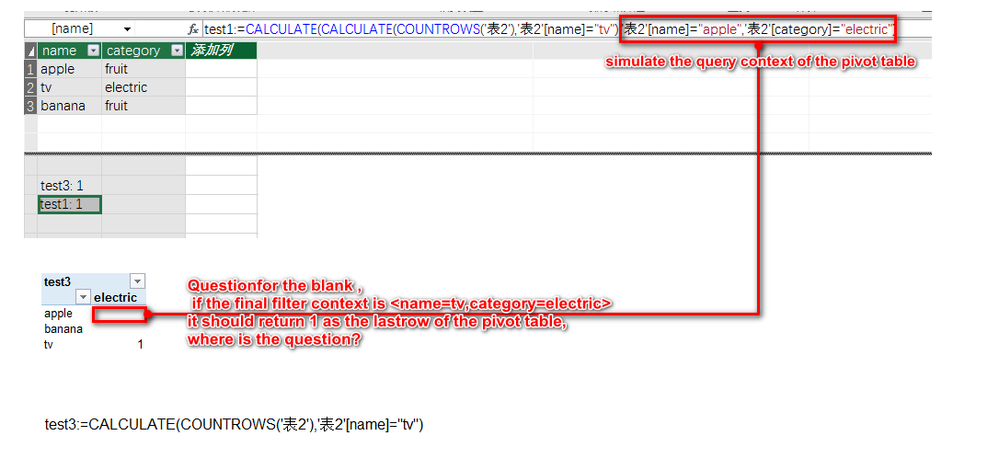
As I know calculate can replace the original filter context(query context) with its inside filters, but i feel puzzled by this simple case.
Hi @ryan-gao,
In this scenario, you may need to use ALL function to firstly ignore any filters that might have been applied, then replace with a new filter context. The formula below is for your reference. ![]()
test =
CALCULATE (
CALCULATE ( COUNTROWS ( '表2' ), '表2'[name] = "tv" ),
FILTER ( ALL ( '表2' ), '表2'[category="electric"] )
)
Regards
Thanks @v-ljerr-msft
In this scenario, I want the red box of the pivot table to retrun 1,your formula can not do this, but I found the final answer . it is "autoexists" . so if rows and columns of the pivot table came from the same table ,it automaticly remove the nonexist combinations first, no matter how the filter context in calculate defines ,it will always return blank.
hope you can understand my poor english
anyone can help?
thanks in advance
If you have recently started exploring Fabric, we'd love to hear how it's going. Your feedback can help with product improvements.
A new Power BI DataViz World Championship is coming this June! Don't miss out on submitting your entry.
Share feedback directly with Fabric product managers, participate in targeted research studies and influence the Fabric roadmap.
| User | Count |
|---|---|
| 57 | |
| 37 | |
| 34 | |
| 19 | |
| 17 |
| User | Count |
|---|---|
| 74 | |
| 70 | |
| 37 | |
| 35 | |
| 25 |