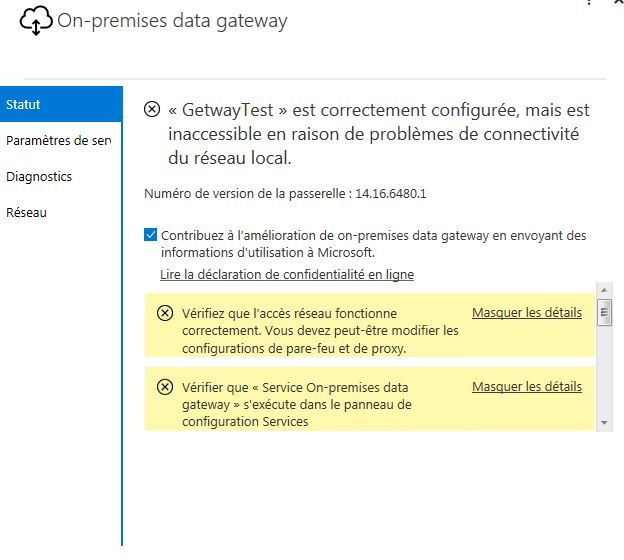
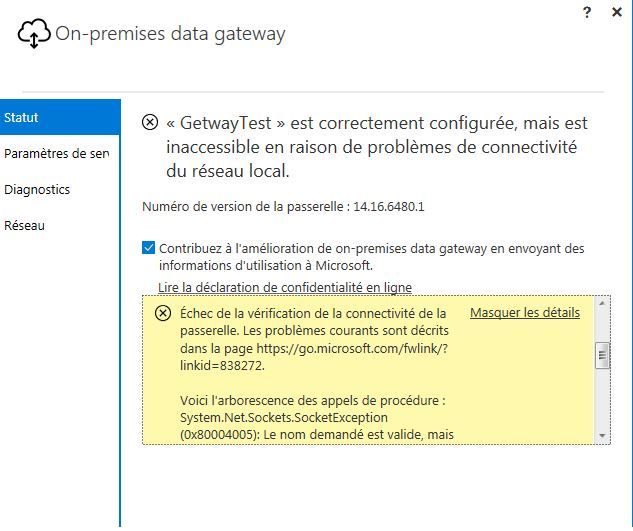
Hello, my gateway does not work anymore when it worked very well, here are my error messages
1st message :
Failed to update gateway details. You may have to change the account under which the gateway runs.
Error updating gateway configuration.
2nd message :
Network connectivity is limited.
Check that network access is working properly. You may need to change the firewall and proxy configurations.
3rd message :
Network access to Azure Service Bus is limited.
Check that network access is working properly. You may need to change the firewall and proxy configurations.
4th message :
Failed to verify gateway connectivity. Common issues are described in https://go.microsoft.com/fwlink/?linkid=838272.
Here is the tree of procedure calls:
System.Net.Sockets.SocketException (0x80004005): The requested name is valid, but no data of the required type was found
at System.Net.Dns.GetAddrInfo (String name)
at System.Net.Dns.InternalGetHostByName (String hostName, Boolean includeIPv6)
at System.Net.Dns.GetHostEntry (String hostNameOrAddress)
at Microsoft.PowerBI.DataMovement.Pipeline.GatewayCore.HealthCheck.NetworkCheck.CheckDNSQuery ()
at Microsoft.PowerBI.DataMovement.Pipeline.GatewayCore.HealthCheck.NetworkCheck. <> c. <Run> b__5_0 ()
at Microsoft.PowerBI.DataMovement.Pipeline.GatewayCore.HealthCheck.HealthCheckAction.Run (Func`1 checkMethod)
Afficher plus
Afficher moins
Votre contribution sera utilisée pour améliorer la qualité de la traduction et pourra être suggérée aux utilisateurs (sans vous identifier)
Échec de la vérification de la connectivité de la passerelle. Les problèmes courants sont décrits dans la page https://go.microsoft.com/fwlink/?linkid=838272. Voici l'arborescence des appels de procédure : System.Net.Sockets.SocketException (0x80004005): Le nom demandé est valide, mais aucune donnée du type requise n’a été trouvée at System.Net.Dns.GetAddrInfo(String name) at System.Net.Dns.InternalGetHostByName(String hostName, Boolean includeIPv6) at System.Net.Dns.GetHostEntry(String hostNameOrAddress) at Microsoft.PowerBI.DataMovement.Pipeline.GatewayCore.HealthCheck.NetworkCheck.CheckDNSQuery() at Microsoft.PowerBI.DataMovement.Pipeline.GatewayCore.HealthCheck.NetworkCheck.<>c.<Run>b__5_0() at Microsoft.PowerBI.DataMovement.Pipeline.GatewayCore.HealthCheck.HealthCheckAction.Run(Func`1 checkMethod)
Traductions de
Échec de la vérification de la connectivité de la passerelle. Les problèmes courants sont décrits dans la page https://go.microsoft.com/fwlink/?linkid=838272. Voici l'arborescence des appels de procédure : System.Net.Sockets.SocketException (0x80004005): Le nom demandé est valide, mais aucune donnée du type requise n’a été trouvée at System.Net.Dns.GetAddrInfo(String name) at System.Net.Dns.InternalGetHostByName(String hostName, Boolean includeIPv6) at System.Net.Dns.GetHostEntry(String hostNameOrAddress) at Microsoft.PowerBI.DataMovement.Pipeline.GatewayCore.HealthCheck.NetworkCheck.CheckDNSQuery() at Microsoft.PowerBI.DataMovement.Pipeline.GatewayCore.HealthCheck.NetworkCheck.<>c.<Run>b__5_0() at Microsoft.PowerBI.DataMovement.Pipeline.GatewayCore.HealthCheck.HealthCheckAction.Run(Func`1 checkMethod)
Définitions de
Échec de la vérification de la connectivité de la passerelle. Les problèmes courants sont décrits dans la page https://go.microsoft.com/fwlink/?linkid=838272. Voici l'arborescence des appels de procédure : System.Net.Sockets.SocketException (0x80004005): Le nom demandé est valide, mais aucune donnée du type requise n’a été trouvée at System.Net.Dns.GetAddrInfo(String name) at System.Net.Dns.InternalGetHostByName(String hostName, Boolean includeIPv6) at System.Net.Dns.GetHostEntry(String hostNameOrAddress) at Microsoft.PowerBI.DataMovement.Pipeline.GatewayCore.HealthCheck.NetworkCheck.CheckDNSQuery() at Microsoft.PowerBI.DataMovement.Pipeline.GatewayCore.HealthCheck.NetworkCheck.<>c.<Run>b__5_0() at Microsoft.PowerBI.DataMovement.Pipeline.GatewayCore.HealthCheck.HealthCheckAction.Run(Func`1 checkMethod)
Exemples de
Échec de la vérification de la connectivité de la passerelle. Les problèmes courants sont décrits dans la page https://go.microsoft.com/fwlink/?linkid=838272. Voici l'arborescence des appels de procédure : System.Net.Sockets.SocketException (0x80004005): Le nom demandé est valide, mais aucune donnée du type requise n’a été trouvée at System.Net.Dns.GetAddrInfo(String name) at System.Net.Dns.InternalGetHostByName(String hostName, Boolean includeIPv6) at System.Net.Dns.GetHostEntry(String hostNameOrAddress) at Microsoft.PowerBI.DataMovement.Pipeline.GatewayCore.HealthCheck.NetworkCheck.CheckDNSQuery() at Microsoft.PowerBI.DataMovement.Pipeline.GatewayCore.HealthCheck.NetworkCheck.<>c.<Run>b__5_0() at Microsoft.PowerBI.DataMovement.Pipeline.GatewayCore.HealthCheck.HealthCheckAction.Run(Func`1 checkMethod)
Synonymes de
Échec de la vérification de la connectivité de la passerelle. Les problèmes courants sont décrits dans la page https://go.microsoft.com/fwlink/?linkid=838272. Voici l'arborescence des appels de procédure : System.Net.Sockets.SocketException (0x80004005): Le nom demandé est valide, mais aucune donnée du type requise n’a été trouvée at System.Net.Dns.GetAddrInfo(String name) at System.Net.Dns.InternalGetHostByName(String hostName, Boolean includeIPv6) at System.Net.Dns.GetHostEntry(String hostNameOrAddress) at Microsoft.PowerBI.DataMovement.Pipeline.GatewayCore.HealthCheck.NetworkCheck.CheckDNSQuery() at Microsoft.PowerBI.DataMovement.Pipeline.GatewayCore.HealthCheck.NetworkCheck.<>c.<Run>b__5_0() at Microsoft.PowerBI.DataMovement.Pipeline.GatewayCore.HealthCheck.HealthCheckAction.Run(Func`1 checkMethod)