cancel
Showing results for 
Search instead for 
Did you mean: 

Data Days is here! Join us now for 60+ days of learning, challenges, and connection. Learn more

Reply
sfuhr
Frequent Visitor

problems using switch() function with unichar()

I try to display 2 different symbols in a table depending on a status - here is the small dax function:


test status = SWITCH(TRUE();
    [Projectstatus] = 0; UNICHAR(9940);
    [Projectstatus] = 1; UNICHAR(9989);
    "")

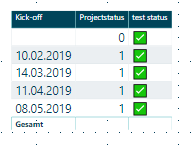
Code works for different unichar-values - it seems to be a problem with the number range that i'm in. It ends in the result that the unichar(9989) is displayed for all rows:

switch - unicode.PNG

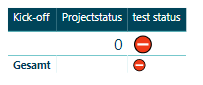
Selecting only the status "0" the result is correct:


switch - unicode II.png


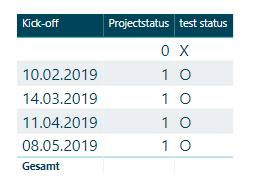
Selecting other values the result ist correct:


switch - unicode III.PNG

Any tipps / hints / thoughts on this subject or problem. Is it a bug in the unichar / switch function? Thx in advance for your help.


Best regards,

Stephan


1 ACCEPTED SOLUTION
sfuhr
Frequent Visitor

Hello ! i do not have a final solution, whoever i found a work around to use the unichar symbols:


status char = SWITCH(TRUE();
    AVERAGE(Testtabelle[Status]) = 1; UNICHAR(9989);
    AVERAGE(Testtabelle[Status]) = 0; UNICHAR(9940)&" "; 
    ""
)

Adding a character and the end from one of the selections works fine.


Best regards,

Stephan

View solution in original post

5 REPLIES 5
sfuhr
Frequent Visitor

Hello ! i do not have a final solution, whoever i found a work around to use the unichar symbols:


status char = SWITCH(TRUE();
    AVERAGE(Testtabelle[Status]) = 1; UNICHAR(9989);
    AVERAGE(Testtabelle[Status]) = 0; UNICHAR(9940)&" "; 
    ""
)

Adding a character and the end from one of the selections works fine.


Best regards,

Stephan

Nolock
Resident Rockstar
Resident Rockstar

Hi guys,


the code is correct, the problem is somewhere else. I tried to reproduce your problem and it also didn't work for me. What I tried was to take another value as parameter of UNICHAR and voila, it worked. It means there is a bug in Power BI.

Do you know how to report it?


status char = 
VAR UP =
    UNICHAR ( 9989 )
VAR DOWN =
    UNICHAR ( 940 )
VAR Result =
    SWITCH ( TestTable2[Status]; 0; DOWN; 1; UP; BLANK () )
RETURN
    Result

Annotation 2019-02-26 084203.jpg

sfuhr
Frequent Visitor

Hi Nolock,


i also believe that there is a bug in Power BI - i found also a work around (see my reply). 


I don't know, how to report this as a bug to the power bi team - could you point me into the right direction - Thanks.


best regards,

Stephan

Nolock
Resident Rockstar
Resident Rockstar

I've asked the uncle Google and there is a separated forum for that: https://community.powerbi.com/t5/Issues/idb-p/Issues

@sfuhr, do you take care about it?

sfuhr
Frequent Visitor

Helpful resources

Announcements
Fabric Data Days is here Carousel

Fabric Data Days 2026

Don't miss out on Data Days, June 15 through August 7. Learn Fabric, Power BI, SQL, AI and more.

May Power BI Update Carousel

Power BI Monthly Update - May 2026

Check out the May 2026 Power BI update to learn about new features.

Power BI DataViz World Championships carousel

Power BI DataViz World Championships - June 2026

A new Power BI DataViz World Championship is coming this June! Don't miss out on submitting your entry.