Join us at FabCon Atlanta from March 16 - 20, 2026, for the ultimate Fabric, Power BI, AI and SQL community-led event. Save $200 with code FABCOMM.
Register now!The Power BI Data Visualization World Championships is back! It's time to submit your entry. Live now!
I try to display 2 different symbols in a table depending on a status - here is the small dax function:
test status = SWITCH(TRUE();
[Projectstatus] = 0; UNICHAR(9940);
[Projectstatus] = 1; UNICHAR(9989);
"")
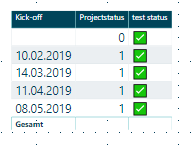
Code works for different unichar-values - it seems to be a problem with the number range that i'm in. It ends in the result that the unichar(9989) is displayed for all rows:
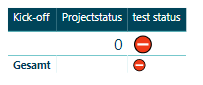
Selecting only the status "0" the result is correct:
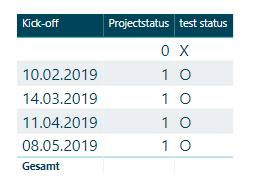
Selecting other values the result ist correct:
Any tipps / hints / thoughts on this subject or problem. Is it a bug in the unichar / switch function? Thx in advance for your help.
Best regards,
Stephan
Solved! Go to Solution.
Hello ! i do not have a final solution, whoever i found a work around to use the unichar symbols:
status char = SWITCH(TRUE();
AVERAGE(Testtabelle[Status]) = 1; UNICHAR(9989);
AVERAGE(Testtabelle[Status]) = 0; UNICHAR(9940)&" ";
""
)Adding a character and the end from one of the selections works fine.
Best regards,
Stephan
Hello ! i do not have a final solution, whoever i found a work around to use the unichar symbols:
status char = SWITCH(TRUE();
AVERAGE(Testtabelle[Status]) = 1; UNICHAR(9989);
AVERAGE(Testtabelle[Status]) = 0; UNICHAR(9940)&" ";
""
)Adding a character and the end from one of the selections works fine.
Best regards,
Stephan
Hi guys,
the code is correct, the problem is somewhere else. I tried to reproduce your problem and it also didn't work for me. What I tried was to take another value as parameter of UNICHAR and voila, it worked. It means there is a bug in Power BI.
Do you know how to report it?
status char =
VAR UP =
UNICHAR ( 9989 )
VAR DOWN =
UNICHAR ( 940 )
VAR Result =
SWITCH ( TestTable2[Status]; 0; DOWN; 1; UP; BLANK () )
RETURN
ResultHi Nolock,
i also believe that there is a bug in Power BI - i found also a work around (see my reply).
I don't know, how to report this as a bug to the power bi team - could you point me into the right direction - Thanks.
best regards,
Stephan
I've asked the uncle Google and there is a separated forum for that: https://community.powerbi.com/t5/Issues/idb-p/Issues
@sfuhr, do you take care about it?
@Nolock -> reported as a bug.
https://community.powerbi.com/t5/Issues/Bug-using-switch-function-with-unichar/idi-p/631819#M39493
Thx for your help... Stephan
The Power BI Data Visualization World Championships is back! It's time to submit your entry.
Check out the January 2026 Power BI update to learn about new features.
| User | Count |
|---|---|
| 69 | |
| 45 | |
| 36 | |
| 28 | |
| 23 |
| User | Count |
|---|---|
| 141 | |
| 124 | |
| 59 | |
| 40 | |
| 32 |