This is best Fabric, Power BI, SQL and AI community event. How do we know? The last event sold out! Save €200 with code FABCMTY200.
Register nowA new Data Days event is coming soon! This time we’re going bigger than ever. Fabric, Power BI, SQL, AI and more. Don't miss out.
Hi,
I have relation between a lot of tables, all bidirectional, but if I put some fields of different tables on a table object it says that it's not possible to establish relation between more fields, why?
The relations are ok and the tables are correctly related, how can I do?
Thanks
Solved! Go to Solution.
Hi @Giada90 ,
As the error describes, the reason is that the two fields are built without a proper relationship to filter.
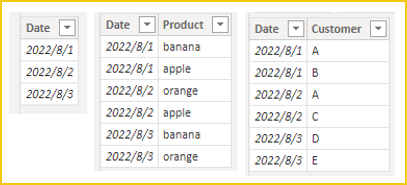
I created three tables for testing:
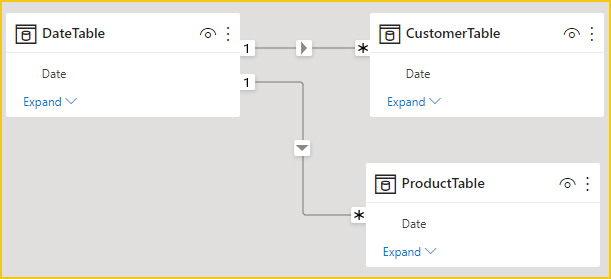
Relationships:
When we drag the customer field and the product field into the visual form and set them to not aggregate, the same error is displayed:
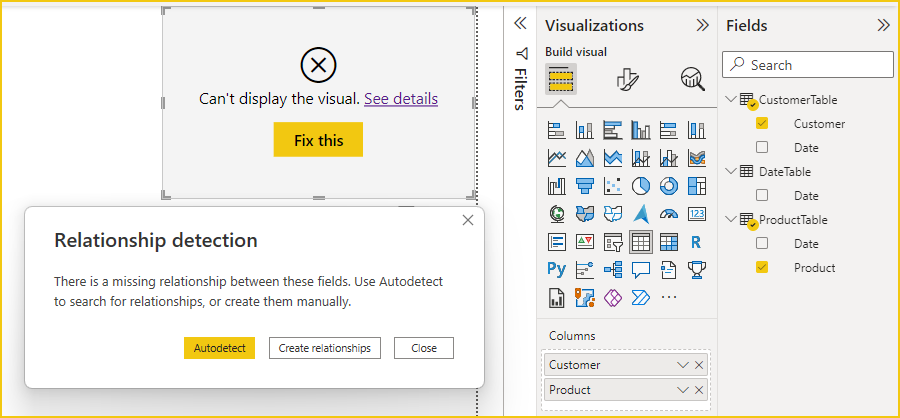
This is because [customer] does not have any relationship with [product], such as one-to-one or one-to-many. They can just both filtered by 'Date'[Date](one-to-many).
If you need to relate to the many-to-many dimension,please refer:
Many-to-many relationship guidance
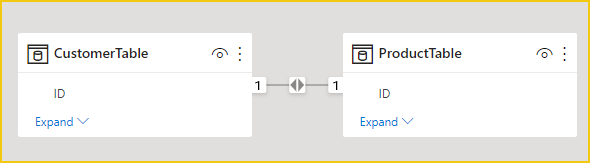
After adding the unique identifier (ID) column for each order:
Power BI is designed to work with a Star Schema, and a good model is half the battle.
Understand star schema and the importance for Power BI
Best Regards,
Gao
Community Support Team
If there is any post helps, then please consider Accept it as the solution to help the other members find it more quickly. If I misunderstand your needs or you still have problems on it, please feel free to let us know. Thanks a lot!
How to get your questions answered quickly -- How to provide sample data
Hi @Giada90 ,
As the error describes, the reason is that the two fields are built without a proper relationship to filter.
I created three tables for testing:
Relationships:
When we drag the customer field and the product field into the visual form and set them to not aggregate, the same error is displayed:
This is because [customer] does not have any relationship with [product], such as one-to-one or one-to-many. They can just both filtered by 'Date'[Date](one-to-many).
If you need to relate to the many-to-many dimension,please refer:
Many-to-many relationship guidance
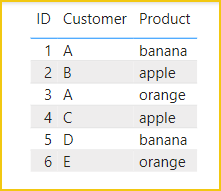
After adding the unique identifier (ID) column for each order:
Power BI is designed to work with a Star Schema, and a good model is half the battle.
Understand star schema and the importance for Power BI
Best Regards,
Gao
Community Support Team
If there is any post helps, then please consider Accept it as the solution to help the other members find it more quickly. If I misunderstand your needs or you still have problems on it, please feel free to let us know. Thanks a lot!
How to get your questions answered quickly -- How to provide sample data
Thanks!
Hi,
Are you use measure in your visual ?
Would it be possible to share your sample PBIX here ?
Check out the May 2026 Power BI update to learn about new features.
Sign up to receive a private message when registration opens and key events begin.
If you have recently started exploring Fabric, we'd love to hear how it's going. Your feedback can help with product improvements.
| User | Count |
|---|---|
| 31 | |
| 26 | |
| 23 | |
| 22 | |
| 15 |
| User | Count |
|---|---|
| 62 | |
| 47 | |
| 28 | |
| 24 | |
| 21 |