
This is best Fabric, Power BI, SQL and AI community event. How do we know? The last event sold out! Save €200 with code FABCMTY200.
Register nowA new Data Days event is coming soon! This time we’re going bigger than ever. Fabric, Power BI, SQL, AI and more. Don't miss out.
Hello Guys,
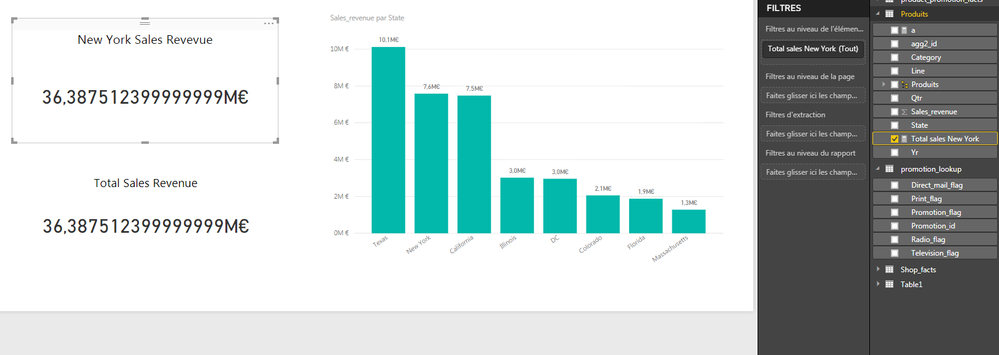
I am using an excel file as my data source. I am working with my table product at the moment specifically with the fields Sales Revenue and States. I want to create a new measure on that table that will calculate the total revenue but only for the state on New york and with the use of variables. So with the declaration of my measure, i have created two variables one that hepls me filter the state of New York and another one that sums the field Sales revenue. Then i returned the result of the use of the CALCULATE FUNCTION.
As you can see on the pictures the variable that sums my revenue but the one with the filter does not work. I am supposed to have 7.5 millions euros for New York's revenue. It works when i create another measure just to calculate the sum of the revenue but i rather not proceed like that for performance measures.
Does anyone please know where i went wrong?
Regards,
Tatiana
this is my DAX expression:
Solved! Go to Solution.
I think the issue is that second VAR evaluates the SUM before the filter context from the first VAR is applied, so it returns a scalar value
CALCULATE(SUM(Produits[Sales_revenue]),NewYorkSales)
should work fine
I think the issue is that second VAR evaluates the SUM before the filter context from the first VAR is applied, so it returns a scalar value
CALCULATE(SUM(Produits[Sales_revenue]),NewYorkSales)
should work fine
Check out the May 2026 Power BI update to learn about new features.
Sign up to receive a private message when registration opens and key events begin.
If you have recently started exploring Fabric, we'd love to hear how it's going. Your feedback can help with product improvements.
| User | Count |
|---|---|
| 30 | |
| 26 | |
| 25 | |
| 22 | |
| 13 |
| User | Count |
|---|---|
| 58 | |
| 50 | |
| 26 | |
| 20 | |
| 19 |