
cancel
Showing results for 
Search instead for 
Did you mean: 

Get Fabric certified for FREE! Don't miss your chance! Learn more

Reply
Tatynout
Frequent Visitor

problem with filter function in my expression

Hello Guys,


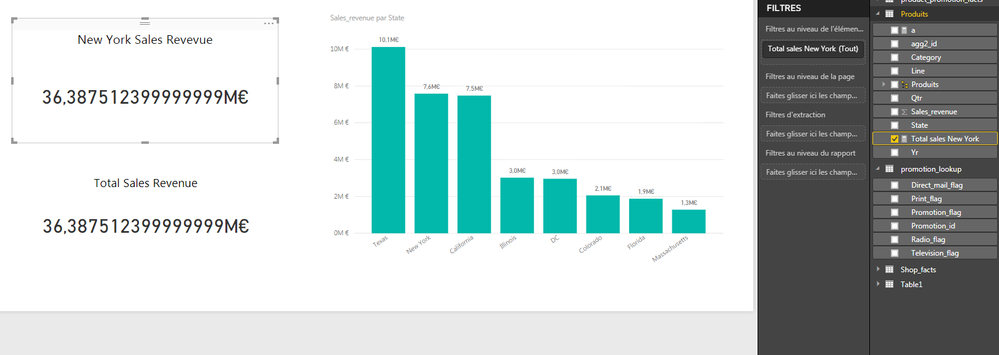
I am using an excel file as my data source. I am working with my table product at the moment specifically with the fields Sales Revenue and States. I want to create a new measure on that table that will calculate the total revenue but only for the state on New york and with the use of variables. So with the declaration of my measure, i have created two variables one that hepls me filter the state of New York and another one that sums the field Sales revenue. Then i returned the result of the use of the CALCULATE FUNCTION. 


As you can see on the pictures the variable that sums my revenue but the one with the filter does not work. I am supposed to have 7.5 millions euros for New York's revenue. It works when i create another measure just to calculate the sum of the revenue but i rather not proceed like that for performance measures. 


Does anyone please know where i went wrong?


Regards,

Tatiana

function 1.png


this is my DAX expression: 


function2.png

1 ACCEPTED SOLUTION
Stachu
Community Champion
Community Champion

I think the issue is that second VAR evaluates the SUM before the filter context from the first VAR is applied, so it returns a scalar value

CALCULATE(SUM(Produits[Sales_revenue]),NewYorkSales)


should work fine


Did I answer your question? Mark my post as a solution!
Thank you for the kudos 🙂

View solution in original post

2 REPLIES 2
Stachu
Community Champion
Community Champion

I think the issue is that second VAR evaluates the SUM before the filter context from the first VAR is applied, so it returns a scalar value

CALCULATE(SUM(Produits[Sales_revenue]),NewYorkSales)


should work fine


Did I answer your question? Mark my post as a solution!
Thank you for the kudos 🙂

It works just fine!


Thanks you very much @Stachu

Helpful resources

Announcements
Join our Fabric User Panel

Join our Fabric User Panel

Share feedback directly with Fabric product managers, participate in targeted research studies and influence the Fabric roadmap.

Sticker Challenge 2026 Carousel

Join our Community Sticker Challenge 2026

If you love stickers, then you will definitely want to check out our Community Sticker Challenge!

January Power BI Update Carousel

Power BI Monthly Update - January 2026

Check out the January 2026 Power BI update to learn about new features.

FabCon Atlanta 2026 carousel

FabCon Atlanta 2026

Join us at FabCon Atlanta, March 16-20, for the ultimate Fabric, Power BI, AI and SQL community-led event. Save $200 with code FABCOMM.