
Join us at FabCon Atlanta from March 16 - 20, 2026, for the ultimate Fabric, Power BI, AI and SQL community-led event. Save $200 with code FABCOMM.
Register now!Vote for your favorite vizzies from the Power BI Dataviz World Championship submissions. Vote now!
Hi,
is it possible to create a filter in this format or something similar? Any ideas?
Thank you
Solved! Go to Solution.
Hi @Giada_Togliatti ,
You can use Legend on a visual as a filter.
Legends by default are created the same way as in your screenshot.
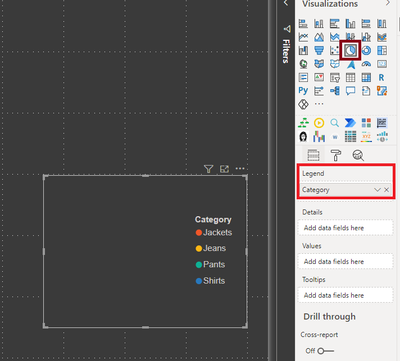
As a workaround, create an empty chart with just value in legend section and use it as a filter.
Something like shown below: (I used a PIE CHART visual)
Thanks,
Pragati
Hi @Giada_Togliatti ,
You can use Legend on a visual as a filter.
Legends by default are created the same way as in your screenshot.
As a workaround, create an empty chart with just value in legend section and use it as a filter.
Something like shown below: (I used a PIE CHART visual)
Thanks,
Pragati
@Giada_Togliatti , In slicer, you can try, orientation - Horizontal , That will give button impact and then you can color items to color buttons
see if that can help
https://docs.microsoft.com/en-us/power-bi/power-bi-slicer-filter-responsive
Vote for your favorite vizzies from the Power BI World Championship submissions!
If you love stickers, then you will definitely want to check out our Community Sticker Challenge!
Check out the January 2026 Power BI update to learn about new features.
| User | Count |
|---|---|
| 66 | |
| 51 | |
| 42 | |
| 25 | |
| 22 |
| User | Count |
|---|---|
| 139 | |
| 116 | |
| 54 | |
| 37 | |
| 31 |