
Join us at FabCon Atlanta from March 16 - 20, 2026, for the ultimate Fabric, Power BI, AI and SQL community-led event. Save $200 with code FABCOMM.
Register now!The Power BI Data Visualization World Championships is back! It's time to submit your entry. Live now!
Hi,
is it possible to create a filter in this format or something similar? Any ideas?
Thank you
Solved! Go to Solution.
Hi @Giada_Togliatti ,
You can use Legend on a visual as a filter.
Legends by default are created the same way as in your screenshot.
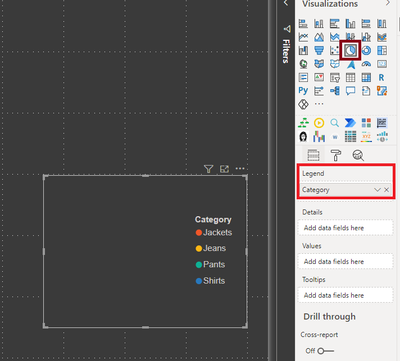
As a workaround, create an empty chart with just value in legend section and use it as a filter.
Something like shown below: (I used a PIE CHART visual)
Thanks,
Pragati
Hi @Giada_Togliatti ,
You can use Legend on a visual as a filter.
Legends by default are created the same way as in your screenshot.
As a workaround, create an empty chart with just value in legend section and use it as a filter.
Something like shown below: (I used a PIE CHART visual)
Thanks,
Pragati
@Giada_Togliatti , In slicer, you can try, orientation - Horizontal , That will give button impact and then you can color items to color buttons
see if that can help
https://docs.microsoft.com/en-us/power-bi/power-bi-slicer-filter-responsive
The Power BI Data Visualization World Championships is back! It's time to submit your entry.
Check out the January 2026 Power BI update to learn about new features.
| User | Count |
|---|---|
| 66 | |
| 45 | |
| 38 | |
| 26 | |
| 23 |
| User | Count |
|---|---|
| 136 | |
| 117 | |
| 55 | |
| 36 | |
| 30 |