cancel
Showing results for 
Search instead for 
Did you mean: 

July 7 - July 17 | Round 2 of the Power BI Dataviz World Championships. Don't miss your chance! Learn more

Reply
WSL
Regular Visitor

parameter

Hi All,


I'm new to PBI. i have a question on the possibility to display all the parameters value in the PBI dashboard.


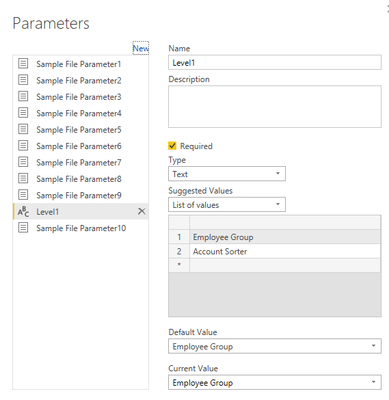
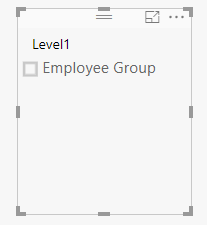
Example show as below, I want to display the list of values in the parameter and show this as a slicer in PBI dashboard. But in the second picture below, you can see it only displays one value which is “employee group” but not both values.

Ultimately, my objective is to use the parameter as a slicer to switch the table visualization to the view that I want to display in dashboard.


Really appreciateif anyone can help in this matter.

Parameter.pngPicture 2.png

1 ACCEPTED SOLUTION
v-piga-msft
Resident Rockstar
Resident Rockstar

Hi @WSL,


Currently, the value of the Query Parameters can only be used within Query Editor and in Data Source dialogs when you getting data ,so it is not possible to reference the Query Parameter on the report.


You could vote a similar idea here.


In addition, more details about Query Parameter, you could refer to the links below.


https://powerbi.microsoft.com/en-us/blog/deep-dive-into-query-parameters-and-power-bi-templates/


http://biinsight.com/power-bi-desktop-query-parameters-part-1/


http://biinsight.com/power-bi-desktop-query-parameters-part-3-list-output/


Best Regards,

Cherry


Community Support Team _ Cherry Gao
If this post helps, then please consider Accept it as the solution to help the other members find it more quickly.

View solution in original post

3 REPLIES 3
v-piga-msft
Resident Rockstar
Resident Rockstar

Hi @WSL,


Currently, the value of the Query Parameters can only be used within Query Editor and in Data Source dialogs when you getting data ,so it is not possible to reference the Query Parameter on the report.


You could vote a similar idea here.


In addition, more details about Query Parameter, you could refer to the links below.


https://powerbi.microsoft.com/en-us/blog/deep-dive-into-query-parameters-and-power-bi-templates/


http://biinsight.com/power-bi-desktop-query-parameters-part-1/


http://biinsight.com/power-bi-desktop-query-parameters-part-3-list-output/


Best Regards,

Cherry


Community Support Team _ Cherry Gao
If this post helps, then please consider Accept it as the solution to help the other members find it more quickly.

Thanks @v-piga-msft Cherry! will vote for the idea for sure. 

Hi @WSL


If my answer helps you, please mark the right reply as answer. So more people will find the solution easily.


Best Regards,

Cherry

Community Support Team _ Cherry Gao
If this post helps, then please consider Accept it as the solution to help the other members find it more quickly.

Helpful resources

Announcements
FabCon and SQLCon Barcelona 2026

FabCon & SQLCon – Barcelona 2026

Join us in Barcelona for FabCon and SQLCon, the Fabric, Power BI, SQL, and AI community event. Save €200 with code FABCMTY200.

60 days of Data Days Carousel

Data Days 2026

Join Fabric Data Days 2026: 60 days of free live/on-demand sessions, challenges, study groups, and certification opportunities.

Power BI DataViz World Championships carousel

Power BI DataViz World Championships - June 2026

A new Power BI DataViz World Championship is coming this June! Don't miss out on submitting your entry.