cancel
Showing results for 
Search instead for 
Did you mean: 

Learn from the best! Meet the four finalists headed to the FINALS of the Power BI Dataviz World Championships! Register now

Reply
puj831
Frequent Visitor

mode stats

ex.PNG

how do you calculate the the ID who had Accepted the most number of calls (without knowing). So in the example, the mode ID is 1 because it acccepted 2 calls (more than any other ID) and rejected 2 calls and cancelled 1 call, meaning that they had 5 call transactions. So their call acceptance would be 2/5 or 40%. Any suggestions on a calculated measure?


3 REPLIES 3
v-lili6-msft
Community Support
Community Support

Hi@ puj831


You can try these two measures as below:

Everyone call acceptance:

Measure = var tmp =SUMMARIZE(Table2,Table2[ID],"Acc",CALCULATE(SUM(Table2[Accepted])),"totalCall",CALCULATE(SUM(Table2[Accepted])+SUM(Table2[Cancelled])+SUM(Table2[Rejected])),"Per",CALCULATE(SUM(Table2[Accepted]))/CALCULATE(SUM(Table2[Accepted])+SUM(Table2[Cancelled])+SUM(Table2[Rejected]))) return var MaxAcc=MAXX(tmp,[Acc]) return
SUMX(filter(tmp,MAX([Acc])=MaxAcc),[Per])

Most call accepted :

Measure 4 = var maxValueID = CALCULATE(maxx(TOPN(1, SUMMARIZE('Table2', Table2[ID]), [Measure], DESC), [id]), all(Table2)) return if(min(Table2[ID]) = maxValueID, [Measure], BLANK()) 

 Then drag filed ID and measure 4 into table visual


Result:

9.PNG

Here is Demo, please try it

https://www.dropbox.com/s/dkr3po7b7cd3i34/mode%20stats.pbix?dl=0


Best Regards,

Lin


Community Support Team _ Lin
If this post helps, then please consider Accept it as the solution to help the other members find it more quickly.
v-lili6-msft
Community Support
Community Support

Hi@ puj831

You can try to use measure as below:

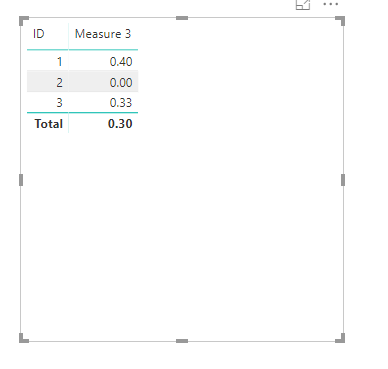
Measure 3 = CALCULATE(SUM(Table1[Accepted]))/CALCULATE(SUM(Table1[Accepted])+SUM(Table1[Cancelled])+SUM(Table1[Rejected]))

Result:

4.png

Best Regards,

Lin

Community Support Team _ Lin
If this post helps, then please consider Accept it as the solution to help the other members find it more quickly.

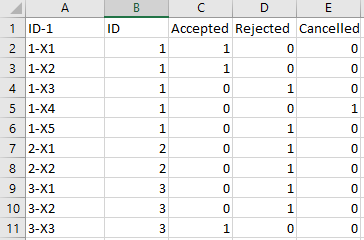
Thanks, however, how can I get it to show only 0.40, not the others. So it would be the the ID that has the most acceptances only. thanks!

Helpful resources

Announcements
Join our Fabric User Panel

Join our Fabric User Panel

Share feedback directly with Fabric product managers, participate in targeted research studies and influence the Fabric roadmap.

March Power BI Update Carousel

Power BI Community Update - March 2026

Check out the March 2026 Power BI update to learn about new features.