Join us at FabCon Atlanta from March 16 - 20, 2026, for the ultimate Fabric, Power BI, AI and SQL community-led event. Save $200 with code FABCOMM.
Register now!The Power BI Data Visualization World Championships is back! Get ahead of the game and start preparing now! Learn more
Hi PowerBi Community,
I am trying to adjust the width of the bars using the stacked column chart visualisation but i can't find the feature minimum category width under the x axis, does this feature still exist? or is it located somwhere else
Thanks in advance !
Solved! Go to Solution.
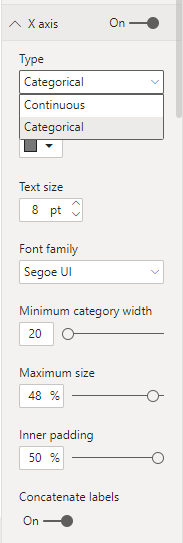
nevermind , i have found the feature , you need to select categorical type first then adjust minimum category width
Thanks
Hi @em12340 ,
The Maximum Category width should be in:
- The Y axis for Stacked Bar Chart
- The X axis for Stacked Column Chart
Cheers
Robin
If this post helps, then please consider Accept it as the solution to help the other members find it more quickly.
HI Robin ,
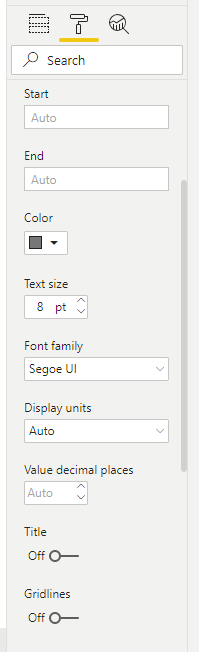
Thanks for the reply although i still dont see that feature in stacked column chart nor in the Stacked Bar Chart. These are the only features i see in the Y and X axis
nevermind , i have found the feature , you need to select categorical type first then adjust minimum category width
Thanks
But why your stacked column chart got the dropdown Type? mine doesnt have, similar to @em12340
The Power BI Data Visualization World Championships is back! Get ahead of the game and start preparing now!
| User | Count |
|---|---|
| 40 | |
| 37 | |
| 33 | |
| 29 | |
| 27 |
| User | Count |
|---|---|
| 133 | |
| 104 | |
| 61 | |
| 59 | |
| 55 |