Join us in Barcelona for FabCon and SQLCon, September 28 - October 1, 2026.
This is best Fabric, Power BI, SQL and AI community event. How do we know? The last event sold out! Save €200 with code FABCMTY200.
Register now- Power BI forums
- Get Help with Power BI
- Desktop
- Service
- Report Server
- Power Query
- Mobile Apps
- Developer
- DAX Commands and Tips
- Custom Visuals Development Discussion
- Health and Life Sciences
- Power BI Spanish forums
- Translated Spanish Desktop
- Training and Consulting
- Instructor Led Training
- Dashboard in a Day for Women, by Women
- Galleries
- Data Stories Gallery
- Themes Gallery
- Contests Gallery
- QuickViz Gallery
- Quick Measures Gallery
- Visual Calculations Gallery
- Fabric Apps Gallery
- Notebook Gallery
- Translytical Task Flow Gallery
- TMDL Gallery
- R Script Showcase
- Webinars and Video Gallery
- Ideas
- Custom Visuals Ideas (read-only)
- Issues
- Issues
- Events
- Upcoming Events
The Fabric community is now in read-only for platform upgrade. Learn more
- Power BI forums
- Forums
- Get Help with Power BI
- Desktop
- Re: missing fields from Salesforce Objects source
- Subscribe to RSS Feed
- Mark Topic as New
- Mark Topic as Read
- Float this Topic for Current User
- Bookmark
- Subscribe
- Printer Friendly Page

- Mark as New
- Bookmark
- Subscribe
- Mute
- Subscribe to RSS Feed
- Permalink
missing fields from Salesforce Objects source
Hi,
I'm trying to load the CaseMilestone object from Salesforce to Power Bi Desktop.
I manage to load most of the columns, but there are 7 missing:
BusinessHoursId
StoppedTimeInMins
StoppedTimeInHrs
StoppedTimeInDays
ActualElapsedTimeInMins
ActualElapsedTimeInHrs
ActualElapsedTimeInDays
I'm not removing any columns from the result.
let
    Source = Salesforce.Data("https://login.salesforce.com/", [CreateNavigationProperties=true]),
    CaseMilestone = Source{[Name="CaseMilestone"]}[Data]
in
    CaseMilestone
When checking the same table via DataLoader I do get all the tables in my output.
Anyone has an idea what might be wrong here? And how to fix it :-).
Tnx & Regards,
Wim
Solved! Go to Solution.
- Mark as New
- Bookmark
- Subscribe
- Mute
- Subscribe to RSS Feed
- Permalink
Thanks for the feedback.
I'm not sure these are custom fields. I believe they are standard (but will probably only exist in the DB once an option has been activated).
I have a workaround now, as apparently the fields have been copied to our Cases object as well. Not as clean, but it works for me.
Wim


- Mark as New
- Bookmark
- Subscribe
- Mute
- Subscribe to RSS Feed
- Permalink
Hi Wim,
Since Data Loader returns these CaseMilestone fields, I would first confirm that both tools use the same Salesforce user and API version. In the current Salesforce Objects connector, you can explicitly set a supported ApiVersion in the Salesforce.Data call.
Power BI Connector for Salesforce may also be worth testing. It lets you select and preview the Salesforce objects and fields available to the application user before importing them into Power BI. This can help determine whether the issue is specific to the native connector.
AppExchange and 30-day free trial:
https://appexchange.salesforce.com/appxListingDetail?listingId=31526f0e-abd8-4cb5-bd1a-3bd56b5c0577
Documentation:
https://metricasoftware.com/docs/salesforce/
Support and demo:
https://metricasoftware.com/docs/salesforce/contact-support/
Cheers,
Metrica Team


- Mark as New
- Bookmark
- Subscribe
- Mute
- Subscribe to RSS Feed
- Permalink
Hi, were you able to find a solution? As a workaround, maybe you can try to test your connection with a 3rd party connector., which is compatible with SF objects and works with custom fields too. I've tried windsor.ai, supermetrics and funnel.io. I stayed with windsor because it is much cheaper so just to let you know other options. In case you wonder, to make the connection first search for the Salesforce connector in the data sources list:
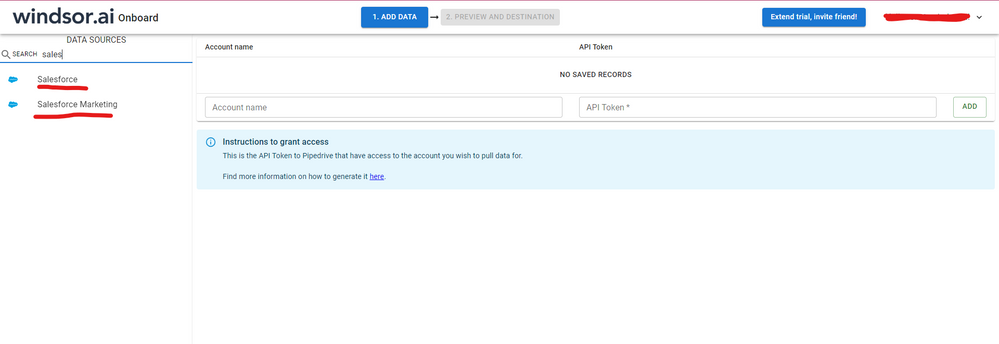
After that, just grant access to your Salesforce account using your credentials, then on preview and destination page you will see a preview of your Salesforce fields:

There just select the fields you need. It is also compatible with custom fields and custom objects, so you'll be able to export them through windsor. Finally, just select PBI as your data destination and finally just copy and paste the url on PBI --> Get Data --> Web --> Paste the url.

- Mark as New
- Bookmark
- Subscribe
- Mute
- Subscribe to RSS Feed
- Permalink
Hi @Anonymous,
If this is a case, please use api to get data form salesforce.
AFAIK, power bi connectors are packaged which fields can return back to power bi, by default it not support custom fields.
Regards,
Xiaoxin Sheng
- Mark as New
- Bookmark
- Subscribe
- Mute
- Subscribe to RSS Feed
- Permalink
Thanks for the feedback.
I'm not sure these are custom fields. I believe they are standard (but will probably only exist in the DB once an option has been activated).
I have a workaround now, as apparently the fields have been copied to our Cases object as well. Not as clean, but it works for me.
Wim

- Mark as New
- Bookmark
- Subscribe
- Mute
- Subscribe to RSS Feed
- Permalink
I am missing a work order that will not show in Power BI. Did you ever get another solution other than copy to case object?
- Mark as New
- Bookmark
- Subscribe
- Mute
- Subscribe to RSS Feed
- Permalink
I am missing a work order that will not show in Power BI. Did you ever get another solution other than copy to case object?
Helpful resources

FabCon & SQLCon – Barcelona 2026
Join us in Barcelona for FabCon and SQLCon, the Fabric, Power BI, SQL, and AI community event. Save €200 with code FABCMTY200.

Power BI DataViz World Championships - June 2026
A new Power BI DataViz World Championship is coming this June! Don't miss out on submitting your entry.

| User | Count |
|---|---|
| 23 | |
| 22 | |
| 14 | |
| 14 | |
| 13 |


| User | Count |
|---|---|
| 47 | |
| 39 | |
| 24 | |
| 20 | |
| 20 |


