cancel
Showing results for 
Search instead for 
Did you mean: 

Next up in the FabCon + SQLCon recap series: The roadmap for Microsoft SQL and Maximizing Developer experiences in Fabric. All sessions are available on-demand after the live show. Register now

Reply
Anonymous
Not applicable

minimum value of a measure

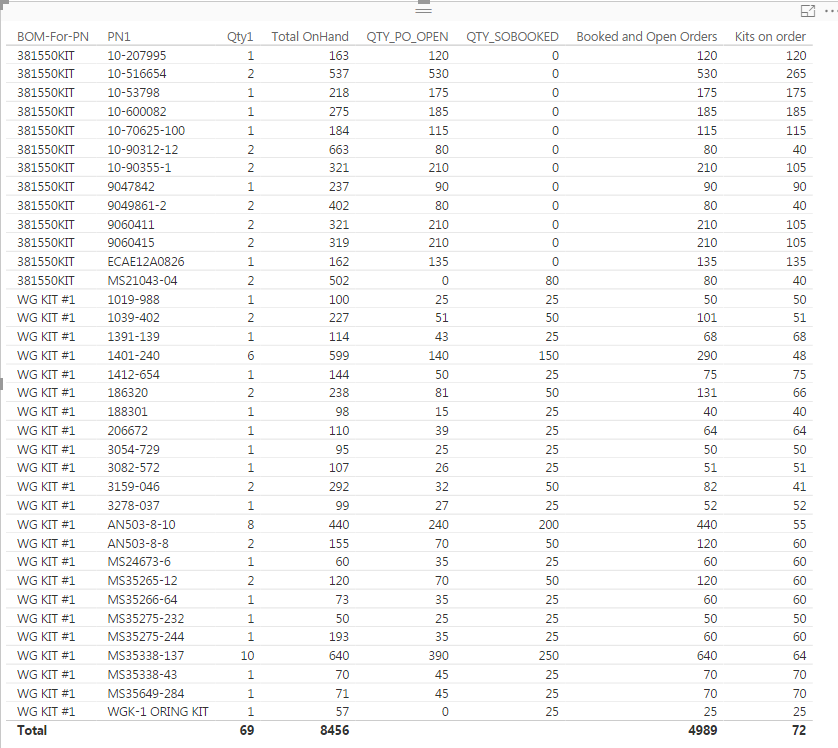
I have built two measures...."Booked and Open Orders" and "Kits on Order".

Booked and Open Orders = sum('Part Number Master'[QTY_PO_OPEN])+sum('Part Number Master'[QTY_SOBOOKED])

Kits on order = DIVIDE([Booked and Open Orders],sum(BOM[Qty1]))


I want the minimum value in the measure "Kits on Order", which is 40 for 381550KIT and 25 for WG KIT #1.


It seems easy enough but everytime I use the Min or Minx, it is saying it only uses column values.


Capture.PNG

1 ACCEPTED SOLUTION
Vvelarde
Community Champion
Community Champion

hi @Anonymous


Use this dax, MinX(Table, Measure or Expression)


Min-Kits-in-order = MINX('Part Number Master',[Kits on order])


Lima - Peru

View solution in original post

5 REPLIES 5
Adity
Regular Visitor

There is one simple way to find the MIN of 3 different expressions or columns. Simply create a table by doing the following. 


MIN(

[expression1],

[expression2],

[expression3]

},

[value]

)


Try this simple way and it shall work! 

Vvelarde
Community Champion
Community Champion

hi @Anonymous


Use this dax, MinX(Table, Measure or Expression)


Min-Kits-in-order = MINX('Part Number Master',[Kits on order])


Lima - Peru

How Can I use MIN in DAX with Multiple columns 

I have 3 columns with deffrent values, How can i get Mnimum value of the total 3 columns 

Anonymous
Not applicable

@mohamed901,

It's admittedly clunky, but the only quick fix that I've found is something like:


var min_growth12 = MIN(growth1,growth2)
var min_growth34 = MIN(growth3,growth4)
var min_growth_next = MIN(min_growth12,min_growth34)
var min_growth = MIN(growth5,min_growth_next)


Where growth1, 2, 3 etc are additional variables in the overall measure.


Jonathan 

Anonymous
Not applicable

I had tried that and I didn't think that it worked because when I added it to the visual, every line had a different number but when I reduced the visual down to just the part number and the new measure, it gave me the correct answer.


Thanks

Helpful resources

Announcements
New to Fabric survey Carousel

New to Fabric Survey

If you have recently started exploring Fabric, we'd love to hear how it's going. Your feedback can help with product improvements.

Power BI DataViz World Championships carousel

Power BI DataViz World Championships - June 2026

A new Power BI DataViz World Championship is coming this June! Don't miss out on submitting your entry.

March Power BI Update Carousel

Power BI Community Update - March 2026

Check out the March 2026 Power BI update to learn about new features.