Join us in Barcelona for FabCon and SQLCon, September 28 - October 1, 2026.
This is best Fabric, Power BI, SQL and AI community event. How do we know? The last event sold out! Save €200 with code FABCMTY200.
Register now- Power BI forums
- Get Help with Power BI
- Desktop
- Service
- Report Server
- Power Query
- Mobile Apps
- Developer
- DAX Commands and Tips
- Custom Visuals Development Discussion
- Health and Life Sciences
- Power BI Spanish forums
- Translated Spanish Desktop
- Training and Consulting
- Instructor Led Training
- Dashboard in a Day for Women, by Women
- Galleries
- Data Stories Gallery
- Themes Gallery
- Contests Gallery
- QuickViz Gallery
- Quick Measures Gallery
- Visual Calculations Gallery
- Fabric Apps Gallery
- Notebook Gallery
- Translytical Task Flow Gallery
- TMDL Gallery
- R Script Showcase
- Webinars and Video Gallery
- Ideas
- Custom Visuals Ideas (read-only)
- Issues
- Issues
- Events
- Upcoming Events
The Fabric community is now in read-only for platform upgrade. Learn more
- Power BI forums
- Forums
- Get Help with Power BI
- Desktop
- minimum value between 2 dates
- Subscribe to RSS Feed
- Mark Topic as New
- Mark Topic as Read
- Float this Topic for Current User
- Bookmark
- Subscribe
- Printer Friendly Page

- Mark as New
- Bookmark
- Subscribe
- Mute
- Subscribe to RSS Feed
- Permalink
- Report Inappropriate Content
minimum value between 2 dates
Hello,
I want to calcule a minimum and maximum for value that i have in table X. But i want to have the minimum and maximum between 2 dates that i have in table Y.
Exemple :
Table X :
| ART | Date | Value |
| refe1 | 28/11/2022 | |
| refe1 | 29/11/2022 | |
| refe1 | 30/11/2022 | |
| refe2 | 28/11/2022 | |
| refe2 | 30/11/2022 |
Table Y :
| ART | Date A | Date B |
| refe1 | 28/11/2022 | 30/11/2022 |
| refe1 | 01/12/2022 | 04/12/2022 |
| refe2 | 28/11/2022 | 30/11/2022 |
| refe2 | 01/12/2022 | 04/12/2022 |
I tried :
MINX(
KEEPFILTERS(DATESBETWEEN('TableX'[dateFormatted],'TableY'[DATE A],'CBANOQ1'[DATE B])),
CALCULATE(SUM('TableX'[Value]))
)
Thank you for your help
Solved! Go to Solution.


- Mark as New
- Bookmark
- Subscribe
- Mute
- Subscribe to RSS Feed
- Permalink
- Report Inappropriate Content
Hi, @Anonymous
Please try formula like:
minimum =
CALCULATE (
    MIN ( TableX[Value] ),
    FILTER (
        TableX,
        TableX[ART] = SELECTEDVALUE ( TableY[ART] )
            && TableX[Date] >= SELECTEDVALUE ( TableY[Date A] )
            && TableX[Date] <= SELECTEDVALUE ( TableY[Date B] )
    )
)
Your expected result seems to have wrong value, please check again.
Result:
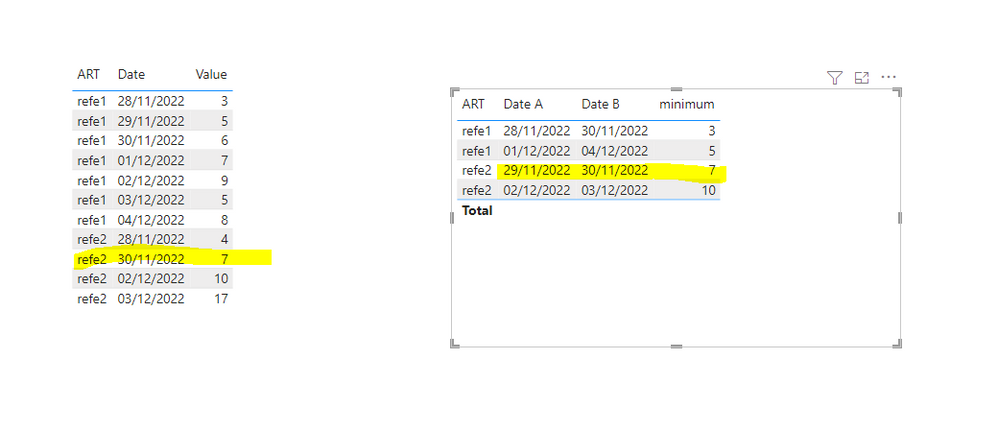
Best Regards,
Community Support Team _ Eason


- Mark as New
- Bookmark
- Subscribe
- Mute
- Subscribe to RSS Feed
- Permalink
- Report Inappropriate Content
- Mark as New
- Bookmark
- Subscribe
- Mute
- Subscribe to RSS Feed
- Permalink
- Report Inappropriate Content

- Mark as New
- Bookmark
- Subscribe
- Mute
- Subscribe to RSS Feed
- Permalink
- Report Inappropriate Content
Hello,
I tried your suggestion but it's donesn't work.
I add a exemple in the tables just to be more specific for the result that i want :
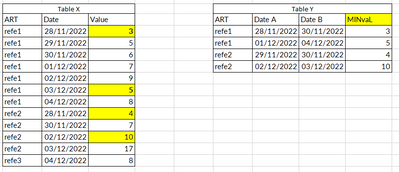
Thanks for your hepl
- Mark as New
- Bookmark
- Subscribe
- Mute
- Subscribe to RSS Feed
- Permalink
- Report Inappropriate Content
Hi, @Anonymous
Please try formula like:
minimum =
CALCULATE (
    MIN ( TableX[Value] ),
    FILTER (
        TableX,
        TableX[ART] = SELECTEDVALUE ( TableY[ART] )
            && TableX[Date] >= SELECTEDVALUE ( TableY[Date A] )
            && TableX[Date] <= SELECTEDVALUE ( TableY[Date B] )
    )
)
Your expected result seems to have wrong value, please check again.
Result:
Best Regards,
Community Support Team _ Eason
- Mark as New
- Bookmark
- Subscribe
- Mute
- Subscribe to RSS Feed
- Permalink
- Report Inappropriate Content
TableX:
| ART | Date | Value |
| refe1 | 28/11/2022 | 3 |
| refe1 | 29/11/2022 | 5 |
| refe1 | 30/11/2022 | 6 |
| refe1 | 01/12/2022 | 7 |
| refe1 | 02/12/2022 | 9 |
| refe1 | 03/12/2022 | 5 |
| refe1 | 04/12/2022 | 8 |
| refe2 | 28/11/2022 | 4 |
| refe2 | 30/11/2022 | 7 |
| refe2 | 02/12/2022 | 10 |
| refe2 | 03/12/2022 | 17 |
TableY:
| ART | Date A | Date B | output |
| refe1 | 28/11/2022 | 30/11/2022 | 3 |
| refe1 | 01/12/2022 | 04/12/2022 | 5 |
| refe2 | 29/11/2022 | 30/11/2022 | 4 |
| refe2 | 02/12/2022 | 03/12/2022 | 10 |


- Mark as New
- Bookmark
- Subscribe
- Mute
- Subscribe to RSS Feed
- Permalink
- Report Inappropriate Content
Hi @Anonymous , Can you share the expected output result too.
- Mark as New
- Bookmark
- Subscribe
- Mute
- Subscribe to RSS Feed
- Permalink
- Report Inappropriate Content
- Mark as New
- Bookmark
- Subscribe
- Mute
- Subscribe to RSS Feed
- Permalink
- Report Inappropriate Content
Hi, @Anonymous
The fields in your formula don't seem to match the fields in your table.
Can you share your expected output to further explain your requirement?
Best Regards,
Community Support Team _ Eason
- Mark as New
- Bookmark
- Subscribe
- Mute
- Subscribe to RSS Feed
- Permalink
- Report Inappropriate Content
- Mark as New
- Bookmark
- Subscribe
- Mute
- Subscribe to RSS Feed
- Permalink
- Report Inappropriate Content
TableX:
| ART | Date | Value |
| refe1 | 28/11/2022 | 3 |
| refe1 | 29/11/2022 | 5 |
| refe1 | 30/11/2022 | 6 |
| refe1 | 01/12/2022 | 7 |
| refe1 | 02/12/2022 | 9 |
| refe1 | 03/12/2022 | 5 |
| refe1 | 04/12/2022 | 8 |
| refe2 | 28/11/2022 | 4 |
| refe2 | 30/11/2022 | 7 |
| refe2 | 02/12/2022 | 10 |
| refe2 | 03/12/2022 | 17 |
TableY:
| ART | Date A | Date B | output |
| refe1 | 28/11/2022 | 30/11/2022 | 3 |
| refe1 | 01/12/2022 | 04/12/2022 | 5 |
| refe2 | 29/11/2022 | 30/11/2022 | 4 |
| refe2 | 02/12/2022 | 03/12/2022 | 10 |
Helpful resources

FabCon & SQLCon – Barcelona 2026
Join us in Barcelona for FabCon and SQLCon, the Fabric, Power BI, SQL, and AI community event. Save €200 with code FABCMTY200.

Power BI DataViz World Championships - June 2026
A new Power BI DataViz World Championship is coming this June! Don't miss out on submitting your entry.

| User | Count |
|---|---|
| 23 | |
| 22 | |
| 14 | |
| 14 | |
| 13 |


| User | Count |
|---|---|
| 47 | |
| 39 | |
| 24 | |
| 20 | |
| 20 |


