cancel
Showing results for 
Search instead for 
Did you mean: 

The Power BI Data Visualization World Championships is back! Get ahead of the game and start preparing now! Learn more

Reply
jcastr02
Post Prodigy
Post Prodigy

matrix columns disappearing

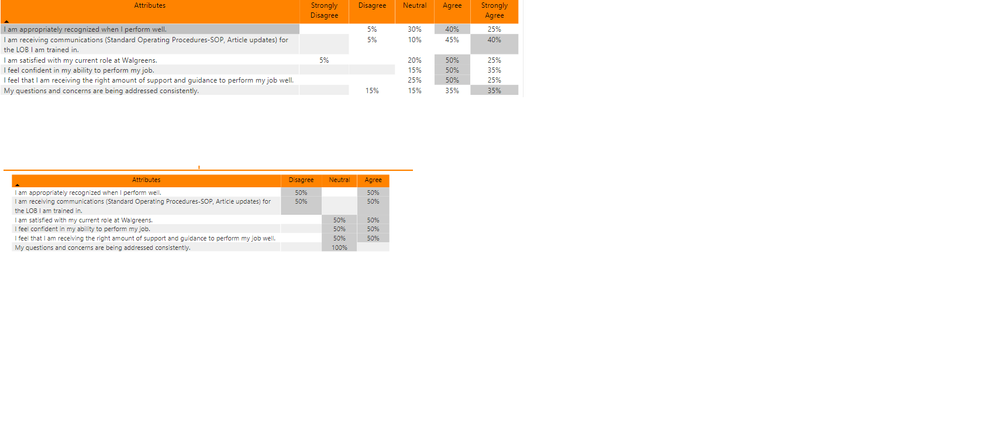
I have a matrix visualization where all columns are showing, if I show all results.  If I filter, the columns disappear and this is just because no one responded with those (in this case no one responded with strongly agree or strongly disagree).  I tried the show all items with no data, but that didn't work.  Any ideas?


filtering matrix.png

2 REPLIES 2
v-lid-msft
Community Support
Community Support

Hi @jcastr02 ,


We can also try to change the measure used in value field as following to meet your requirement:


Measure = [Previous Measure Formula] & ""


if the value used in the matrix is a percentage of column total, we can use the following measure to meet your requirement:


Measure =
VAR poct =
    DIVIDE (
        DISTINCT ( 'Table'[Value] ),
        CALCULATE (
            DISTINCT ( 'Table'[Value] ),
            ALLEXCEPT ( 'Table', 'Table'[Attributes] )
        ),
        0
    )
RETURN
    IF ( poct = 0, "", FORMAT ( poct, "0%" ) )


Best regards,


Community Support Team _ Dong Li
If this post helps, then please consider Accept it as the solution to help the other members find it more quickly.
d_gosbell
Super User
Super User

As I see it you have 2 possible solutions here.


1. It might be possible to adjust your measure so that it returns 0 instead of blank if there is no data. You just need to be careful doing this as it can cause performance issues in some cases.


2. Instead of using a matrix you could use a table and create 5 measures, one for each of your different responses and use those 5 measures on your table. It's hard to be sure without knowing what your data model looks like, but I'm thinking that these measures would use a pattern something like the following:

Strongly Agree % = CALCULATE( [percentage measure], table[Response] = "Strongly Agree")

Helpful resources

Announcements
Power BI DataViz World Championships

Power BI Dataviz World Championships

The Power BI Data Visualization World Championships is back! Get ahead of the game and start preparing now!

December 2025 Power BI Update Carousel

Power BI Monthly Update - December 2025

Check out the December 2025 Power BI Holiday Recap!

FabCon Atlanta 2026 carousel

FabCon Atlanta 2026

Join us at FabCon Atlanta, March 16-20, for the ultimate Fabric, Power BI, AI and SQL community-led event. Save $200 with code FABCOMM.