Join us at FabCon Atlanta from March 16 - 20, 2026, for the ultimate Fabric, Power BI, AI and SQL community-led event. Save $200 with code FABCOMM.
Register now!View all the Fabric Data Days sessions on demand. View schedule
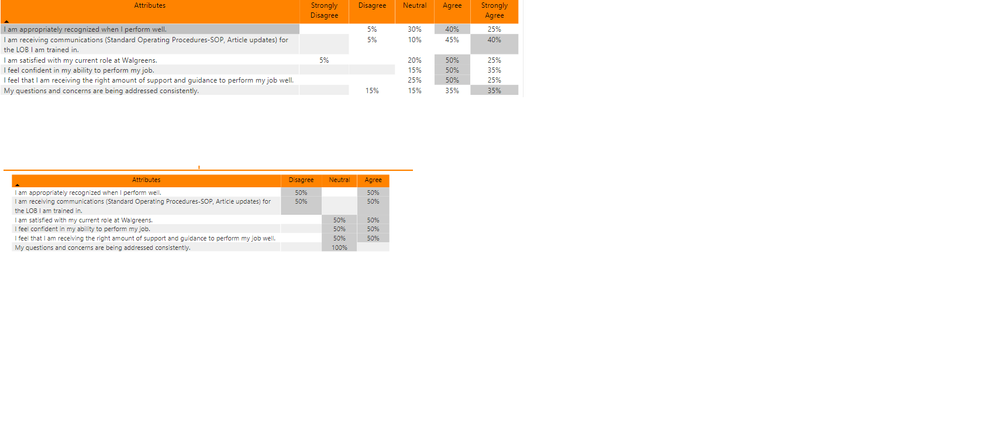
I have a matrix visualization where all columns are showing, if I show all results. If I filter, the columns disappear and this is just because no one responded with those (in this case no one responded with strongly agree or strongly disagree). I tried the show all items with no data, but that didn't work. Any ideas?
Hi @jcastr02 ,
We can also try to change the measure used in value field as following to meet your requirement:
Measure = [Previous Measure Formula] & ""
if the value used in the matrix is a percentage of column total, we can use the following measure to meet your requirement:
Measure =
VAR poct =
DIVIDE (
DISTINCT ( 'Table'[Value] ),
CALCULATE (
DISTINCT ( 'Table'[Value] ),
ALLEXCEPT ( 'Table', 'Table'[Attributes] )
),
0
)
RETURN
IF ( poct = 0, "", FORMAT ( poct, "0%" ) )
Best regards,
As I see it you have 2 possible solutions here.
1. It might be possible to adjust your measure so that it returns 0 instead of blank if there is no data. You just need to be careful doing this as it can cause performance issues in some cases.
2. Instead of using a matrix you could use a table and create 5 measures, one for each of your different responses and use those 5 measures on your table. It's hard to be sure without knowing what your data model looks like, but I'm thinking that these measures would use a pattern something like the following:
Strongly Agree % = CALCULATE( [percentage measure], table[Response] = "Strongly Agree")
Check out the November 2025 Power BI update to learn about new features.
Advance your Data & AI career with 50 days of live learning, contests, hands-on challenges, study groups & certifications and more!