cancel
Showing results for 
Search instead for 
Did you mean: 

The Power BI Data Visualization World Championships is back! It's time to submit your entry. Live now!

Reply
mya
Frequent Visitor

matrix chart

Hi 

I want to create a matrix chart with period date and region as coulumn header and category as row header .. 

Values - to get the distinct count of the customer who have a order amount greater than a parameter value . 

Also have to get the sum of the sales for each catergory . 

Please help . 

1 ACCEPTED SOLUTION
Anonymous
Not applicable

Hi, @mya 


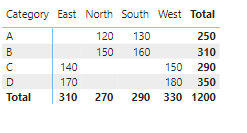
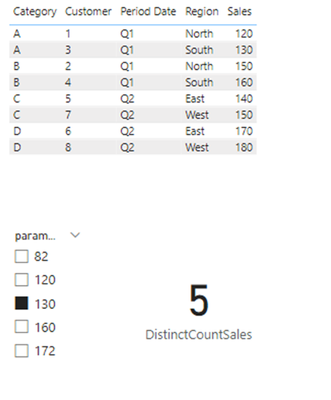
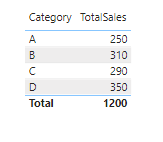
Based on your description, I have created some measures to achieve the effect you are looking for. Following picture shows the effect of the display.


Matrix:

vyaningymsft_0-1708916133648.png


Distinct count of the customer:

vyaningymsft_1-1708916145683.png

Total sales by Category:

vyaningymsft_2-1708916158549.png

Measure:

DistinctCountSales =

VAR SelectedValue = SELECTEDVALUE('Parameter'[Parameter])

RETURN

    CALCULATE(

        DISTINCTCOUNT('Table'[Sales]),

        'Table'[Sales] > SelectedValue

    )


TotalSales =

SUMX(

    SUMMARIZE('Table', 'Table'[Category], "Total Sales", SUM('Table'[Sales])),

    [Total Sales]

)


Best Regards,
Yang
Community Support Team


If there is any post helps, then please consider Accept it as the solution  to help the other members find it more quickly.
If I misunderstand your needs or you still have problems on it, please feel free to let us know. Thanks a lot!

How to get your questions answered quickly --  How to provide sample data in the Power BI Forum

View solution in original post

1 REPLY 1
Anonymous
Not applicable

Hi, @mya 


Based on your description, I have created some measures to achieve the effect you are looking for. Following picture shows the effect of the display.


Matrix:

vyaningymsft_0-1708916133648.png


Distinct count of the customer:

vyaningymsft_1-1708916145683.png

Total sales by Category:

vyaningymsft_2-1708916158549.png

Measure:

DistinctCountSales =

VAR SelectedValue = SELECTEDVALUE('Parameter'[Parameter])

RETURN

    CALCULATE(

        DISTINCTCOUNT('Table'[Sales]),

        'Table'[Sales] > SelectedValue

    )


TotalSales =

SUMX(

    SUMMARIZE('Table', 'Table'[Category], "Total Sales", SUM('Table'[Sales])),

    [Total Sales]

)


Best Regards,
Yang
Community Support Team


If there is any post helps, then please consider Accept it as the solution  to help the other members find it more quickly.
If I misunderstand your needs or you still have problems on it, please feel free to let us know. Thanks a lot!

How to get your questions answered quickly --  How to provide sample data in the Power BI Forum

Helpful resources

Announcements
FabCon Atlanta 2026 carousel

FabCon Atlanta 2026

Join us at FabCon Atlanta, March 16-20, for the ultimate Fabric, Power BI, AI and SQL community-led event. Save $200 with code FABCOMM.