
Join us at FabCon Atlanta from March 16 - 20, 2026, for the ultimate Fabric, Power BI, AI and SQL community-led event. Save $200 with code FABCOMM.
Register now!The Power BI Data Visualization World Championships is back! Get ahead of the game and start preparing now! Learn more
Hi I have a few tables with English A-E data and Maths A-E data how do I make these two tables go on 1 visualization graph and 1 slicer sort A-E
Solved! Go to Solution.
Hi @kettsn ,
According your describtion,refer the below:
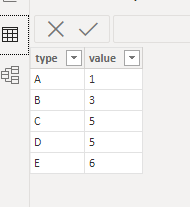
TableA;
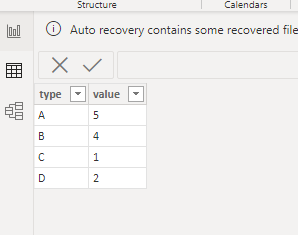
TableB:
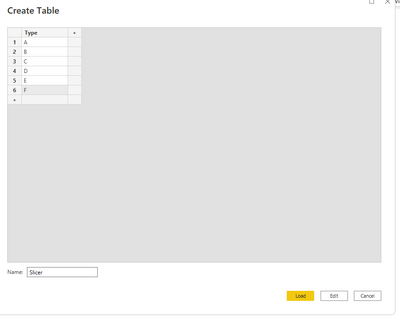
First ,create slicer table:
Then create another table base on tableA and table B:
TableC =
UNION (
SELECTCOLUMNS (
TableA,
"Tpye", TableA[type],
"Table", "TableA",
"Value", TableA[value]
),
SELECTCOLUMNS (
TableB,
"Tpye", TableB[type],
"Table", "TableB",
"Value", TableB[value]
)
)
Relationship:
Final output:
Did I answer your question? Mark my post as a solution!
Best Regards
Lucien
Hi,
Share some data and show the expected result.
Hi @kettsn ,
According your describtion,refer the below:
TableA;
TableB:
First ,create slicer table:
Then create another table base on tableA and table B:
TableC =
UNION (
SELECTCOLUMNS (
TableA,
"Tpye", TableA[type],
"Table", "TableA",
"Value", TableA[value]
),
SELECTCOLUMNS (
TableB,
"Tpye", TableB[type],
"Table", "TableB",
"Value", TableB[value]
)
)
Relationship:
Final output:
Did I answer your question? Mark my post as a solution!
Best Regards
Lucien
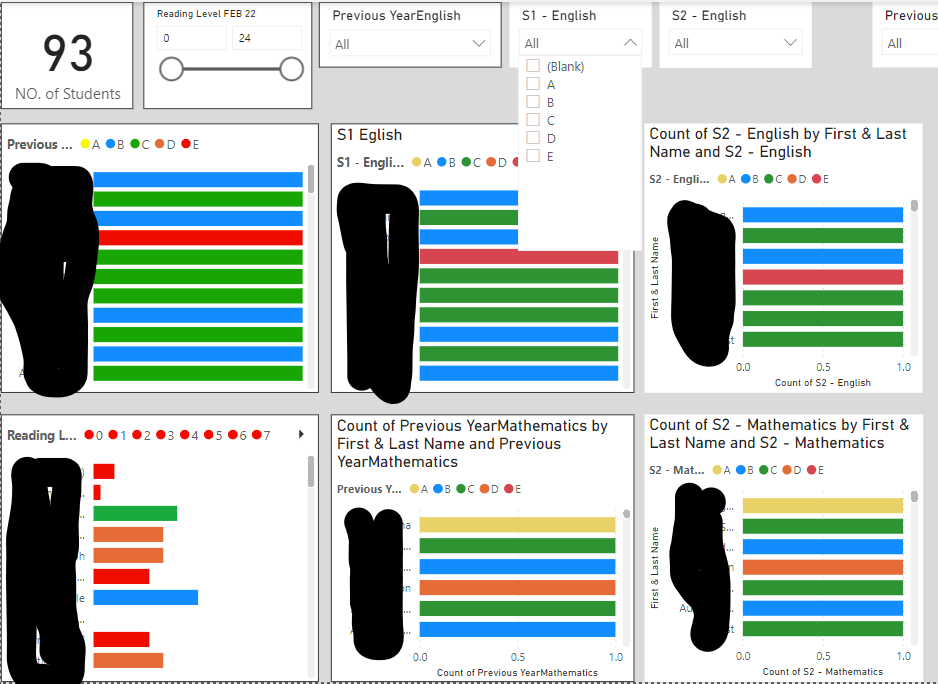
Hi I tried that solution but it still didnt use 1 slicer to slicer all my graphs. See image below for what I am trying to achieve. I dont want a slicer for each graph. I want to be able to select options base on A-E is this possible
The Power BI Data Visualization World Championships is back! Get ahead of the game and start preparing now!
| User | Count |
|---|---|
| 39 | |
| 38 | |
| 38 | |
| 28 | |
| 27 |
| User | Count |
|---|---|
| 124 | |
| 88 | |
| 73 | |
| 66 | |
| 65 |