cancel
Showing results for 
Search instead for 
Did you mean: 

The Power BI Data Visualization World Championships is back! Get ahead of the game and start preparing now! Learn more

Reply
Pikachu-Power
Impactful Individual

legend when two values in the bar chart

hello,
i put two measures in the value field of a grouped bar chart in the following form:
 
Display_Value =
VAR _SelectedMeasure = SELECTEDVALUE ( 'Measure_Selection'[Measure] )
RETURN
    SWITCH(
        _SelectedMeasure,
        "IP",[Plan],
        "IFCI",[FCI],
        "IFCII",[FCII],
        "IFCIII",[FCIII]
    )
 
but i cant put a measure in the legend when i have two measure values. are there some workarounds?
 
3 REPLIES 3
v-jingzhang
Community Support
Community Support

@Pikachu-Power  See if these threads can help.

https://community.powerbi.com/t5/Desktop/Multiple-values-in-line-chart-with-legend/m-p/1357551

https://community.powerbi.com/t5/Desktop/Stagged-Bar-Chart-with-multiple-values/m-p/1392877

https://radacad.com/dax-measure-in-the-axis-of-the-power-bi-report


From your measure above, it seems you have used a dynamic measure, so do you want to show two measures listed in the switch function at the same time or show two measures that have a switch function at the same time? It seems to have a lot of info in a chart. I cannot show two measures at the same time with a legend in a bar chart. When using a dynamic measure, it shows only one measure every time switching a selection.


Additionally, I found a visual called Multiple Axes Chart from Power BI Visuals AppSource that can have multiple values with a legend. You may check if it can realize what you want. It will display like below.
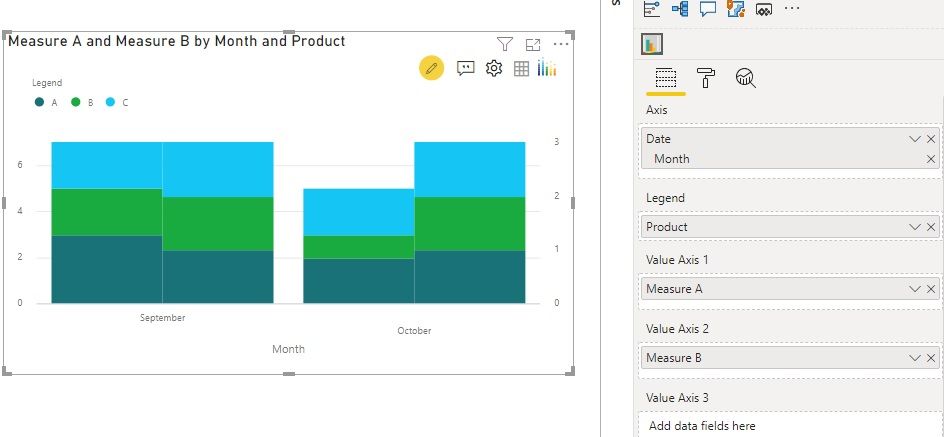
v-jingzhang_0-1601449081447.jpeg

Click … in visualization panel to get more visuals.
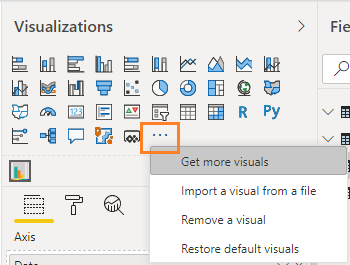
v-jingzhang_1-1601449081449.png

amitchandak
Super User
Super User

@Pikachu-Power , The information you have provided is not making the problem clear to me. Can you please explain with an example.

In case you need a Measure slicer to refer.

https://radacad.com/change-the-column-or-measure-value-in-a-power-bi-visual-by-selection-of-the-slic...
https://community.powerbi.com/t5/Desktop/Slicer-MTD-QTD-YTD-to-filter-dates-using-the-slicer/td-p/50...


Appreciate your Kudos.


Share with Power BI Enthusiasts: Full Power BI Video (20 Hours) YouTube
Microsoft Fabric Series 60+ Videos YouTube
Microsoft Fabric Hindi End to End YouTube

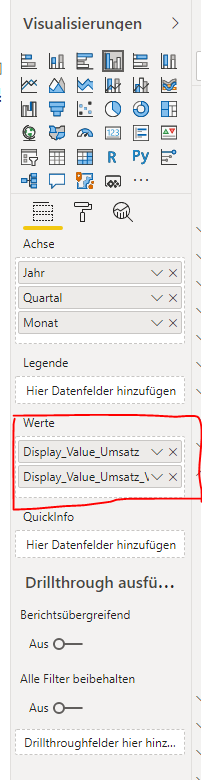
It is nothing special:


Unbenannt.PNG

When I have two measures in the values a legend is not accepted. Looking for a workaround for that. I have two measures because i want to see two bar charts. I think it is not possible to write only one measure to show two bar charts? For the measures I use see above.


Helpful resources

Announcements
Power BI DataViz World Championships

Power BI Dataviz World Championships

The Power BI Data Visualization World Championships is back! Get ahead of the game and start preparing now!

December 2025 Power BI Update Carousel

Power BI Monthly Update - December 2025

Check out the December 2025 Power BI Holiday Recap!

FabCon Atlanta 2026 carousel

FabCon Atlanta 2026

Join us at FabCon Atlanta, March 16-20, for the ultimate Fabric, Power BI, AI and SQL community-led event. Save $200 with code FABCOMM.