cancel
Showing results for 
Search instead for 
Did you mean: 

Get Fabric Certified for FREE during Fabric Data Days. Don't miss your chance! Request now

Reply
Pikachu-Power
Impactful Individual

legend when two values in the bar chart

hello,
i put two measures in the value field of a grouped bar chart in the following form:
 
Display_Value =
VAR _SelectedMeasure = SELECTEDVALUE ( 'Measure_Selection'[Measure] )
RETURN
    SWITCH(
        _SelectedMeasure,
        "IP",[Plan],
        "IFCI",[FCI],
        "IFCII",[FCII],
        "IFCIII",[FCIII]
    )
 
but i cant put a measure in the legend when i have two measure values. are there some workarounds?
 
3 REPLIES 3
v-jingzhang
Community Support
Community Support

@Pikachu-Power  See if these threads can help.

https://community.powerbi.com/t5/Desktop/Multiple-values-in-line-chart-with-legend/m-p/1357551

https://community.powerbi.com/t5/Desktop/Stagged-Bar-Chart-with-multiple-values/m-p/1392877

https://radacad.com/dax-measure-in-the-axis-of-the-power-bi-report


From your measure above, it seems you have used a dynamic measure, so do you want to show two measures listed in the switch function at the same time or show two measures that have a switch function at the same time? It seems to have a lot of info in a chart. I cannot show two measures at the same time with a legend in a bar chart. When using a dynamic measure, it shows only one measure every time switching a selection.


Additionally, I found a visual called Multiple Axes Chart from Power BI Visuals AppSource that can have multiple values with a legend. You may check if it can realize what you want. It will display like below.
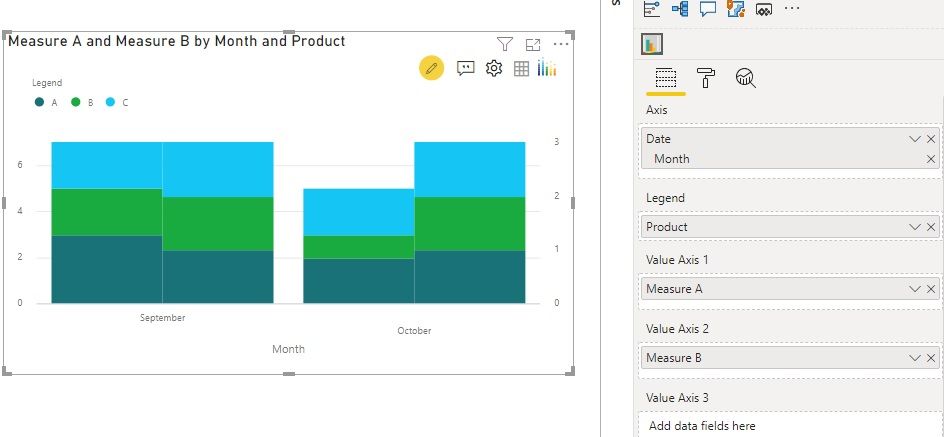
v-jingzhang_0-1601449081447.jpeg

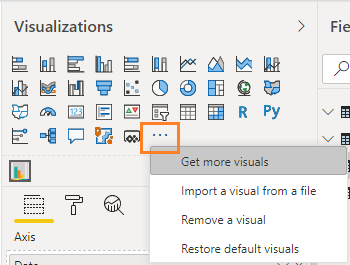
Click … in visualization panel to get more visuals.
v-jingzhang_1-1601449081449.png

amitchandak
Super User
Super User

@Pikachu-Power , The information you have provided is not making the problem clear to me. Can you please explain with an example.

In case you need a Measure slicer to refer.

https://radacad.com/change-the-column-or-measure-value-in-a-power-bi-visual-by-selection-of-the-slic...
https://community.powerbi.com/t5/Desktop/Slicer-MTD-QTD-YTD-to-filter-dates-using-the-slicer/td-p/50...


Appreciate your Kudos.


Share with Power BI Enthusiasts: Full Power BI Video (20 Hours) YouTube
Microsoft Fabric Series 60+ Videos YouTube
Microsoft Fabric Hindi End to End YouTube

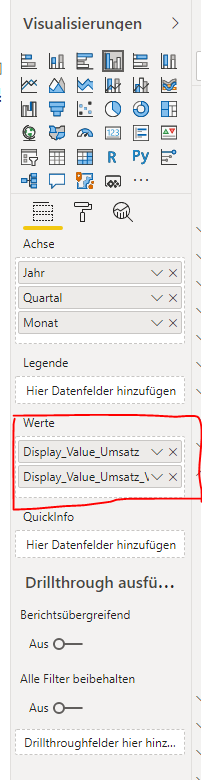
It is nothing special:


Unbenannt.PNG

When I have two measures in the values a legend is not accepted. Looking for a workaround for that. I have two measures because i want to see two bar charts. I think it is not possible to write only one measure to show two bar charts? For the measures I use see above.


Helpful resources

Announcements
November Power BI Update Carousel

Power BI Monthly Update - November 2025

Check out the November 2025 Power BI update to learn about new features.

Fabric Data Days Carousel

Fabric Data Days

Advance your Data & AI career with 50 days of live learning, contests, hands-on challenges, study groups & certifications and more!

FabCon Atlanta 2026 carousel

FabCon Atlanta 2026

Join us at FabCon Atlanta, March 16-20, for the ultimate Fabric, Power BI, AI and SQL community-led event. Save $200 with code FABCOMM.

Top Solution Authors
Top Kudoed Authors