Hi @v-ljerr-msft ,
My data is set up as follows:
Portfolio id | Project id | Hours Logged| Entry Date
------------------------------------------------------------------
Core | test proj 1 | 5 | Jan 1st 2017
------------------------------------------------------------------
Core | test proj 1 | 10 | Jan 1st 2017
-------------------------------------------------------------------
Core | test proj 2 | 10 | Jan 1st 2017
--------------------------------------------------------------------
Corporate | test proj 3 | 10 | Jan 2nd 2017
--------------------------------------------------------------------
Corporate | test proj 4 | 10 | Jan 2nd 2017
---------------------------------------------------------------------
Basically a given project can only be associated with only one portfolio
There are many projects associated with a portfolio
A project can have many hours logged entries on a given day
I am using the topN visual filter on the visual to display the top 3 projects with the most logged hours for a given portfolio as follows:
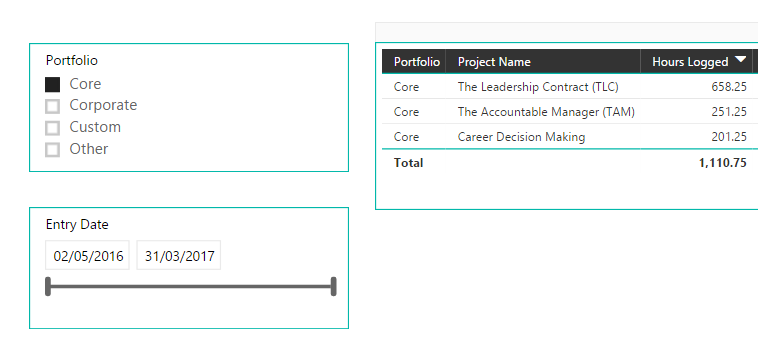

The measure I am trying to create is a percentage calculation: Total hours logged for that given project/Total hours for that given portfolio
total hours logged for that given project is just SUM(Hours Logged)
total hours for that given portfolio should be a measure that is filtered by the portfolio and entry date slicer but not the TopN visual filter
this is what I originally had but does not work in this case:
Total Hours Logged for portfolio = CALCULATE(SUM(TimeEntries[Hours Logged]) , ALLSELECTED())
Percentage = SUM([Hours Logged])/[Total Hours Logged]
I have uploaded a sample CSV file with some data if it helps:
http://www.filedropper.com/data_69


 It's better to post some sample data with your expected result or share a sample pbix file.


