cancel
Showing results for 
Search instead for 
Did you mean: 

We've captured the moments from FabCon & SQLCon that everyone is talking about, and we are bringing them to the community, live and on-demand. Starts on April 14th. Register now

Reply
mohd89ali
Frequent Visitor

increase/decrease difference percentage

Hi all, 


i am working on a COVID-19 dashboard and i am facing a problem calculating the increase/decrease in the difference by percent. 


look at the table below 


Country/RegionProvince/StateDateCase_TypeCasesLongLatDifferenceLast_Update_Date
ChinaAnhui2020-01-22Deaths0117.226431.825702020-03-15 12:54:41
ChinaAnhui2020-01-23Deaths0117.226431.825702020-03-15 12:54:41
ChinaAnhui2020-01-24Deaths0117.226431.825702020-03-15 12:54:41
ChinaAnhui2020-01-22Confirmed1117.226431.825712020-03-15 12:54:41
ChinaAnhui2020-01-23Confirmed9117.226431.825782020-03-15 12:54:41
ChinaAnhui2020-01-24Confirmed15117.226431.825762020-03-15 12:54:41


i want to calculate the increase and decrease in percentage day by day to look like this


Country/RegionProvince/StateDateCase_TypeCasesLongLatDifferenceincrease/decrease difference in percentageLast_Update_Date
ChinaAnhui2020-01-22Deaths0117.226431.8257102020-03-15 12:54:41
ChinaAnhui2020-01-23Deaths0117.226431.82572100%2020-03-15 12:54:41
ChinaAnhui2020-01-24Deaths0117.226431.82578300%2020-03-15 12:54:41
ChinaAnhui2020-01-22Confirmed1117.226431.8257102020-03-15 12:54:41
ChinaAnhui2020-01-23Confirmed9117.226431.82578700%2020-03-15 12:54:41
ChinaAnhui2020-01-24Confirmed15117.226431.82576-25%2020-03-15 12:54:41


could you help me with that please? 


1 ACCEPTED SOLUTION
v-gizhi-msft
Community Support
Community Support

Hi,


Please try this measure:

Measure = 
VAR a =
    IF (
        MAX ( 'Table'[Difference] )
            = MINX ( ALLEXCEPT ( 'Table', 'Table'[Case_Type] ), 'Table'[Difference] ),
        1,
        CALCULATE (
            MAX ( 'Table'[Difference] ),
            FILTER (
                ALLSELECTED ( 'Table' ),
                'Table'[Case_Type] IN FILTERS ( 'Table'[Case_Type] )
                    && 'Table'[Date] < MAX ( 'Table'[Date] )
            )
        )
    )
RETURN
    ( MAX ( 'Table'[Difference] ) - a ) / a

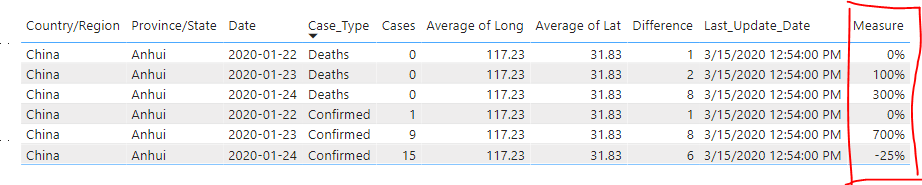
The result shows:

53.PNG

Here is my test pbix file:

pbix 

Hope this helps.


Best Regards,

Giotto Zhi

View solution in original post

3 REPLIES 3
v-gizhi-msft
Community Support
Community Support

Hi,


Please try this measure:

Measure = 
VAR a =
    IF (
        MAX ( 'Table'[Difference] )
            = MINX ( ALLEXCEPT ( 'Table', 'Table'[Case_Type] ), 'Table'[Difference] ),
        1,
        CALCULATE (
            MAX ( 'Table'[Difference] ),
            FILTER (
                ALLSELECTED ( 'Table' ),
                'Table'[Case_Type] IN FILTERS ( 'Table'[Case_Type] )
                    && 'Table'[Date] < MAX ( 'Table'[Date] )
            )
        )
    )
RETURN
    ( MAX ( 'Table'[Difference] ) - a ) / a

The result shows:

53.PNG

Here is my test pbix file:

pbix 

Hope this helps.


Best Regards,

Giotto Zhi

ibarrau
Super User
Super User

Hi, you should follow this post talking about the same and it has more activity:

https://community.powerbi.com/t5/Desktop/Subtracting-the-previous-day-s-value-from-today-s/m-p/97792...


I would recommend you to use PREVIOUSDAY dax function to solve the last day of each situation calculation as argument of filter in a CALCULATE.


Regards,


If this post helps, then please consider Accept it as the solution to help the other members find it more quickly.

Happy to help!

LaDataWeb Blog

MFelix
Super User
Super User

Hi @mohd89ali ,


How are you making the calculation for increase/decrease not really sure how you are achiveing the values, made several try but cannot get the same values.


Regards

Miguel Félix


Did I answer your question? Mark my post as a solution!

Proud to be a Super User!

Check out my blog: Power BI em Português


Helpful resources

Announcements
New to Fabric survey Carousel

New to Fabric Survey

If you have recently started exploring Fabric, we'd love to hear how it's going. Your feedback can help with product improvements.

Power BI DataViz World Championships carousel

Power BI DataViz World Championships - June 2026

A new Power BI DataViz World Championship is coming this June! Don't miss out on submitting your entry.

Join our Fabric User Panel

Join our Fabric User Panel

Share feedback directly with Fabric product managers, participate in targeted research studies and influence the Fabric roadmap.

March Power BI Update Carousel

Power BI Community Update - March 2026

Check out the March 2026 Power BI update to learn about new features.