Join us at FabCon Atlanta from March 16 - 20, 2026, for the ultimate Fabric, Power BI, AI and SQL community-led event. Save $200 with code FABCOMM.
Register now!The Power BI Data Visualization World Championships is back! Get ahead of the game and start preparing now! Learn more
Hello All
How do I identify the originial datasource , after it renamed in Power BI Model.
As an example , let us say , I have two views , employee_v and dept_V and then I rename it to
Employee and Departments ; and also also rename few of the columns .
From where , can I get the originial datasource ( both the view and column names) ?
Thanks in Advance.
Solved! Go to Solution.
Hi @zahirmohideen ,
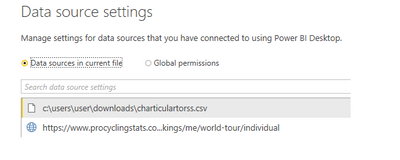
The easier and quicker way I find is to rather use the Data Source settings, which you can find in Power BI Desktop by clicking on the arrow beneath Edit Queries and then selecting Data source Settings .
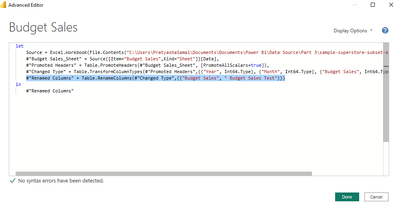
And for Columns , You can go to Power Query and Check manually in the Advanced Editor. In Adavanced Editor you can also find the source .
Thanks ,
Pratyasha Samal
Has this post solved your problem? Please Accept as Solution so that others can find it quickly and to let the community know your problem has been solved.
If you found this post helpful, please give Kudos C
Proud to be a Super User!
Hi @zahirmohideen ,
The easier and quicker way I find is to rather use the Data Source settings, which you can find in Power BI Desktop by clicking on the arrow beneath Edit Queries and then selecting Data source Settings .
And for Columns , You can go to Power Query and Check manually in the Advanced Editor. In Adavanced Editor you can also find the source .
Thanks ,
Pratyasha Samal
Has this post solved your problem? Please Accept as Solution so that others can find it quickly and to let the community know your problem has been solved.
If you found this post helpful, please give Kudos C
Proud to be a Super User!
The Power BI Data Visualization World Championships is back! Get ahead of the game and start preparing now!
| User | Count |
|---|---|
| 39 | |
| 37 | |
| 33 | |
| 32 | |
| 29 |
| User | Count |
|---|---|
| 132 | |
| 88 | |
| 82 | |
| 68 | |
| 64 |