
cancel
Showing results for 
Search instead for 
Did you mean: 

Get Fabric Certified for FREE during AI Skills Fest. This week only. Secure your voucher now.

Reply
Anonymous
Not applicable

how to reorder dates on X-axis of the charts

Hi everyone,

I created a few charts in power bi (line chart, 100% stacked column chart, stacked column chart). The X-axis shows the date of each week (my week runs from every Thursday to Wednesday). 


Below is a screenshot of one of the X-axis. I see that 6/15 is before 6/8 and I tried to sort axis asceding by 'start of week' but it didn't work. Can someone let me know how to make them in the correct order please? I have a calendar table and one column being 'start of week'.


Annotation 2023-06-19 095552.png

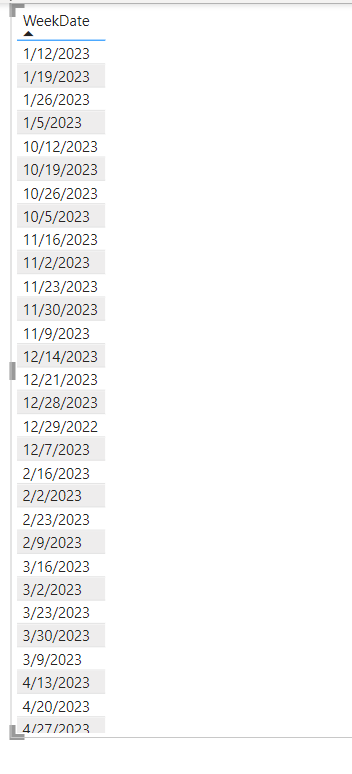
This is how the order of the date in my calendar table looks like:

Annotation 2023-06-19 102454.png


Thank you!

2 ACCEPTED SOLUTIONS
vicky_
Super User
Super User

You need to change the type of your dates. Right now, they are being sorted as if they were strings. 
Power Query can do that for you - guide here

View solution in original post

PhilipTreacy
Super User
Super User

Hi @Anonymous 


Are you actually plotting the date on the x axis?  Looks like you are not, if you are using a text field like the 'Start of Week' you created, you'll get this issue because the values on your x axis are actually text, not dates.


Try just using the date on the x-axis.


Regards


Phil


Did I answer your question? Then please mark my post as the solution.
If I helped you, click on the Thumbs Up to give Kudos.


Blog :: YouTube Channel :: Connect on Linkedin


Proud to be a Super User!


View solution in original post

4 REPLIES 4
PhilipTreacy
Super User
Super User

Hi @Anonymous 


Are you actually plotting the date on the x axis?  Looks like you are not, if you are using a text field like the 'Start of Week' you created, you'll get this issue because the values on your x axis are actually text, not dates.


Try just using the date on the x-axis.


Regards


Phil


Did I answer your question? Then please mark my post as the solution.
If I helped you, click on the Thumbs Up to give Kudos.


Blog :: YouTube Channel :: Connect on Linkedin


Proud to be a Super User!


Anonymous
Not applicable

Thank you Philip! I think I figured it out. Yes, you are right. My dates are in text format not dates so I transformed them into dates. Then I used format visual->x-axis->type, and changed type from 'continuous' to 'categorical' and the x-axis are now showing start of week dates. 

vicky_
Super User
Super User

You need to change the type of your dates. Right now, they are being sorted as if they were strings. 
Power Query can do that for you - guide here

Anonymous
Not applicable

Thank you Vicky for your help!!

Helpful resources

Announcements
May Power BI Update Carousel

Power BI Monthly Update - May 2026

Check out the May 2026 Power BI update to learn about new features.

Fabric SQL PBI Data Days

Data Days 2026 coming soon!

Sign up to receive a private message when registration opens and key events begin.

New to Fabric survey Carousel

New to Fabric Survey

If you have recently started exploring Fabric, we'd love to hear how it's going. Your feedback can help with product improvements.

Power BI DataViz World Championships carousel

Power BI DataViz World Championships - June 2026

A new Power BI DataViz World Championship is coming this June! Don't miss out on submitting your entry.