
cancel
Showing results for 
Search instead for 
Did you mean: 

Get Fabric Certified for FREE during Fabric Data Days. Don't miss your chance! Request now

Reply
saikiran
Helper I
Helper I

how can i get previous row

Hi all,

Hope all are doing good.


 I am getting one problem can you please help me anyone as soon as possible. It's very urgent.


Sample.PNG

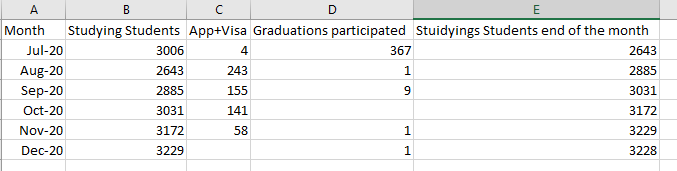
Studying Students end othe month = (Studying studnets+App+visa)-Graduations participated

I want output same as above table.

In my raw table i am getting counts for Studying students and App+visa counts and also Garduations participated counts.

As per my requirement after calculating the Studying students as of end of month count for july 2649 and the same count i want to carry forward to aug 2020 and after that these 2649 count should be added to aug-2020 (approved + visa count)-antipaticipated graduations and after that i will get one result. For these result i want to get into Sep-2020 and so on.


If any body knows output can you please ping me as soon as possible.


Thanks in advance!!


1 ACCEPTED SOLUTION

Hi @saikiran 

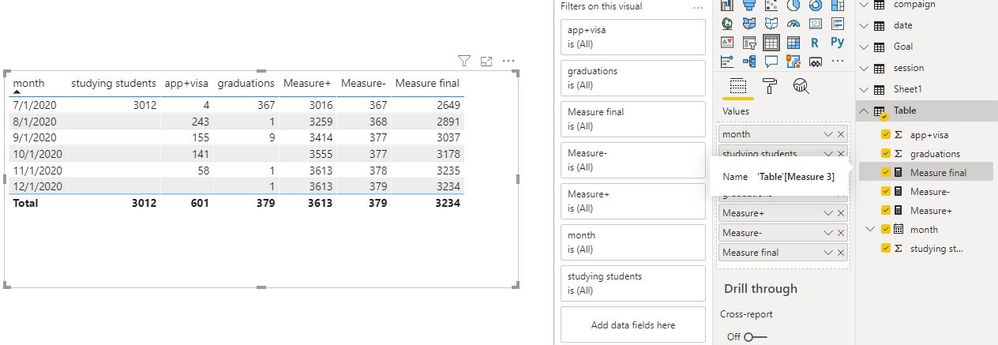
Create measures

Measure+ = SUMX(FILTER(ALLSELECTED('Table'),'Table'[month]<=MAX('Table'[month])),CALCULATE(SUM('Table'[app+visa])+SUM('Table'[studying students])))

Measure- = SUMX(FILTER(ALLSELECTED('Table'),'Table'[month]<=MAX('Table'[month])),CALCULATE(SUM('Table'[graduations])))

Measure final = [Measure+]-[Measure-]

Capture9.JPG

Best Regards
Maggie
Community Support Team _ Maggie Li
If this post helps, then please consider Accept it as the solution to help the other members find it more quickly.

View solution in original post

4 REPLIES 4
amitchandak
Super User
Super User

@saikiran , You need to measure like Cumm with the date and date calendar


Studying Students end othe month =SUM(Table[Studying studnets])+SUM(Table[App+visa])+SUM(Table[Graduations participated])

Cumm = CALCULATE([ Studying Students end othe month]),filter(date,date[date] <=maxx(date,date[date])))
Cumm = CALCULATE([ Studying Students end othe month]),filter(date,date[date] <=max(Table[Date])))


In case you do have date

Date = "01-"& [Month] and mark it as date


First 5 min video shown same -https://youtu.be/yPQ9UV37LOU

Share with Power BI Enthusiasts: Full Power BI Video (20 Hours) YouTube
Microsoft Fabric Series 60+ Videos YouTube
Microsoft Fabric Hindi End to End YouTube

Hi amitchandak,

     Thanks for r your quick response. In the studying students as of end of month i am getting 2649 (i.e.,Jul-2020) as per my calculation and the same resulet i want to carry forwrad to Aug-2020 and these value again calculated to (App+visa) - No. of anticipated Graduations then i will get another result for Aug-2020 these result i want to carry forward to Sep-2020 and so on till dec-2020. can you please try this way and once see the below tables you will get clear clarity.

Expected ouput:

Expected output1.PNG


Getting ouput:

Getting Output.PNG


Thanks in advance!!

Hi @saikiran 

Create measures

Measure+ = SUMX(FILTER(ALLSELECTED('Table'),'Table'[month]<=MAX('Table'[month])),CALCULATE(SUM('Table'[app+visa])+SUM('Table'[studying students])))

Measure- = SUMX(FILTER(ALLSELECTED('Table'),'Table'[month]<=MAX('Table'[month])),CALCULATE(SUM('Table'[graduations])))

Measure final = [Measure+]-[Measure-]

Capture9.JPG

Best Regards
Maggie
Community Support Team _ Maggie Li
If this post helps, then please consider Accept it as the solution to help the other members find it more quickly.

Greg_Deckler
Community Champion
Community Champion

@saikiran - Seems like you want EARLIER, See my article on Mean Time Between Failure (MTBF) which uses EARLIER: http://community.powerbi.com/t5/Community-Blog/Mean-Time-Between-Failure-MTBF-and-Power-BI/ba-p/3395...


Follow on LinkedIn
@ me in replies or I'll lose your thread!!!
Instead of a Kudo, please vote for this idea
Become an expert!: Enterprise DNA
External Tools: MSHGQM
YouTube Channel!: Microsoft Hates Greg
Latest book!:
DAX For Humans

DAX is easy, CALCULATE makes DAX hard...

Helpful resources

Announcements
November Power BI Update Carousel

Power BI Monthly Update - November 2025

Check out the November 2025 Power BI update to learn about new features.

Fabric Data Days Carousel

Fabric Data Days

Advance your Data & AI career with 50 days of live learning, contests, hands-on challenges, study groups & certifications and more!

FabCon Atlanta 2026 carousel

FabCon Atlanta 2026

Join us at FabCon Atlanta, March 16-20, for the ultimate Fabric, Power BI, AI and SQL community-led event. Save $200 with code FABCOMM.

Top Solution Authors
Top Kudoed Authors