Join us at FabCon Atlanta from March 16 - 20, 2026, for the ultimate Fabric, Power BI, AI and SQL community-led event. Save $200 with code FABCOMM.
Register now!Learn from the best! Meet the four finalists headed to the FINALS of the Power BI Dataviz World Championships! Register now
hi
i have two tables:
Grouped forecast and
Forecast lookup
grouped forecast looks like this:
| Month-year | SUM | year | database |
| 62021 | 1500 | 2021 | MTR |
| 72021 | 2000 | 2021 | MTR |
| 82021 | 120 | 2021 | MEX |
| 92021 | 200 | 2021 | MEX |
And forecast lookup looks like this:
| Fmonth-year | Month | Database |
| 12021 | 1 | MTR |
| 22021 | 2 | MTR |
| 32021 | 3 | MEX |
Then, in the lookup forecast table i have two "lookupvalue" columns
from grouped forecast, one for the "mex" database and other for "mtr" database.
(I have to leave the LOOKUPVALUE for all sorts of reasons)
i am looking for a solution to filter the lookupvalue columns and aloow to choose wich database the user want to see the data for..
i created a table called "DATABASE" and contain "mtr" and "mex"
and i created a relationship between "DATABASE" and "GROUPED FORECAST" but its not effect the "LOOKUPVALUES" columns.
thanks 🙂
Solved! Go to Solution.
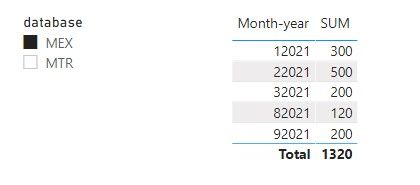
If your forecast lookup table looks like this:
You can create a measure to display the value based on which database is selected in a slicer.
Display Value =
SWITCH (
SELECTEDVALUE ( DATABASE[database] ),
"MTR", SELECTEDVALUE ( 'forecast lookup'[MTR value] ),
"MEX", SELECTEDVALUE ( 'forecast lookup'[MEX value] )
)
If your forecast lookup table looks like grouped forecast table which has a column for database name and another column for corresponding value, you can create a relationship between DATABASE table and forecast lookup table on database columns. Then the database slicer is able to filter it according to the selected database.
Regards,
Community Support Team _ Jing
If this post helps, please Accept it as the solution to help other members find it.
If your forecast lookup table looks like this:
You can create a measure to display the value based on which database is selected in a slicer.
Display Value =
SWITCH (
SELECTEDVALUE ( DATABASE[database] ),
"MTR", SELECTEDVALUE ( 'forecast lookup'[MTR value] ),
"MEX", SELECTEDVALUE ( 'forecast lookup'[MEX value] )
)
If your forecast lookup table looks like grouped forecast table which has a column for database name and another column for corresponding value, you can create a relationship between DATABASE table and forecast lookup table on database columns. Then the database slicer is able to filter it according to the selected database.
Regards,
Community Support Team _ Jing
If this post helps, please Accept it as the solution to help other members find it.
Hi @davidibi4524 ,
In this setup believe that the best option is to:
Regards
Miguel Félix
Proud to be a Super User!
Check out my blog: Power BI em PortuguêsShare feedback directly with Fabric product managers, participate in targeted research studies and influence the Fabric roadmap.
Check out the February 2026 Power BI update to learn about new features.
| User | Count |
|---|---|
| 63 | |
| 55 | |
| 41 | |
| 16 | |
| 14 |
| User | Count |
|---|---|
| 98 | |
| 80 | |
| 35 | |
| 29 | |
| 25 |