cancel
Showing results for 
Search instead for 
Did you mean: 

July 7 - July 17 | Round 2 of the Power BI Dataviz World Championships. Don't miss your chance! Learn more

Reply
Hussard
Frequent Visitor

format field

Hello,


I have one column which contains version of softwares like below 


3.1.7.12

3.1.7.14

2.6.5

2.6.8

27.4.12.8


and so on...


My question is how can I format each numbers between two points to have every time 2 digits ? So:


03.01.07.12

03.01.07.14

02.06.05

02.06.08

27.04.12.08


Is it possible to do that with dax formulas ?


Sébastien

2 ACCEPTED SOLUTIONS
v-danhe-msft
Microsoft Employee
Microsoft Employee

Hi @Hussard,

Based on my test, you could refer to below steps:

Sample data:
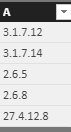
1.PNG

Create 5 columns:

B = IF(PATHITEM(SUBSTITUTE('Table2'[A],".", "|"), 1)=BLANK(),BLANK(),IF(LEN(PATHITEM(SUBSTITUTE('Table2'[A],".", "|"), 1))<2,"0"&PATHITEM(SUBSTITUTE('Table2'[A],".", "|"), 1),PATHITEM(SUBSTITUTE('Table2'[A],".", "|"), 1)))
C = IF(PATHITEM(SUBSTITUTE('Table2'[A],".", "|"), 2)=BLANK(),BLANK(),IF(LEN(PATHITEM(SUBSTITUTE('Table2'[A],".", "|"), 2))<2,".0"&PATHITEM(SUBSTITUTE('Table2'[A],".", "|"), 2),PATHITEM(SUBSTITUTE('Table2'[A],".", "|"), 2)))
D = IF(PATHITEM(SUBSTITUTE('Table2'[A],".", "|"), 3)=BLANK(),BLANK(),IF(LEN(PATHITEM(SUBSTITUTE('Table2'[A],".", "|"), 3))<2,".0"&PATHITEM(SUBSTITUTE('Table2'[A],".", "|"), 3),"."&PATHITEM(SUBSTITUTE('Table2'[A],".", "|"), 3)))
E = IF(PATHITEM(SUBSTITUTE('Table2'[A],".", "|"), 4)=BLANK(),BLANK(),IF(LEN(PATHITEM(SUBSTITUTE('Table2'[A],".", "|"), 4))<2,".0"&PATHITEM(SUBSTITUTE('Table2'[A],".", "|"), 4),"."&PATHITEM(SUBSTITUTE('Table2'[A],".", "|"), 4)))
New A = Table2[B]&Table2[C]&Table2[D]&Table2[E]

Result :
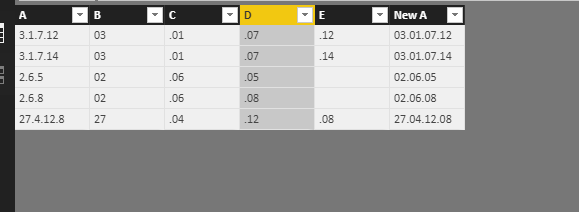
1.PNG


You could also download the pbix file to have a view.


Regards,

Daniel He


Community Support Team _ Daniel He
If this post helps, then please consider Accept it as the solution to help the other members find it more quickly.

View solution in original post

Anonymous
Not applicable

Hi @Hussard

The following way you can get your solution easily.

  1. Go to the Edit Query option under the ribbon pallet.
  2. Create a duplicate column from the existing column.
  3. Go to the Transform tab in Query editor and Select Split column By Delimeter within drop-down select Delimiter type as a "Custom Delimiter" and put "." in the box, then select Each occurrence of Delimeter under "Split at" option.
  4. Change the type of each Delimited column.
  5. Calculate the length of each Delimited column.
  6. Choose the Custom column option under the Add column option and write the below code.
  7. (if [FstPart Length]=1 then ("0" & [FstPart]) else [FstPart]) &
    (if [FstPart Length]=0 then "" else ".") &
    (if [SecPart Length]=1 then ("0" & [SecPart]) else [SecPart]) &
    (if [SecPart Length]=0 then "" else ".") &
    (if [ThrdPart Length]=1 then ("0" & [ThrdPart]) else [ThrdPart]) &
    (if [FrthPart Length]=0 then "" else ".") &
    (if [FrthPart Length]=1 then ("0" & [FrthPart]) else [FrthPart])
  8. Then Select "close & Apply" under the Home tab.

I have given the Sample Pbix file link below. Hope this helps you.


Download pbix file

View solution in original post

3 REPLIES 3
Anonymous
Not applicable

Hi @Hussard

The following way you can get your solution easily.

  1. Go to the Edit Query option under the ribbon pallet.
  2. Create a duplicate column from the existing column.
  3. Go to the Transform tab in Query editor and Select Split column By Delimeter within drop-down select Delimiter type as a "Custom Delimiter" and put "." in the box, then select Each occurrence of Delimeter under "Split at" option.
  4. Change the type of each Delimited column.
  5. Calculate the length of each Delimited column.
  6. Choose the Custom column option under the Add column option and write the below code.
  7. (if [FstPart Length]=1 then ("0" & [FstPart]) else [FstPart]) &
    (if [FstPart Length]=0 then "" else ".") &
    (if [SecPart Length]=1 then ("0" & [SecPart]) else [SecPart]) &
    (if [SecPart Length]=0 then "" else ".") &
    (if [ThrdPart Length]=1 then ("0" & [ThrdPart]) else [ThrdPart]) &
    (if [FrthPart Length]=0 then "" else ".") &
    (if [FrthPart Length]=1 then ("0" & [FrthPart]) else [FrthPart])
  8. Then Select "close & Apply" under the Home tab.

I have given the Sample Pbix file link below. Hope this helps you.


Download pbix file

Hi both,


Thanks a lot I tried both solutions and it suits me.


Regards


Sébastien

v-danhe-msft
Microsoft Employee
Microsoft Employee

Hi @Hussard,

Based on my test, you could refer to below steps:

Sample data:

1.PNG

Create 5 columns:

B = IF(PATHITEM(SUBSTITUTE('Table2'[A],".", "|"), 1)=BLANK(),BLANK(),IF(LEN(PATHITEM(SUBSTITUTE('Table2'[A],".", "|"), 1))<2,"0"&PATHITEM(SUBSTITUTE('Table2'[A],".", "|"), 1),PATHITEM(SUBSTITUTE('Table2'[A],".", "|"), 1)))
C = IF(PATHITEM(SUBSTITUTE('Table2'[A],".", "|"), 2)=BLANK(),BLANK(),IF(LEN(PATHITEM(SUBSTITUTE('Table2'[A],".", "|"), 2))<2,".0"&PATHITEM(SUBSTITUTE('Table2'[A],".", "|"), 2),PATHITEM(SUBSTITUTE('Table2'[A],".", "|"), 2)))
D = IF(PATHITEM(SUBSTITUTE('Table2'[A],".", "|"), 3)=BLANK(),BLANK(),IF(LEN(PATHITEM(SUBSTITUTE('Table2'[A],".", "|"), 3))<2,".0"&PATHITEM(SUBSTITUTE('Table2'[A],".", "|"), 3),"."&PATHITEM(SUBSTITUTE('Table2'[A],".", "|"), 3)))
E = IF(PATHITEM(SUBSTITUTE('Table2'[A],".", "|"), 4)=BLANK(),BLANK(),IF(LEN(PATHITEM(SUBSTITUTE('Table2'[A],".", "|"), 4))<2,".0"&PATHITEM(SUBSTITUTE('Table2'[A],".", "|"), 4),"."&PATHITEM(SUBSTITUTE('Table2'[A],".", "|"), 4)))
New A = Table2[B]&Table2[C]&Table2[D]&Table2[E]

Result :

1.PNG


You could also download the pbix file to have a view.


Regards,

Daniel He


Community Support Team _ Daniel He
If this post helps, then please consider Accept it as the solution to help the other members find it more quickly.

Helpful resources

Announcements
FabCon and SQLCon Barcelona 2026

FabCon & SQLCon – Barcelona 2026

Join us in Barcelona for FabCon and SQLCon, the Fabric, Power BI, SQL, and AI community event. Save €200 with code FABCMTY200.

60 days of Data Days Carousel

Data Days 2026

Join Fabric Data Days 2026: 60 days of free live/on-demand sessions, challenges, study groups, and certification opportunities.

Power BI DataViz World Championships carousel

Power BI DataViz World Championships - June 2026

A new Power BI DataViz World Championship is coming this June! Don't miss out on submitting your entry.