This is best Fabric, Power BI, SQL and AI community event. How do we know? The last event sold out! Save €200 with code FABCMTY200.
Register nowA new Data Days event is coming soon! This time we’re going bigger than ever. Fabric, Power BI, SQL, AI and more. Don't miss out.
Hi,
I am trying to create a report based on Dynamics365 data. The issue I am experiencing is the following:
I want to create a report that shows the accounts and opportunities based on the City that is selected in a slicer. The account can have mulitple addresses defined: Post adress or visit adres for example. Now I would like to filter the report but it should filter based on both addresses. For example: When I select a city the accounts with either a visit adres or post adress should be shown in the table of the report.
Because there are two columns with an address id (Address1 and address2) I have created two relationships. Does anybody know how to create one slicers that checks both addresses and show the correct data?
Thank you in advantage!
Solved! Go to Solution.
Hi @Jorenvdl ,
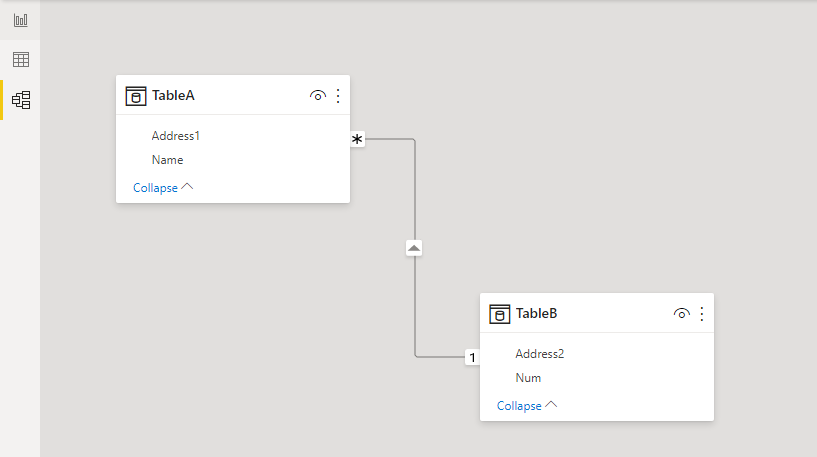
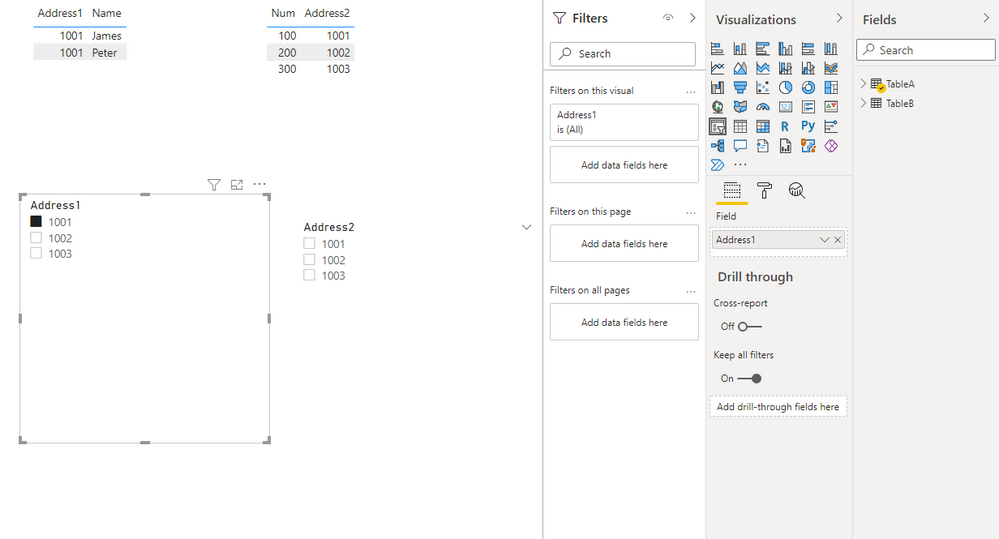
Well, you can create a slicer using your address id. What you need to pay attention to is the flow of your relationship. As shown in the figure below, table B flows to table A, and then the address id of table B is used as the slicer. If the address id of table A is used as the slicer, the address id of table A will not filter the address id of table B.
I have attached my sample pbix, you can download it and test it.
Reference: Relationships in Power BI
Best Regards,
Stephen Tao
If this post helps, then please consider Accept it as the solution to help the other members find it more quickly.
Hi @Jorenvdl ,
Could you tell me if your problem has been solved?
If it is, kindly Accept it as the solution. More people will benefit from it.
Or you are still confused about it, please provide me with more details about your problem.
Best Regards,
Stephen Tao
Hi @Anonymous ,
I am sorry for my delayed response and thank you for your answere. It helped met finding the right direction. I have managed to solve this problem by creating one table with all the adresses. In this table I created a column "ParentId" and created a relationship to the accounts table.
Thanks again for you help!
Hi @Jorenvdl ,
Well, you can create a slicer using your address id. What you need to pay attention to is the flow of your relationship. As shown in the figure below, table B flows to table A, and then the address id of table B is used as the slicer. If the address id of table A is used as the slicer, the address id of table A will not filter the address id of table B.
I have attached my sample pbix, you can download it and test it.
Reference: Relationships in Power BI
Best Regards,
Stephen Tao
If this post helps, then please consider Accept it as the solution to help the other members find it more quickly.
Can you share some sample data and the table structure you have ?
Check out the May 2026 Power BI update to learn about new features.
Sign up to receive a private message when registration opens and key events begin.
If you have recently started exploring Fabric, we'd love to hear how it's going. Your feedback can help with product improvements.
| User | Count |
|---|---|
| 32 | |
| 26 | |
| 25 | |
| 24 | |
| 15 |
| User | Count |
|---|---|
| 61 | |
| 48 | |
| 26 | |
| 21 | |
| 20 |