cancel
Showing results for 
Search instead for 
Did you mean: 

The Power BI Data Visualization World Championships is back! Get ahead of the game and start preparing now! Learn more

Reply
Jorenvdl
Frequent Visitor

filter table based on multiple relationships

Hi,

I am trying to create a report based on Dynamics365 data. The issue I am experiencing is the following:

I want to create a report that shows the accounts and opportunities based on the City that is selected in a slicer. The account can have mulitple addresses defined: Post adress or visit adres for example. Now I would like to filter the report but it should filter based on both addresses. For example: When I select a city the accounts with either a visit adres or post adress should be shown in the table of the report. 

Because there are two columns with an address id (Address1 and address2) I have created two relationships. Does anybody know how to create one slicers that checks both addresses and show the correct data?


Thank you in advantage!

1 ACCEPTED SOLUTION
Anonymous
Not applicable

Hi @Jorenvdl ,


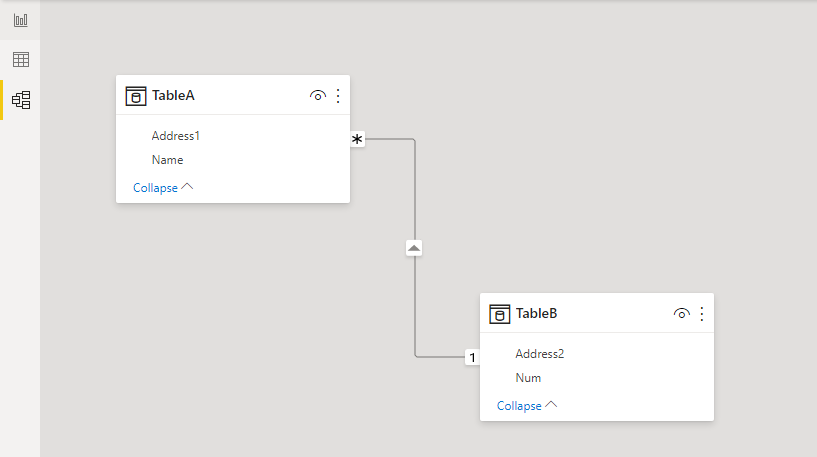
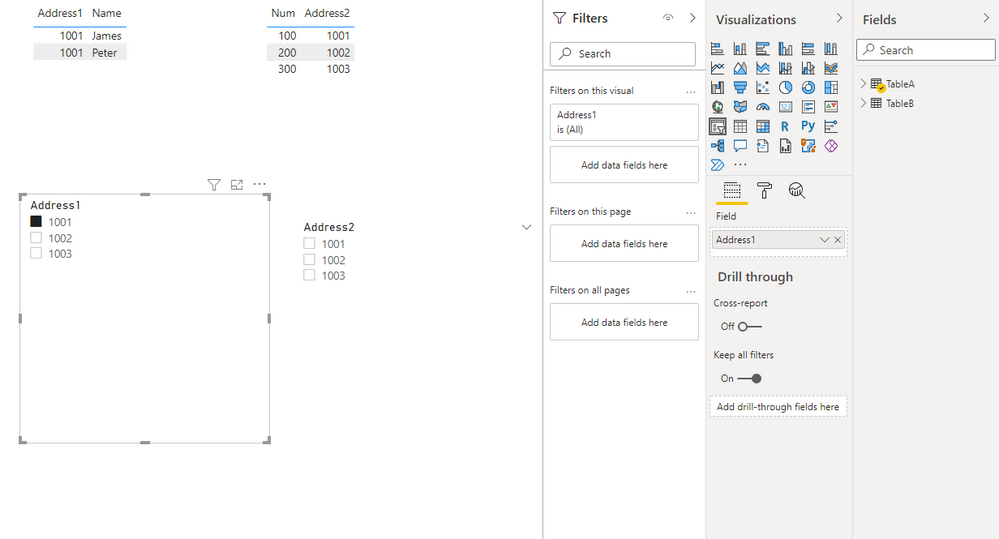
Well, you can create a slicer using your address id. What you need to pay attention to is the flow of your relationship. As shown in the figure below, table B flows to table A, and then the address id of table B is used as the slicer. If the address id of table A is used as the slicer, the address id of table A will not filter the address id of table B.

16.png


I have attached my sample pbix, you can download it and test it.

17.png18.png


Reference: Relationships in Power BI


Best Regards,

Stephen Tao


If this post helps, then please consider Accept it as the solution to help the other members find it more quickly.

View solution in original post

4 REPLIES 4
Anonymous
Not applicable

Hi @Jorenvdl ,


Could you tell me if your problem has been solved?
If it is, kindly Accept it as the solution. More people will benefit from it.
Or you are still confused about it, please provide me with more details about your problem.


Best Regards,
Stephen Tao

Hi @Anonymous ,

I am sorry for my delayed response and thank you for your answere. It helped met finding the right direction. I have managed to solve this problem by creating one table with all the adresses. In this table I created a column "ParentId" and created a relationship to the accounts table.


Thanks again for you help!

Anonymous
Not applicable

Hi @Jorenvdl ,


Well, you can create a slicer using your address id. What you need to pay attention to is the flow of your relationship. As shown in the figure below, table B flows to table A, and then the address id of table B is used as the slicer. If the address id of table A is used as the slicer, the address id of table A will not filter the address id of table B.

16.png


I have attached my sample pbix, you can download it and test it.

17.png18.png


Reference: Relationships in Power BI


Best Regards,

Stephen Tao


If this post helps, then please consider Accept it as the solution to help the other members find it more quickly.

Thejeswar
Super User
Super User

Can you share some sample data and the table structure you have ?

Helpful resources

Announcements
Power BI DataViz World Championships

Power BI Dataviz World Championships

The Power BI Data Visualization World Championships is back! Get ahead of the game and start preparing now!

December 2025 Power BI Update Carousel

Power BI Monthly Update - December 2025

Check out the December 2025 Power BI Holiday Recap!

FabCon Atlanta 2026 carousel

FabCon Atlanta 2026

Join us at FabCon Atlanta, March 16-20, for the ultimate Fabric, Power BI, AI and SQL community-led event. Save $200 with code FABCOMM.