cancel
Showing results for 
Search instead for 
Did you mean: 

Did you hear? There's a new SQL AI Developer certification (DP-800). Start preparing now and be one of the first to get certified. Register now

Reply
Anonymous
Not applicable

error message when applying a summarize function


Hello, 


I've created below 'attempt' to create a new table. From what I've been able to find, I can't see what's incorrect about either the syntax or the content. any suggestions are appreciated.

 
"newvalue = summarize(T_Historic_Monthly_Commercial_Forecast,T_Historic_Monthly_Commercial_Forecast[Item Code],T_Historic_Monthly_Commercial_Forecast[YYYYMM],"abcde",calculate(sum(T_Historic_Monthly_Commercial_Forecast[Commercial Forecast])))"


Results in the following error message.

"The expression refers to multiple columns. Multiple columns cannot be converted to a scalar value."


thanks, 

1 ACCEPTED SOLUTION
v-yulgu-msft
Microsoft Employee
Microsoft Employee

Hi @Anonymous ,


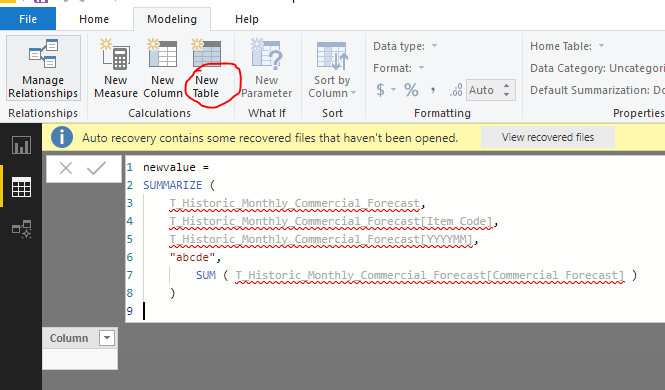
Make sure you click the "New Table" button instead of "New Measure" to generate a calculated table. Also, the DAX formula could be simplified as:

newvalue =
SUMMARIZE (
    T_Historic_Monthly_Commercial_Forecast,
    T_Historic_Monthly_Commercial_Forecast[Item Code],
    T_Historic_Monthly_Commercial_Forecast[YYYYMM],
    "abcde", 
        SUM ( T_Historic_Monthly_Commercial_Forecast[Commercial Forecast] )
)

1.PNG


Best regards,

Yuliana Gu

Community Support Team _ Yuliana Gu
If this post helps, then please consider Accept it as the solution to help the other members find it more quickly.

View solution in original post

2 REPLIES 2
v-yulgu-msft
Microsoft Employee
Microsoft Employee

Hi @Anonymous ,


Make sure you click the "New Table" button instead of "New Measure" to generate a calculated table. Also, the DAX formula could be simplified as:

newvalue =
SUMMARIZE (
    T_Historic_Monthly_Commercial_Forecast,
    T_Historic_Monthly_Commercial_Forecast[Item Code],
    T_Historic_Monthly_Commercial_Forecast[YYYYMM],
    "abcde", 
        SUM ( T_Historic_Monthly_Commercial_Forecast[Commercial Forecast] )
)

1.PNG


Best regards,

Yuliana Gu

Community Support Team _ Yuliana Gu
If this post helps, then please consider Accept it as the solution to help the other members find it more quickly.
Anonymous
Not applicable

Thanks a lot @v-yulgu-msft 


next question is then if I can include / add conditions to this sum. I tried adding a filter, but ended up with error message, probably related to syntax. 

Helpful resources

Announcements
April Power BI Update Carousel

Power BI Monthly Update - April 2026

Check out the April 2026 Power BI update to learn about new features.

Fabric SQL PBI Data Days

Data Days 2026 coming soon!

Sign up to receive a private message when registration opens and key events begin.

New to Fabric survey Carousel

New to Fabric Survey

If you have recently started exploring Fabric, we'd love to hear how it's going. Your feedback can help with product improvements.

Power BI DataViz World Championships carousel

Power BI DataViz World Championships - June 2026

A new Power BI DataViz World Championship is coming this June! Don't miss out on submitting your entry.