Learn from the best! Meet the four finalists headed to the FINALS of the Power BI Dataviz World Championships! Register now
Hello,
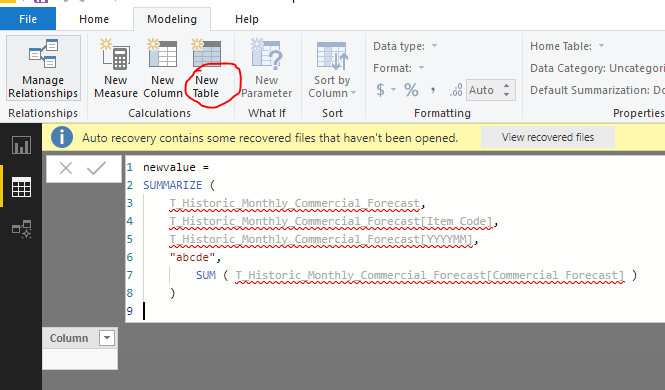
I've created below 'attempt' to create a new table. From what I've been able to find, I can't see what's incorrect about either the syntax or the content. any suggestions are appreciated.
Results in the following error message.
"The expression refers to multiple columns. Multiple columns cannot be converted to a scalar value."
thanks,
Solved! Go to Solution.
Hi @Anonymous ,
Make sure you click the "New Table" button instead of "New Measure" to generate a calculated table. Also, the DAX formula could be simplified as:
newvalue =
SUMMARIZE (
T_Historic_Monthly_Commercial_Forecast,
T_Historic_Monthly_Commercial_Forecast[Item Code],
T_Historic_Monthly_Commercial_Forecast[YYYYMM],
"abcde",
SUM ( T_Historic_Monthly_Commercial_Forecast[Commercial Forecast] )
)
Best regards,
Yuliana Gu
Hi @Anonymous ,
Make sure you click the "New Table" button instead of "New Measure" to generate a calculated table. Also, the DAX formula could be simplified as:
newvalue =
SUMMARIZE (
T_Historic_Monthly_Commercial_Forecast,
T_Historic_Monthly_Commercial_Forecast[Item Code],
T_Historic_Monthly_Commercial_Forecast[YYYYMM],
"abcde",
SUM ( T_Historic_Monthly_Commercial_Forecast[Commercial Forecast] )
)
Best regards,
Yuliana Gu
Thanks a lot @v-yulgu-msft
next question is then if I can include / add conditions to this sum. I tried adding a filter, but ended up with error message, probably related to syntax.
| User | Count |
|---|---|
| 60 | |
| 46 | |
| 32 | |
| 17 | |
| 16 |
| User | Count |
|---|---|
| 82 | |
| 68 | |
| 43 | |
| 26 | |
| 23 |